- JMP will suspend normal business operations for our Winter Holiday beginning on Wednesday, Dec. 24, 2025, at 5:00 p.m. ET (2:00 p.m. ET for JMP Accounts Receivable).
Regular business hours will resume at 9:00 a.m. EST on Friday, Jan. 2, 2026. - We’re retiring the File Exchange at the end of this year. The JMP Marketplace is now your destination for add-ins and extensions.
- Subscribe to RSS Feed
- Mark Topic as New
- Mark Topic as Read
- Float this Topic for Current User
- Bookmark
- Subscribe
- Mute
- Printer Friendly Page
Discussions
Solve problems, and share tips and tricks with other JMP users.- JMP User Community
- :
- Discussions
- :
- Setting data table left panel size in JSL?

- Mark as New
- Bookmark
- Subscribe
- Mute
- Subscribe to RSS Feed
- Get Direct Link
- Report Inappropriate Content
Setting data table left panel size in JSL?
I have a script which generates a data table and adds new scripts so the user can do additional analysis and data modification. The problem is that the script names are relatively long and get truncated by the size of the left panel when the new table is created. I know I can set the size and position of the table with JSL, but is there a way to set the left panel size? I thought that maybe H Splitter Box() would be the right answer, but I couldn't get it to work for me.
Basically, I get the image on the left, but I want the image on the right:
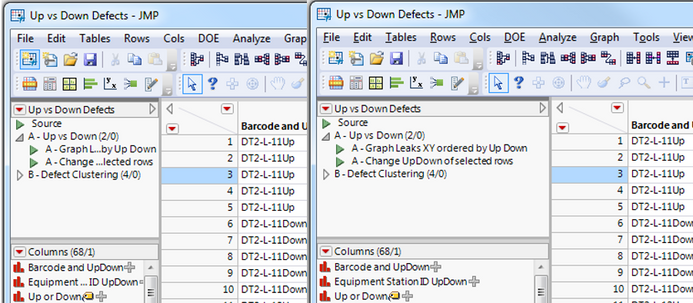
Thanks!
--Joe
Accepted Solutions


- Mark as New
- Bookmark
- Subscribe
- Mute
- Subscribe to RSS Feed
- Get Direct Link
- Report Inappropriate Content
Re: Setting data table left panel size in JSL?
This was surprisingly possible, but it takes a couple steps. See example:
Names Default To Here( 1 );
dt = Open( "$SAMPLE_DATA\Big Class.jmp" );
window = Get Window( dt );
sp = window << Find(SplitterBox(1));
sp << Set Width(300);
- Mark as New
- Bookmark
- Subscribe
- Mute
- Subscribe to RSS Feed
- Get Direct Link
- Report Inappropriate Content
Re: Setting data table left panel size in JSL?
This was surprisingly possible, but it takes a couple steps. See example:
Names Default To Here( 1 );
dt = Open( "$SAMPLE_DATA\Big Class.jmp" );
window = Get Window( dt );
sp = window << Find(SplitterBox(1));
sp << Set Width(300);
- Mark as New
- Bookmark
- Subscribe
- Mute
- Subscribe to RSS Feed
- Get Direct Link
- Report Inappropriate Content
Re: Setting data table left panel size in JSL?
Brilliant! That does exactly what I wanted.
Follow-up question: How would I know or find out that the left panel is SplitterBox(1)? I tried to use "dt << Get XML" to see the structure of the data table, but it didn't give me anything (presumably the table isn't an XML object).
- Mark as New
- Bookmark
- Subscribe
- Mute
- Subscribe to RSS Feed
- Get Direct Link
- Report Inappropriate Content
Re: Setting data table left panel size in JSL?
In the above code if you use: window << Get XML or window << Show Tree Structure you'll figure out it's a splitterbox.
The data table is a unique object in JMP (for good reasons). It's meant to be stand alone in it's own window, b/c of this it doesn't appear support the regular window functions, <<get XML, <<child, << parent, << top parent, ect. The Get Window() function is our savior in this case as it allows us to gain access to the window object holding the data table.
Cheers!

- Mark as New
- Bookmark
- Subscribe
- Mute
- Subscribe to RSS Feed
- Get Direct Link
- Report Inappropriate Content
Re: Setting data table left panel size in JSL?
Hi, any chance you'd know how to adjust the height of the table script panel / SplitterBox(1) too? 'Set Size, Height, Size' all don't seem to work.


- Mark as New
- Bookmark
- Subscribe
- Mute
- Subscribe to RSS Feed
- Get Direct Link
- Report Inappropriate Content
Re: Setting data table left panel size in JSL?
The Scripting Index shows that
Set Height
is a valid message for a Splitter Box


- Mark as New
- Bookmark
- Subscribe
- Mute
- Subscribe to RSS Feed
- Get Direct Link
- Report Inappropriate Content
Re: Setting data table left panel size in JSL?
@Ressel wrote:how to adjust the height of the table script panel
Something like
dt = Open( "$SAMPLE_DATA\Big Class.jmp" );
t= get window(dt);
sb = t[SplitterBox(1)];
sb << set sizes({3,1,100});
sb[Tab Page Box (3)]<< title("fixed size -> 100 is ignored")
- Mark as New
- Bookmark
- Subscribe
- Mute
- Subscribe to RSS Feed
- Get Direct Link
- Report Inappropriate Content
Re: Setting data table left panel size in JSL?
Yes, I saw that, but I couldn't get it to work. Leaning on @hogi's example:
// this works nicely
// set sizes specifies the size proportions of the three table panels. excellent
dt = Open( "$SAMPLE_DATA\Big Class.jmp" );
t = Get Window( dt );
sb = t[SplitterBox( 1 )];
sb << Set Sizes( {1, 1, 3} );

// trying to replace set sizes with set height does not work
sb << Set Height( 200 );

// similarly, leaning on the initial solution in this thread, this also doesn't work
window = Get Window( dt );
sb2 = window << Find( SplitterBox( 1 ) );
sb2 << Set Height( 200 );
Thank's @hogi!
- Mark as New
- Bookmark
- Subscribe
- Mute
- Subscribe to RSS Feed
- Get Direct Link
- Report Inappropriate Content
Re: Setting data table left panel size in JSL?
I tried 2 other variants which did not work.
dt = Open( "$SAMPLE_DATA\Big Class.jmp" );
t = new window("helper window", dt << new data box);
lb = t[splitter Box(1)][ListBox( 1 )]; // scripts List Box
lb << select << Set Height( 300 );

wait(1);
lb << deselect(0);
tpb = t[Tab page Box( 1 )]; //scripts tab page box
tpb << select << Set Height( 300 );
Seems that the splitter box is in control of the sizes and keeps them fixed according to the ratios from set size .
Recommended Articles
- © 2025 JMP Statistical Discovery LLC. All Rights Reserved.
- Terms of Use
- Privacy Statement
- Contact Us