- JMP will suspend normal business operations for our Winter Holiday beginning on Wednesday, Dec. 24, 2025, at 5:00 p.m. ET (2:00 p.m. ET for JMP Accounts Receivable).
Regular business hours will resume at 9:00 a.m. EST on Friday, Jan. 2, 2026. - We’re retiring the File Exchange at the end of this year. The JMP Marketplace is now your destination for add-ins and extensions.
- Subscribe to RSS Feed
- Mark Topic as New
- Mark Topic as Read
- Float this Topic for Current User
- Bookmark
- Subscribe
- Mute
- Printer Friendly Page
Discussions
Solve problems, and share tips and tricks with other JMP users.- JMP User Community
- :
- Discussions
- :
- Scripting: save multiple data table to multiple sheets in Excel

- Mark as New
- Bookmark
- Subscribe
- Mute
- Subscribe to RSS Feed
- Get Direct Link
- Report Inappropriate Content
Scripting: save multiple data table to multiple sheets in Excel
I like to save multiple datatables, each to an individual sheet, in a single Excel file?
What is the script to achieved that?
I tried "append", but it did not work
dt<< Save as("$DESKTOP/Untitled73.xlsx", append);
Thanks!
Accepted Solutions


- Mark as New
- Bookmark
- Subscribe
- Mute
- Subscribe to RSS Feed
- Get Direct Link
- Report Inappropriate Content
Re: Scripting: save multiple data table to multiple sheets in Excel
The answer to your question comes from the Scripting Indes
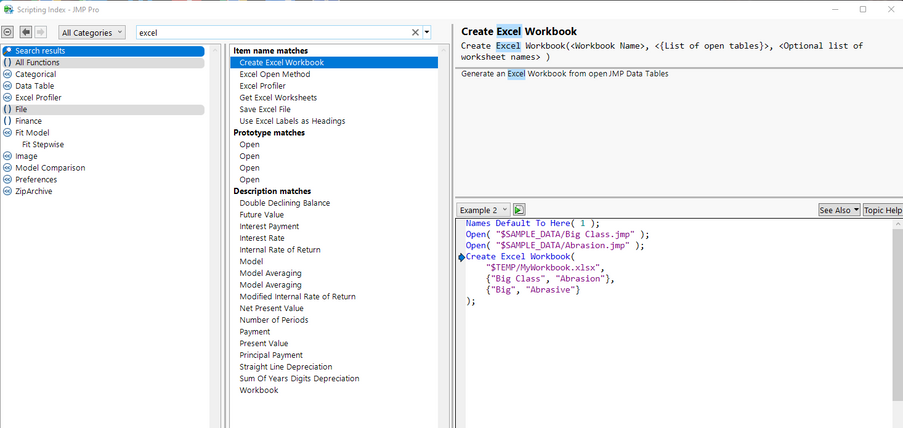
Here is one of the examples from that entry
Names Default To Here( 1 );
Open( "$SAMPLE_DATA/Big Class.jmp" );
Open( "$SAMPLE_DATA/Abrasion.jmp" );
Create Excel Workbook(
	"$TEMP/MyWorkbook.xlsx",
	{"Big Class", "Abrasion"},
	{"Big", "Abrasive"}
);- Mark as New
- Bookmark
- Subscribe
- Mute
- Subscribe to RSS Feed
- Get Direct Link
- Report Inappropriate Content
Re: Scripting: save multiple data table to multiple sheets in Excel
This issue you are having is with 2 of the elements that you are attempting to pass to the Create Excel Workbook
The third element in Create Excell Workbook function, need to be a list. In your case, the specification is not a list.
Element 2 documentation indicates that what is required is "List of open tables". While your specification of
While the returned element from the Summarize() function, GroupBy, is a list, GroupBy[1] is a string variable. You need to do something like
tempList = {};
insert into( tempList, GroupBy[1]);
Create Excel Workbook ("$DESKTOP/Untitled1.xlsx", {dt2}, tempList);

- Mark as New
- Bookmark
- Subscribe
- Mute
- Subscribe to RSS Feed
- Get Direct Link
- Report Inappropriate Content
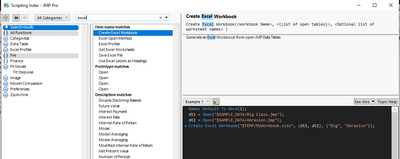
Re: Scripting: save multiple data table to multiple sheets in Excel
- Mark as New
- Bookmark
- Subscribe
- Mute
- Subscribe to RSS Feed
- Get Direct Link
- Report Inappropriate Content
Re: Scripting: save multiple data table to multiple sheets in Excel
The answer to your question comes from the Scripting Indes
Here is one of the examples from that entry
Names Default To Here( 1 );
Open( "$SAMPLE_DATA/Big Class.jmp" );
Open( "$SAMPLE_DATA/Abrasion.jmp" );
Create Excel Workbook(
	"$TEMP/MyWorkbook.xlsx",
	{"Big Class", "Abrasion"},
	{"Big", "Abrasive"}
);- Mark as New
- Bookmark
- Subscribe
- Mute
- Subscribe to RSS Feed
- Get Direct Link
- Report Inappropriate Content
Re: Scripting: save multiple data table to multiple sheets in Excel
Thank you for pointing out the Srcipting index, it is really helpful.
A further question: does the "list of the worksheet names" have to be strings? Can they be string variables?

Here is an example I am struggling with:
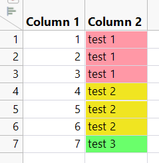
The script below creates three datatables based on :Column 2 values, then save three separate sheets in one Excel files. I would like to name each worksheet based on :Column 2 values, but when I put GroupBy variable as the worksheet names (the red script below), it does not assign :Column 2 value to each worksheet.
dt = current datatable();

Summarize (dt, GroupBy = By (:Column 2) );

For ( i=1, i<= N items (GroupBy), i++,

dt<< select where (:Column 2 == GroupBy [i]);

dt2= dt << subset (

	Selected Rows( 1 ),
	Selected columns only( 0 )
);

show (dt2);
show (GroupBy[i]);
Create Excel Workbook ("$DESKTOP/Untitled1.xlsx", {dt2}, GroupBy[i]);
);
Thank you for your help!
- Mark as New
- Bookmark
- Subscribe
- Mute
- Subscribe to RSS Feed
- Get Direct Link
- Report Inappropriate Content
Re: Scripting: save multiple data table to multiple sheets in Excel
This issue you are having is with 2 of the elements that you are attempting to pass to the Create Excel Workbook
The third element in Create Excell Workbook function, need to be a list. In your case, the specification is not a list.
Element 2 documentation indicates that what is required is "List of open tables". While your specification of
While the returned element from the Summarize() function, GroupBy, is a list, GroupBy[1] is a string variable. You need to do something like
tempList = {};
insert into( tempList, GroupBy[1]);
Create Excel Workbook ("$DESKTOP/Untitled1.xlsx", {dt2}, tempList);
Recommended Articles
- © 2026 JMP Statistical Discovery LLC. All Rights Reserved.
- Terms of Use
- Privacy Statement
- Contact Us