- JMP will suspend normal business operations for our Winter Holiday beginning on Wednesday, Dec. 24, 2025, at 5:00 p.m. ET (2:00 p.m. ET for JMP Accounts Receivable).
Regular business hours will resume at 9:00 a.m. EST on Friday, Jan. 2, 2026. - We’re retiring the File Exchange at the end of this year. The JMP Marketplace is now your destination for add-ins and extensions.
- Subscribe to RSS Feed
- Mark Topic as New
- Mark Topic as Read
- Float this Topic for Current User
- Bookmark
- Subscribe
- Mute
- Printer Friendly Page
Discussions
Solve problems, and share tips and tricks with other JMP users.- JMP User Community
- :
- Discussions
- :
- Reorganizing A Table by Items Within A Column

- Mark as New
- Bookmark
- Subscribe
- Mute
- Subscribe to RSS Feed
- Get Direct Link
- Report Inappropriate Content
Reorganizing A Table by Items Within A Column
Hello,
I have a system that calibrates data and outputs the information as so:
| Tire ID | Tread | Depth | Drag | uS | psi |
| 2326 | Inner | 0.618584 | 0.117774 | 0.417314 | 21.15549 |
| 2326 | Outer | 0.740841 | 0.417079 | 0.417314 | 21.15549 |
| 2327 | Inner | 0.329065 | 0.218903 | 0.365071 | 25.65573 |
| 2327 | Outer | 0.478055 | 0.214953 | 0.365071 | 25.65573 |
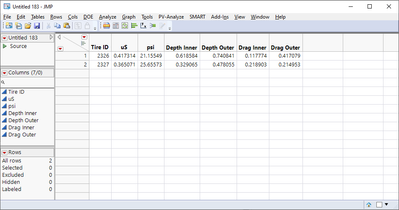
The Tire ID is read twice, once for the inner tread readings, and once for the outside. Is there a script I can use to reorganize it as such:
| Tire ID | Inner Depth | Outer Depth | Inner Drag | Outer Drag | uS | psi |
| 2326 | 0.61858445 | 0.74084057 | 0.1177737 | 0.4170794 | 0.41731 | 21.1555 |
| 2327 | 0.32906451 | 0.47805545 | 0.2189025 | 0.2149527 | 0.36507 | 25.6557 |
Here, there is only one entry per tire. The entries for Depth and Drag have been renamed by Inner or Outer and the identical columns have just been merged into one. This is a snip of a much larger sheet with many more columns - some different, others the same.
Ideally, the script can determine what cells are the same according to tired ID and just remove replicates. But a script that's set up with predetermined names could work too, since the column names never change.
Thank you!
@jthi, @txnelson , you two helped tremendously last time! Thank you for that! I don't really know what approach to take and haven't been able to find anything similar enough in previous solutions.


- Mark as New
- Bookmark
- Subscribe
- Mute
- Subscribe to RSS Feed
- Get Direct Link
- Report Inappropriate Content
Re: Reorganizing A Table by Items Within A Column
This is a brute-force approach, but it works. Note the variables for split columns and nonsplit columns.
dt = New Table( "Base Tire Data", Add Rows( 4 ),
	New Column( "Tire ID", Numeric, "Continuous", Format( "Best", 12 ),
		Set Values( [2326, 2326, 2327, 2327] ) ),
	New Column( "Tread", Character( 16 ), "Nominal",
		Set Values( {"Inner", "Outer", "Inner", "Outer"} ) ),
	New Column( "Depth", Numeric, "Continuous", Format( "Best", 12 ),
		Set Values( [0.618584, 0.740841, 0.329065, 0.478055] ) ),
	New Column( "Drag", Numeric, "Continuous", Format( "Best", 12 ),
		Set Values( [0.117774, 0.417079, 0.218903, 0.214953] ) ),
	New Column( "uS", Numeric, "Continuous", Format( "Best", 12 ),
		Set Values( [0.417314, 0.417314, 0.365071, 0.365071] ) ),
	New Column( "psi", Numeric, "Continuous", Format( "Best", 12 ),
		Set Values( [21.15549, 21.15549, 25.65573, 25.65573] ) )
);

nr = nrows(dt);

dtt = New Table( "Split Tires");
dtt << new column("Tire ID", Numeric, "Continuous", Format( "Best", 12 ));

split_cols = {"Depth", "Drag"};
nonsplit_cols = {"uS", "psi"};

for (i = 1, i <= nitems(split_cols), i++,
	inn_col = "Inner " || split_cols[i];
	out_col = "Outer " || split_cols[i];
	dtt << new column(inn_col, Numeric, "Continuous", Format( "Best", 12 ));
	dtt << new column(out_col, Numeric, "Continuous", Format( "Best", 12 ));
);

for (i = 1, i <= nitems(nonsplit_cols), i++,
	one_col = nonsplit_cols[i];
	dtt << new column(one_col, Numeric, "Continuous", Format( "Best", 12 ));
);

dtt << Add Rows( nr/2 );

k = 0;
for (i = 1, i <= nr, i+=2,
	k++;
	for (m = 1, m <= nitems(split_cols), m++,
		one_col = split_cols[m];
		inn_col = "Inner " || split_cols[m];
		out_col = "Outer " || split_cols[m];

		column(dtt, inn_col)[k] = column(dt, one_col)[i];
		column(dtt, out_col)[k] = column(dt, one_col)[i+1];
	);

	column(dtt, "Tire ID")[k] = column(dt, "Tire ID")[i];

	for (m = 1, m <= nitems(nonsplit_cols), m++,
		one_col = nonsplit_cols[m];
		column(dtt, one_col)[k] = column(dt, one_col)[i];
	);
);
- Mark as New
- Bookmark
- Subscribe
- Mute
- Subscribe to RSS Feed
- Get Direct Link
- Report Inappropriate Content
Re: Reorganizing A Table by Items Within A Column
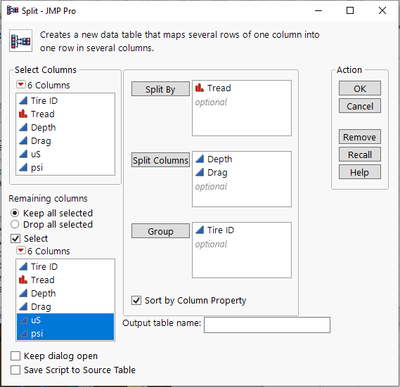
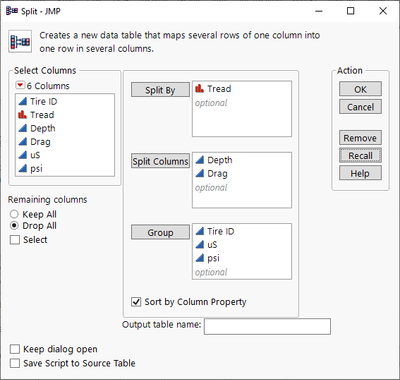
What you are asking for is available by using the Split platform
Tables=>Split
After you open the Split platform, setup the screen as shown below
Once you click OK, it will create a new data table
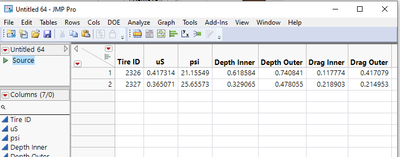
The script to perform the Split is contained in the Source entry of the data table
Just right click on the word Source
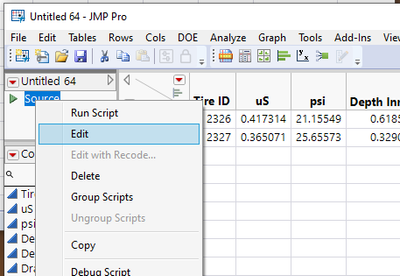
and select Edit
The Edit window will open and show the JSL required to run the Split and create the data table you want.
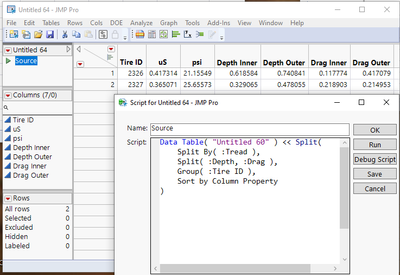
Just cut and paste the JSL from the Edit window, into your script
- Mark as New
- Bookmark
- Subscribe
- Mute
- Subscribe to RSS Feed
- Get Direct Link
- Report Inappropriate Content
Re: Reorganizing A Table by Items Within A Column
Nice Jim! Much better than my brute force approach. I would add uS and psi to the Group columns as per @Arocha1 's request.
Recommended Articles
- © 2025 JMP Statistical Discovery LLC. All Rights Reserved.
- Terms of Use
- Privacy Statement
- Contact Us