- Don’t miss your chance to experience Discovery Summit Europe at our best available rate! Early bird registration through 31 Oct.
- Graph Builder Toolbar streamlines interactive graphing. Creates shortcuts on Report and GraphBuilder Helpers toolbars. Download and install the extension.
- Subscribe to RSS Feed
- Mark Topic as New
- Mark Topic as Read
- Float this Topic for Current User
- Bookmark
- Subscribe
- Mute
- Printer Friendly Page
Discussions
Solve problems, and share tips and tricks with other JMP users.- User Community
- :
- Discussions
- :
- Remove percentage sign in Graph Builder

- Mark as New
- Bookmark
- Subscribe
- Mute
- Subscribe to RSS Feed
- Get Direct Link
- Report Inappropriate Content
Remove percentage sign in Graph Builder
Hi -
I am interested in removing redundant % sign in the graph generated with graph builder since Y axis already has it. This would help with space when I have too many bars.
How can I remove percentage sign that is highlighted in red?
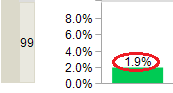
I am using Jmp 12.2
Thank you!

- Mark as New
- Bookmark
- Subscribe
- Mute
- Subscribe to RSS Feed
- Get Direct Link
- Report Inappropriate Content
Re: Remove percentage sign in Graph Builder
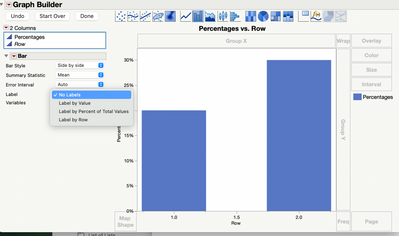
Sorry, I don't have that version to hand. But, if it helps, in the current version theres an option:

- Mark as New
- Bookmark
- Subscribe
- Mute
- Subscribe to RSS Feed
- Get Direct Link
- Report Inappropriate Content
Re: Remove percentage sign in Graph Builder
@ian_jmp
Doesn't the screenshot shows how to remove the label?
How to remove the percentage sign of the label in the current Jmp version?


- Mark as New
- Bookmark
- Subscribe
- Mute
- Subscribe to RSS Feed
- Get Direct Link
- Report Inappropriate Content
Re: Remove percentage sign in Graph Builder
The only way that I think you can do what you want is to add the labels by writing some simple JSL.
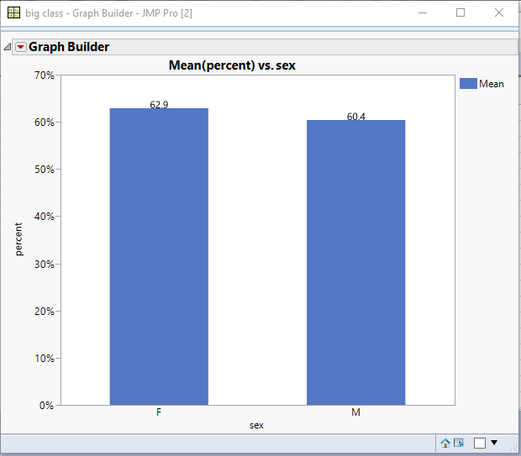
Names Default To Here( 1 );
dt = Open( "$SAMPLE_DATA/big class.jmp" );
dt << New Column( "percent", Format( "percent", 12, 1 ), formula( :Height / :Weight ) );
gb = Graph Builder(
	Size( 528, 448 ),
	Show Control Panel( 0 ),
	Variables( X( :sex ), Y( :percent ) ),
	Elements( Bar( X, Y, Legend( 6 ) ) )
);
gbr = gb << report;
flist = {.0};
Insert Into( flist, Round( Col Mean( If( :sex == "F", :percent, . ) ), 3 ) );
f = Char( flist[2] * 100 );
mlist = {1};
Insert Into( mlist, Round( Col Mean( If( :sex == "M", :percent, . ) ), 3 ) );
m = Char( mlist[2] * 100 );
gbr[framebox( 1 )] << Add Graphics Script(
	Text( Center Justified, flist, f );
	Text( Center Justified, mlist, m );
);


- Mark as New
- Bookmark
- Subscribe
- Mute
- Subscribe to RSS Feed
- Get Direct Link
- Report Inappropriate Content
Re: Remove percentage sign in Graph Builder
Here is a solution for newer versions of JMP
We can start with the same example as the previous post
Names Default To Here( 1 );
dt = Open( "$SAMPLE_DATA/big class.jmp" );
dt << New Column( "percent", Format( "percent", 12, 1 ), formula( :Height / :Weight ) );
gb = Graph Builder(
	Size( 528, 448 ),
	Show Control Panel( 0 ),
	Variables( X( :sex ), Y( :percent ) ),
	Elements( Bar( X, Y, Legend( 6 ) ) )
);
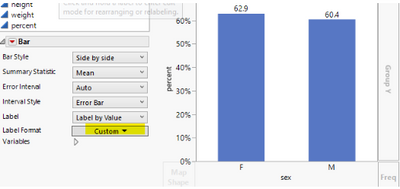
Then in Graph Builder choose Label -> Label By Value. This will show the extra % symbol
Under Label Format, click on the Auto dropdown (twice) and choose a new format. One option would be best or fixed dec, but this will show the format as a decimal value
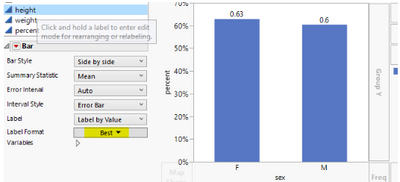
To get that value * 100, but without the percent symbol click on the dropdown again and choose Custom
Click Set Custom Format
The formula editor will open with the word value in the middle. Click the multiplication button and then type 100
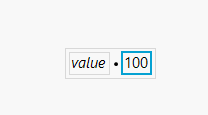
Click OK
Recommended Articles
- © 2026 JMP Statistical Discovery LLC. All Rights Reserved.
- Terms of Use
- Privacy Statement
- Contact Us