- Don’t miss your chance to experience Discovery Summit Europe at our best available rate! Early bird registration through 31 Oct.
- Graph Builder Toolbar streamlines interactive graphing. Creates shortcuts on Report and GraphBuilder Helpers toolbars. Download and install the extension.
- Subscribe to RSS Feed
- Mark Topic as New
- Mark Topic as Read
- Float this Topic for Current User
- Bookmark
- Subscribe
- Mute
- Printer Friendly Page
Discussions
Solve problems, and share tips and tricks with other JMP users.- User Community
- :
- Discussions
- :
- Re: Remove character strings

- Mark as New
- Bookmark
- Subscribe
- Mute
- Subscribe to RSS Feed
- Get Direct Link
- Report Inappropriate Content
Remove character strings
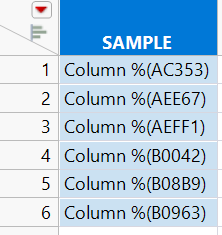
I have this column SAMPLE where I need only to retain the code inside the () but somehow, I cannot remove the Column% word and the parenthesis. I tried using Word(2,:SAMPLE) but it only returned an error.
How to remove the word Column % and the parenthesis from the string?
Accepted Solutions


- Mark as New
- Bookmark
- Subscribe
- Mute
- Subscribe to RSS Feed
- Get Direct Link
- Report Inappropriate Content
Re: Remove character strings
Using Word seems to work fine for me
Names Default To Here(1);

dt = New Table("Untitled 18",
	Add Rows(1),
	Compress File When Saved(1),
	New Column("S", Character, "Nominal", Set Values({"COLUMN %(AC353)"}))
);

dt << New Column("", Character, Nominal, Formula(
	Word(2, :S)
));
Could you provide the datatable instead of an image? Also changing the separator to () instead of " " (default) might work
Word(2, :S, "()")
- Mark as New
- Bookmark
- Subscribe
- Mute
- Subscribe to RSS Feed
- Get Direct Link
- Report Inappropriate Content
Re: Remove character strings
Using Word seems to work fine for me
Names Default To Here(1);

dt = New Table("Untitled 18",
	Add Rows(1),
	Compress File When Saved(1),
	New Column("S", Character, "Nominal", Set Values({"COLUMN %(AC353)"}))
);

dt << New Column("", Character, Nominal, Formula(
	Word(2, :S)
));
Could you provide the datatable instead of an image? Also changing the separator to () instead of " " (default) might work
Word(2, :S, "()")
- Mark as New
- Bookmark
- Subscribe
- Mute
- Subscribe to RSS Feed
- Get Direct Link
- Report Inappropriate Content
Re: Remove character strings
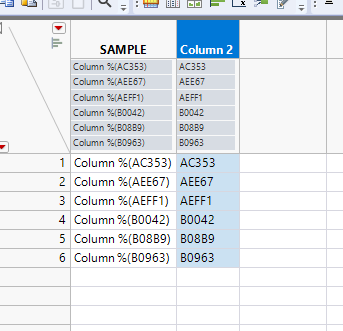
Attached file is the sample data table. What I want is that only AC353, AEE67 and so on would be the only values of the column sample.
- Mark as New
- Bookmark
- Subscribe
- Mute
- Subscribe to RSS Feed
- Get Direct Link
- Report Inappropriate Content
Re: Remove character strings
Formula I provided with "()" should work, just replace :S with correct column
Recommended Articles
- © 2026 JMP Statistical Discovery LLC. All Rights Reserved.
- Terms of Use
- Privacy Statement
- Contact Us