- JMP will suspend normal business operations for our Winter Holiday beginning on Wednesday, Dec. 24, 2025, at 5:00 p.m. ET (2:00 p.m. ET for JMP Accounts Receivable).
Regular business hours will resume at 9:00 a.m. EST on Friday, Jan. 2, 2026. - We’re retiring the File Exchange at the end of this year. The JMP Marketplace is now your destination for add-ins and extensions.
- Subscribe to RSS Feed
- Mark Topic as New
- Mark Topic as Read
- Float this Topic for Current User
- Bookmark
- Subscribe
- Mute
- Printer Friendly Page
Discussions
Solve problems, and share tips and tricks with other JMP users.- JMP User Community
- :
- Discussions
- :
- Regex: disable singleline option

- Mark as New
- Bookmark
- Subscribe
- Mute
- Subscribe to RSS Feed
- Get Direct Link
- Report Inappropriate Content
Regex: disable singleline option
How do I have to adjust a Regex search such that it just finds "bc" in the first line?
According to Regex web test pages( https://regex101.com/ , https://regexr.com/)
the regex expression "\A.*bc" should find "bc" in the first line - and ignore bc in the second line:
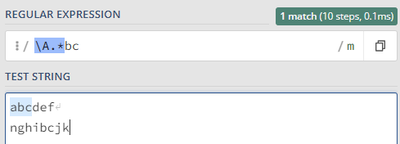
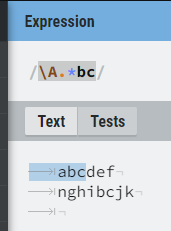
In Jmp with
Regex(
"abcdef
nghibcjk",
	"\A.*bc"
);
I get the result
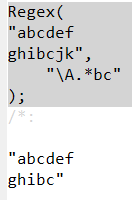
... which corresponds to Regex with additional option /s (singleline):
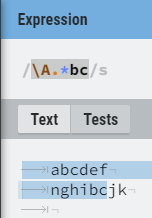
How can I disable the singleline option?
I just found options for
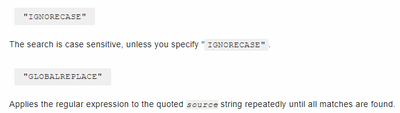
.. .and for the greedy option which can be disabled by using .*? instead of .*.
Accepted Solutions
- Mark as New
- Bookmark
- Subscribe
- Mute
- Subscribe to RSS Feed
- Get Direct Link
- Report Inappropriate Content
Re: Regex: disable singleline option
Thanks, @jthi
I hoped the answer would be different. Interesting ...
Hm, here is the wish to fix it:


- Mark as New
- Bookmark
- Subscribe
- Mute
- Subscribe to RSS Feed
- Get Direct Link
- Report Inappropriate Content
Re: Regex: disable singleline option
I don't think JMP's Regex() function supports any (general) regex flags outside of IGNORECAS (I think g, i, m and s are the most useful flags (Advanced searching with flags (mozilla.org)). I have made wish list item regarding global search, though it was hastily done and was just for Regex Match Add flag to Regex Match() to find all non-overlapping occurances of pattern . Luckily these are fairly easy to workaround most of the time.
- Mark as New
- Bookmark
- Subscribe
- Mute
- Subscribe to RSS Feed
- Get Direct Link
- Report Inappropriate Content
Re: Regex: disable singleline option
Thanks, @jthi
I hoped the answer would be different. Interesting ...
Hm, here is the wish to fix it:
Recommended Articles
- © 2025 JMP Statistical Discovery LLC. All Rights Reserved.
- Terms of Use
- Privacy Statement
- Contact Us