Turn on suggestions
Auto-suggest helps you quickly narrow down your search results by suggesting possible matches as you type.
- Don’t miss your chance to experience Discovery Summit Europe at our best available rate! Early bird registration through 31 Oct.
- Graph Builder Toolbar streamlines interactive graphing. Creates shortcuts on Report and GraphBuilder Helpers toolbars. Download and install the extension.
Options
- Subscribe to RSS Feed
- Mark Topic as New
- Mark Topic as Read
- Float this Topic for Current User
- Bookmark
- Subscribe
- Mute
- Printer Friendly Page
Discussions
Solve problems, and share tips and tricks with other JMP users.- User Community
- :
- Discussions
- :
- Refresh chart in the same place

Level II
- Mark as New
- Bookmark
- Subscribe
- Mute
- Subscribe to RSS Feed
- Get Direct Link
- Report Inappropriate Content
Refresh chart in the same place
Apr 15, 2024 04:25 PM
(3046 views)
Hi, i have a several charts created in a new window, i want to have a "refresh button" that will refresh specific chart in the same place (if for example i filtered some data), for now all i got that it adds the cart under the original and if i delete the original before it gives an error
3 REPLIES 3


Super User
- Mark as New
- Bookmark
- Subscribe
- Mute
- Subscribe to RSS Feed
- Get Direct Link
- Report Inappropriate Content
Re: Refresh chart in the same place
Created:
Apr 15, 2024 04:52 PM
| Last Modified: Apr 15, 2024 1:53 PM
(3040 views)
| Posted in reply to message from Buldozer 04-15-2024
Here is an example that my give you an approach you can use
names default to here(1);
dt =
// Open Data Table: Big Class.jmp
// → Data Table( "Big Class" )
Open( "$SAMPLE_DATA/Big Class.jmp" );

nw = new window("Example",
	vlb =vlist box(
	),
	buttonbox("refresh",
		biv << delete;
		wait(2);// the wait() is just to show that the chart has been deleted before the refresh
		vlb<<append(biv = dt << bivariate(x(:height),y(:weight)));
	)
);
vlb<<append(biv = dt << bivariate(x(:height),y(:weight)));
Jim
Level II
- Mark as New
- Bookmark
- Subscribe
- Mute
- Subscribe to RSS Feed
- Get Direct Link
- Report Inappropriate Content
Re: Refresh chart in the same place
Thanks!!! working great!

Super User
- Mark as New
- Bookmark
- Subscribe
- Mute
- Subscribe to RSS Feed
- Get Direct Link
- Report Inappropriate Content
Re: Refresh chart in the same place
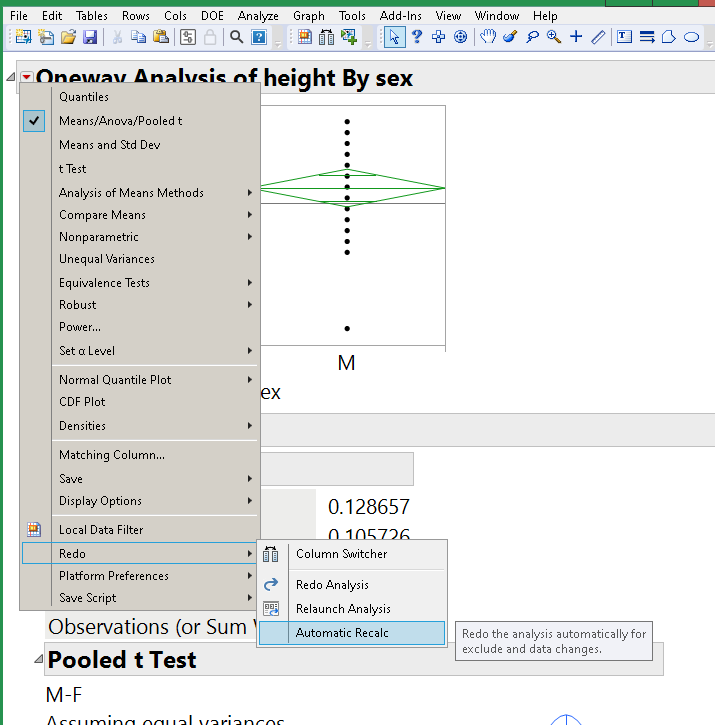
Maybe Auto Recalc will work for you; the graph updates as the data changes.
Craige
Recommended Articles
- © 2026 JMP Statistical Discovery LLC. All Rights Reserved.
- Terms of Use
- Privacy Statement
- Contact Us