- Don’t miss your chance to experience Discovery Summit Europe at our best available rate! Early bird registration through 31 Oct.
- Graph Builder Toolbar streamlines interactive graphing. Creates shortcuts on Report and GraphBuilder Helpers toolbars. Download and install the extension.
- Subscribe to RSS Feed
- Mark Topic as New
- Mark Topic as Read
- Float this Topic for Current User
- Bookmark
- Subscribe
- Mute
- Printer Friendly Page
Discussions
Solve problems, and share tips and tricks with other JMP users.- User Community
- :
- Discussions
- :
- Rational Subgrouping

- Mark as New
- Bookmark
- Subscribe
- Mute
- Subscribe to RSS Feed
- Get Direct Link
- Report Inappropriate Content
Rational Subgrouping
Hi Tonya, I saw your recent article New subgrouping features for Process Screening available in JMP 16.1 2022-11-02.
Is there a way of automating the selection of Phases? I may want to sort the data in 100's of different ways via the Phase function
If I use the same data "Semiconductor capability" and want to get these two graphs with Phases (1) Wafer (2) SITE
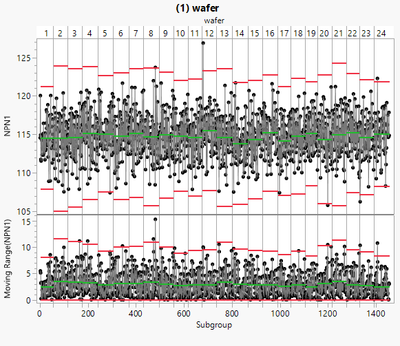
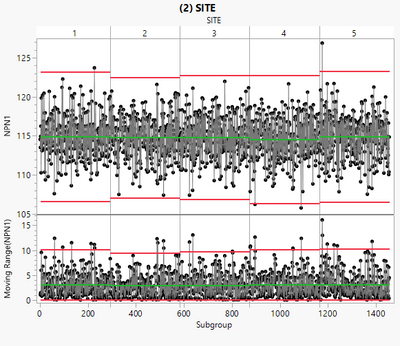
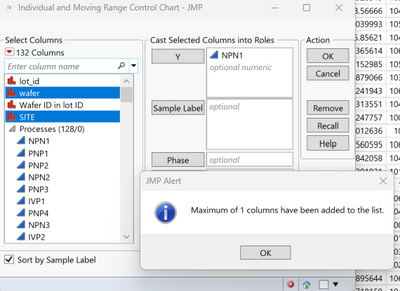
I have to do them one at a time, there is a facility under Analyze/Quality and Process/Control Chart/IMR Control Chart, but this only allows you to select one Phase, see the error dialogue box below "Maximum od 1 column have been added to the list" - it will not accept more that 1 data source to sort the data. Is there a way to add multiple Phases as the graphs about
Accepted Solutions


- Mark as New
- Bookmark
- Subscribe
- Mute
- Subscribe to RSS Feed
- Get Direct Link
- Report Inappropriate Content
Re: Rational Subgrouping
I suggest using the Process Screening platform and using the Grouping role.
Process Screening(
	Process Variables( :NPN1 ),
	Grouping( :lot_id, :wafer ),
	Control Chart Type( "Indiv and MR" )
);
This will give you the statistics and analyses you want, but you will get a separate control chart for each level of the grouping variable rather than 2 control charts with phase variables.
- Mark as New
- Bookmark
- Subscribe
- Mute
- Subscribe to RSS Feed
- Get Direct Link
- Report Inappropriate Content
Re: Rational Subgrouping
I suggest using the Process Screening platform and using the Grouping role.
Process Screening(
	Process Variables( :NPN1 ),
	Grouping( :lot_id, :wafer ),
	Control Chart Type( "Indiv and MR" )
);
This will give you the statistics and analyses you want, but you will get a separate control chart for each level of the grouping variable rather than 2 control charts with phase variables.
- Mark as New
- Bookmark
- Subscribe
- Mute
- Subscribe to RSS Feed
- Get Direct Link
- Report Inappropriate Content
Re: Rational Subgrouping
Thanks Tonya for your help, the grouping function in Screening is very good, soI can get individual graphs of all the subgroups, but I have to align the y axis scale as they auto adjust, which is a bit of a pain. But the flagging of different categories alarms is very useful. Thank you

- Mark as New
- Bookmark
- Subscribe
- Mute
- Subscribe to RSS Feed
- Get Direct Link
- Report Inappropriate Content
Re: Rational Subgrouping
You can align one Y axis, right-click and select Edit > Copy Axis Settings. Now press and hold the Control key for Windows or the Command key for Mac, right-click on the same axis on another plot and select Edit > Paste Axis Settings. The changes will be broadcast to all the axes in the same role.
Recommended Articles
- © 2026 JMP Statistical Discovery LLC. All Rights Reserved.
- Terms of Use
- Privacy Statement
- Contact Us