- Discovery Summit 2026: Early User Edition - September 23-24.Register. It's free.
- Graph Builder Toolbar streamlines interactive graphing. Creates shortcuts on Report and GraphBuilder Helpers toolbars. Download and install the extension.
- Subscribe to RSS Feed
- Mark Topic as New
- Mark Topic as Read
- Float this Topic for Current User
- Bookmark
- Subscribe
- Mute
- Printer Friendly Page
Discussions
Solve problems, and share tips and tricks with other JMP users.- User Community
- :
- Discussions
- :
- Re: Random decimals incorporated in mixture screening design

- Mark as New
- Bookmark
- Subscribe
- Mute
- Subscribe to RSS Feed
- Get Direct Link
- Report Inappropriate Content
Random decimals incorporated in mixture screening design
Hi :)
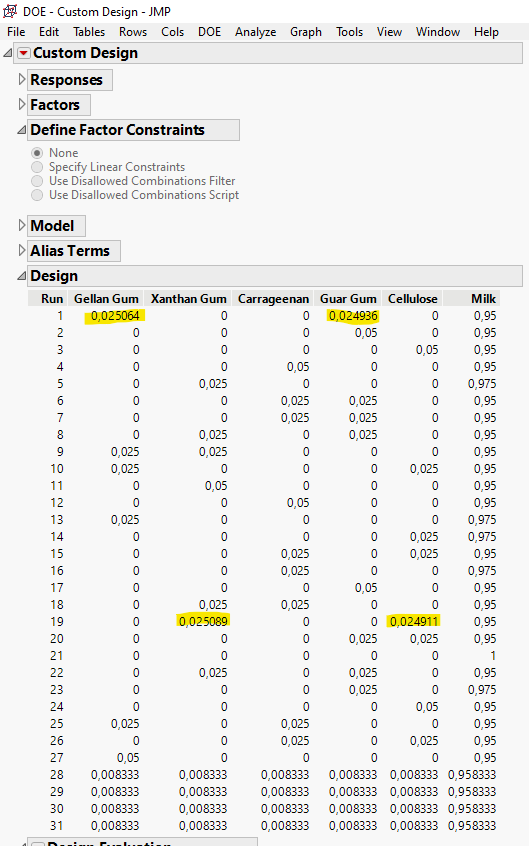
I wonder why JMP introduces the four highlighted numbers (yellow) in the design (0.025064, 0.024936, 0.025089 and 0.024911)? Why are these four values not 0.025?
Accepted Solutions


- Mark as New
- Bookmark
- Subscribe
- Mute
- Subscribe to RSS Feed
- Get Direct Link
- Report Inappropriate Content
Re: Random decimals incorporated in mixture screening design
Hi @Principles77,
Welcome in the Community !
The Custom design platform uses the Coordinate-Exchange Algorithm to create designs based on random points, and then move the coordinates of these random points to improve the design based on defined optimality criterion and converge to a specific design.
LinkedIn post on this topic : https://www.linkedin.com/feed/update/urn:li:activity:7163071856332234752/
The "stange" and very precise values you see are a result of this algorithm computation.
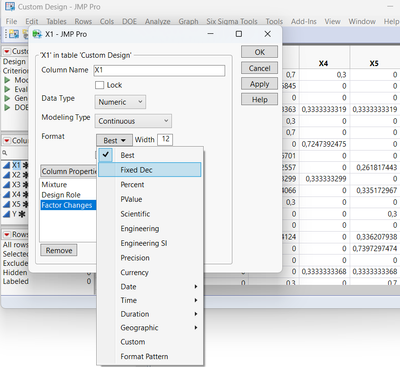
When you make your datatable, you can always change the format of the column and limit the number of decimals (double-click on the factors column, click on Format and set the "Fixed Dec" to the number of decimals you want) :
Hope this response answers your question,
"It is not unusual for a well-designed experiment to analyze itself" (Box, Hunter and Hunter)
- Mark as New
- Bookmark
- Subscribe
- Mute
- Subscribe to RSS Feed
- Get Direct Link
- Report Inappropriate Content
Re: Random decimals incorporated in mixture screening design
Hi @Principles77,
Welcome in the Community !
The Custom design platform uses the Coordinate-Exchange Algorithm to create designs based on random points, and then move the coordinates of these random points to improve the design based on defined optimality criterion and converge to a specific design.
LinkedIn post on this topic : https://www.linkedin.com/feed/update/urn:li:activity:7163071856332234752/
The "stange" and very precise values you see are a result of this algorithm computation.
When you make your datatable, you can always change the format of the column and limit the number of decimals (double-click on the factors column, click on Format and set the "Fixed Dec" to the number of decimals you want) :
Hope this response answers your question,
"It is not unusual for a well-designed experiment to analyze itself" (Box, Hunter and Hunter)
Recommended Articles
- © 2026 JMP Statistical Discovery LLC. All Rights Reserved.
- Terms of Use
- Privacy Statement
- Contact Us