cancel
Showing results for 
Show  only  | Search instead for 
Did you mean: 
  • DownloadSemiconductor Toolkit: Tools to create wafer maps, add wafer geometry to graphics, explore die defects & compare wafers.
  • Discovery Summit 2026: Early User Edition - September 23-24.Register. It's free.
  • Use JMP Clinical with CDISC-compliant data. Review studies, ID safety and efficacy signals & communicate findings with interactive graphics. Register to see how. Aug. 27, 2 pm US ET.

Discussions

Solve problems, and share tips and tricks with other JMP users.
Choose Language Hide Translation Bar
GregMcMahon
Level IV

Putting labels in custom maps

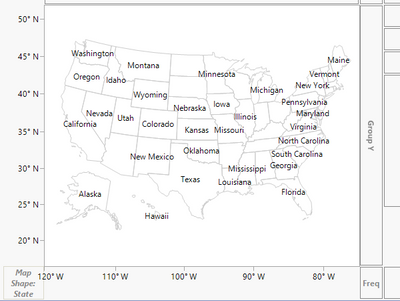
I've built a custom map and it looks beautiful in Graphbuilder. What I would like to do is add labels to the regions in it but I just can't seem to figure out how that is done. An example would be from the online tutorial where the study is of temperature distributions in an office building. They describe how to make the custom map and the final result shows the actual room numbers on the map itself, but unfortunately it wasn't described how they got there. Or a simpler example would be putting the state names within the US map.


Thanks very much!


Best regards,

Gre

1 REPLY 1
jthi
Super User

Re: Putting labels in custom maps

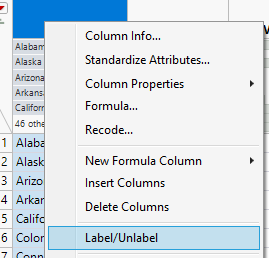
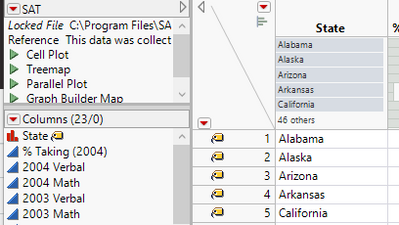
Set Label to column you want to show and then select all rows you want to have the label on and set labels on those:

jthi_2-1624084306027.png


jthi_0-1624084274563.png

and then create your map

jthi_1-1624084284959.png


-Jarmo

Recommended Articles