- JMP will suspend normal business operations for our Winter Holiday beginning on Wednesday, Dec. 24, 2025, at 5:00 p.m. ET (2:00 p.m. ET for JMP Accounts Receivable).
Regular business hours will resume at 9:00 a.m. EST on Friday, Jan. 2, 2026. - We’re retiring the File Exchange at the end of this year. The JMP Marketplace is now your destination for add-ins and extensions.
- Subscribe to RSS Feed
- Mark Topic as New
- Mark Topic as Read
- Float this Topic for Current User
- Bookmark
- Subscribe
- Mute
- Printer Friendly Page
Discussions
Solve problems, and share tips and tricks with other JMP users.- JMP User Community
- :
- Discussions
- :
- Problem of create column

- Mark as New
- Bookmark
- Subscribe
- Mute
- Subscribe to RSS Feed
- Get Direct Link
- Report Inappropriate Content
Problem of create column
Hi, all
I had face a very simple problem which is create the column.
When I single run the below code, it come out this error in the log
Try(dt_firstseq_summary << Delete Column( "Percent" ) );
dt_firstseq_summary << New Column( "Percent",
	Numeric,
	Continuous,
	Format( "Best", 8 ),
	Formula( :Name("Total_Tested") / Col Sum(:Total_Tested) )
);
dt_firstseq_summary :name( "Percent" ) << Delete formula;
Error:
Send Expects Scriptable Object in access or evaluation of 'Send' , dt_firstseq_summary << /*###*/New Column( "Percent",
Numeric,
Continuous,
Format( "Best", 8 ),
Formula( :Total_Tested / Col Sum( :Total_Tested ) )
) /*###*/
In the following script, error marked by /*###*/
Try( dt_firstseq_summary << Delete Column( "Percent" ) );
dt_firstseq_summary << /*###*/New Column( "Percent",
Numeric,
Continuous,
Format( "Best", 8 ),
Formula( :Total_Tested / Col Sum( :Total_Tested ) )
) /*###*/;
dt_firstseq_summary:Percent << Delete formula;
But when I run my whole program, it able to create the column in data table, but the percent column cannot calculate the value.See photo below:
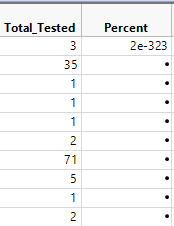
Error:
Column Percent Formula Interrupted
Name Unresolved: Total_Tested 1 times At rows: 2 Operation: Total_Tested, :Total_Tested/*###*/
Formula evaluation errors have been ignored
May I know how to fix it?
Any answer is appreciate.
Thanks.
Accepted Solutions


- Mark as New
- Bookmark
- Subscribe
- Mute
- Subscribe to RSS Feed
- Get Direct Link
- Report Inappropriate Content
Re: Problem of create column
Save the data table reference that is returned from the join operation. Then use it to send messages to create the new column that you want. Like this:
dt_joined = dt_firstseq_summary << Join(
	With(dt_final_summary),
	Select( :S_B_Name, :N Rows, :Name( "Percent" ) ),
	SelectWith( :S_B_Name, :N Rows, :Name( "Percent" ) ),
	By Matching Columns( :S_B_Name = :S_B_Name ),
	Preserve Main Table Order();
	Output Table Name("Combined Table");
);
dt_joined << New Column( ... ):

- Mark as New
- Bookmark
- Subscribe
- Mute
- Subscribe to RSS Feed
- Get Direct Link
- Report Inappropriate Content
Re: Problem of create column
Is it possible that your summary table is still linked to the raw data table and that is causing your issue?
I tried your code with a mocked up version of your data table and had no issue with the code.
- Mark as New
- Bookmark
- Subscribe
- Mute
- Subscribe to RSS Feed
- Get Direct Link
- Report Inappropriate Content
Re: Problem of create column
Hi, Jim
Yes, the summary table will linked with raw data table.
I will try again.
Thanks for help.
- Mark as New
- Bookmark
- Subscribe
- Mute
- Subscribe to RSS Feed
- Get Direct Link
- Report Inappropriate Content
Re: Problem of create column
Hi, everyone
I now able to join the 2 data table together into one data table.(combined data table)
But now my problem is how to create another new column into the combined data table?
This is my join script to join 2 data table together:
dt_firstseq_summary << Join(
	With(dt_final_summary),
	Select( :S_B_Name, :N Rows, :Name( "Percent" ) ),
	SelectWith( :S_B_Name, :N Rows, :Name( "Percent" ) ),
	By Matching Columns( :S_B_Name = :S_B_Name ),
	Preserve Main Table Order();
	Output Table Name("Combined Table");
);
Thanks.
- Mark as New
- Bookmark
- Subscribe
- Mute
- Subscribe to RSS Feed
- Get Direct Link
- Report Inappropriate Content
Re: Problem of create column
Save the data table reference that is returned from the join operation. Then use it to send messages to create the new column that you want. Like this:
dt_joined = dt_firstseq_summary << Join(
	With(dt_final_summary),
	Select( :S_B_Name, :N Rows, :Name( "Percent" ) ),
	SelectWith( :S_B_Name, :N Rows, :Name( "Percent" ) ),
	By Matching Columns( :S_B_Name = :S_B_Name ),
	Preserve Main Table Order();
	Output Table Name("Combined Table");
);
dt_joined << New Column( ... ):Recommended Articles
- © 2025 JMP Statistical Discovery LLC. All Rights Reserved.
- Terms of Use
- Privacy Statement
- Contact Us