- JMP will suspend normal business operations for our Winter Holiday beginning on Wednesday, Dec. 24, 2025, at 5:00 p.m. ET (2:00 p.m. ET for JMP Accounts Receivable).
Regular business hours will resume at 9:00 a.m. EST on Friday, Jan. 2, 2026. - We’re retiring the File Exchange at the end of this year. The JMP Marketplace is now your destination for add-ins and extensions.
- Subscribe to RSS Feed
- Mark Topic as New
- Mark Topic as Read
- Float this Topic for Current User
- Bookmark
- Subscribe
- Mute
- Printer Friendly Page
Discussions
Solve problems, and share tips and tricks with other JMP users.- JMP User Community
- :
- Discussions
- :
- Polynomial contrasts in JMP 14 pro

- Mark as New
- Bookmark
- Subscribe
- Mute
- Subscribe to RSS Feed
- Get Direct Link
- Report Inappropriate Content
Polynomial contrasts in JMP 14 pro
@Mark_Baileyhas answered this question at https://community.jmp.com/t5/Discussions/How-to-specify-contrast-coefficients-with-quot-Contrast/td-..., but I could not figure out how to carry out this analysis myself in JMP pro 14 :(
I would be thankful if someone could show the step-by-step procedure for performing the polynomial contrasts in GIF animations or screenshots. Also, the detailed report that shows the final values for the Linear, Quadratic, and Cubic contrasts.
I attached the sample data to this post too. Thank you
Kind regards,
Accepted Solutions


- Mark as New
- Bookmark
- Subscribe
- Mute
- Subscribe to RSS Feed
- Get Direct Link
- Report Inappropriate Content
Re: Polynomial contrasts in JMP 14 pro
Why do you post your example in an Excel spreadsheet when this is the JMP Community?
Here are step-by-step instructions. I assume you have your data arranged exactly like the data in the other discussion you cited. There is one categorical factor at four levels. My mock-up of the data uses the name Dose for the factor. The data column for the factor uses the ordinal modeling type. One response uses the numeric data type and the continuous modeling type. My mock-up of the data uses the name Y for the response.
- Select Analyze > Fit Model.
- Select the Y column and click Y.
- Select the Dose data column and click Add.
- Click Run.
- Open the Effect Details outline.
- Click the red triangle next to Effect Details and select LSMeans Contrast.
- Translate each row of coefficients into a column for the contrast specifications. Note that the coefficients in the table will be normalized in the contrast by JMP.
- Translate row 1 of case V=4 in Table A.2 in the other discussion is Linear -3, -1, 1, 3.
- Click the - button to the right of 0 three times.
- Click the - button to the right of 50 once.
- Click the + button to the right of 100 once.
- Click the + button to the right of 200 three times.
- Click New Column.
- Translate row 2 of case V=4 in Table A.2 in the other discussion is Quadratic 1, -1, -1, 1.
- Click the + button to the right of 0 once.
- Click the - button to the right of 50 once.
- Click the - button to the right of 100 once.
- Click the + button to the right of 200 once.
- Click New Column.
- Translate row 3 of case V=4 in Table A.2 in the other discussion is Cubic -1, 3, -3, 1.
- Click the - button to the right of 0 once.
- Click the + button to the right of 50 three times.
- Click the - button to the right of 100 three times.
- Click the + button to the right of 200 once.
- Click Done.
- Translate row 1 of case V=4 in Table A.2 in the other discussion is Linear -3, -1, 1, 3.


You will get the omnibus test first.

Open the Test Detail outline to see the individual contrast results.

- Mark as New
- Bookmark
- Subscribe
- Mute
- Subscribe to RSS Feed
- Get Direct Link
- Report Inappropriate Content
Re: Polynomial contrasts in JMP 14 pro
Why do you post your example in an Excel spreadsheet when this is the JMP Community?
Here are step-by-step instructions. I assume you have your data arranged exactly like the data in the other discussion you cited. There is one categorical factor at four levels. My mock-up of the data uses the name Dose for the factor. The data column for the factor uses the ordinal modeling type. One response uses the numeric data type and the continuous modeling type. My mock-up of the data uses the name Y for the response.
- Select Analyze > Fit Model.
- Select the Y column and click Y.
- Select the Dose data column and click Add.
- Click Run.
- Open the Effect Details outline.
- Click the red triangle next to Effect Details and select LSMeans Contrast.
- Translate each row of coefficients into a column for the contrast specifications. Note that the coefficients in the table will be normalized in the contrast by JMP.
- Translate row 1 of case V=4 in Table A.2 in the other discussion is Linear -3, -1, 1, 3.
- Click the - button to the right of 0 three times.
- Click the - button to the right of 50 once.
- Click the + button to the right of 100 once.
- Click the + button to the right of 200 three times.
- Click New Column.
- Translate row 2 of case V=4 in Table A.2 in the other discussion is Quadratic 1, -1, -1, 1.
- Click the + button to the right of 0 once.
- Click the - button to the right of 50 once.
- Click the - button to the right of 100 once.
- Click the + button to the right of 200 once.
- Click New Column.
- Translate row 3 of case V=4 in Table A.2 in the other discussion is Cubic -1, 3, -3, 1.
- Click the - button to the right of 0 once.
- Click the + button to the right of 50 three times.
- Click the - button to the right of 100 three times.
- Click the + button to the right of 200 once.
- Click Done.
- Translate row 1 of case V=4 in Table A.2 in the other discussion is Linear -3, -1, 1, 3.
You will get the omnibus test first.
Open the Test Detail outline to see the individual contrast results.
- Mark as New
- Bookmark
- Subscribe
- Mute
- Subscribe to RSS Feed
- Get Direct Link
- Report Inappropriate Content
Re: Polynomial contrasts in JMP 14 pro
Please realize that linear regression methods have superseded this analysis. In my example, the Dose is a continuous factor but treated as a categorical one to answer your question. I can use regression with a linear model that includes higher-order terms to test the same things.
Here is the result from using contrasts:

Here is the result using linear regression:
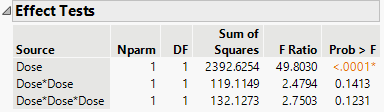
The conclusions are the same from both methods (the linear effect is significant, but the quadratic and cubic effects are not significant). Note that the actual tests are different, so the p-values are not the same, but the conclusions are the same.
- Mark as New
- Bookmark
- Subscribe
- Mute
- Subscribe to RSS Feed
- Get Direct Link
- Report Inappropriate Content
Re: Polynomial contrasts in JMP 14 pro
Thank you, Mark, but I could not find the "Open the Effect Details outline." step. I also check "Specify Contrasts.jmp".
- Mark as New
- Bookmark
- Subscribe
- Mute
- Subscribe to RSS Feed
- Get Direct Link
- Report Inappropriate Content
Re: Polynomial contrasts in JMP 14 pro
The Effect Details outline is initially at the bottom of the Fit Least Squares window.

- Mark as New
- Bookmark
- Subscribe
- Mute
- Subscribe to RSS Feed
- Get Direct Link
- Report Inappropriate Content
Re: Polynomial contrasts in JMP 14 pro
“Model Specification” I need to select “Minimal Report” from the Emphasis menu to get a result similar to yours.
Last question, looking at the “Test Detail” in my attached screenshot, could you please tell me which effect (linear, quadratic, or cubic) is significant or best fit?
- Mark as New
- Bookmark
- Subscribe
- Mute
- Subscribe to RSS Feed
- Get Direct Link
- Report Inappropriate Content
Re: Polynomial contrasts in JMP 14 pro
I used Minimal Report to minimize the irrelevant information. The choice for Emphasis makes a big difference in the initial report that opens.
I cannot tell you which contrasts are significant, but I can tell you where to find the information you can use to decide. I called out the p-values for each of the individual contrasts so you can find it and decide.


- Mark as New
- Bookmark
- Subscribe
- Mute
- Subscribe to RSS Feed
- Get Direct Link
- Report Inappropriate Content
Re: Polynomial contrasts in JMP 14 pro
Thank you so much Mark for the help.
Kind regards,
Recommended Articles
- © 2025 JMP Statistical Discovery LLC. All Rights Reserved.
- Terms of Use
- Privacy Statement
- Contact Us