- JMP will suspend normal business operations for our Winter Holiday beginning on Wednesday, Dec. 24, 2025, at 5:00 p.m. ET (2:00 p.m. ET for JMP Accounts Receivable).
Regular business hours will resume at 9:00 a.m. EST on Friday, Jan. 2, 2026. - We’re retiring the File Exchange at the end of this year. The JMP Marketplace is now your destination for add-ins and extensions.
- Subscribe to RSS Feed
- Mark Topic as New
- Mark Topic as Read
- Float this Topic for Current User
- Bookmark
- Subscribe
- Mute
- Printer Friendly Page
Discussions
Solve problems, and share tips and tricks with other JMP users.- JMP User Community
- :
- Discussions
- :
- Paramétrage axe X des I chart

- Mark as New
- Bookmark
- Subscribe
- Mute
- Subscribe to RSS Feed
- Get Direct Link
- Report Inappropriate Content
Paramétrage axe X des I chart
Je suis utilisateur JMP depuis quelques mois principalement pour les SPC. Aujourd'hui j'ai une question plutôt esthétique mais qui a une finalité de meilleure visualisation des data. Je n'arrive pas à trouver le moyen de faire apparaître l'étiquette de ma donnée qualitative "lot" à chaque changement de lot sur l'axe des abscisses d'une carte de contrôle de type valeurs individuelles (je n'ai pas le même nombre de valeurs par lot et donc j'aimerais faire apparaître chaque lot une seule fois, des la première valeur du dit lot, si possible automatiquement car j'ai plus de 3700 valeurs en tout). Je sais que ce type de visualisation est possible sur Minitab, donc je me dis que ça l'est autant sur JMP ^^).
Merci d'avance pour votre aide précieuse !
Cordialement,
Arkawa
Accepted Solutions


- Mark as New
- Bookmark
- Subscribe
- Mute
- Subscribe to RSS Feed
- Get Direct Link
- Report Inappropriate Content
Re: Paramétrage axe X des I chart
If you are using the Control Chart Builder (CCB) then you can drag multiple x-axis columns into the x-axis box. It might be convenient to drag you batch ID column below the individual run ID on the x-axis.
e.g. drag individual ID first, then drag batch ID below (a blue box will show up) the individual ID.
Alternatively, you can drag Batch ID into the Phase role at the top of the CCB graph. This will divide the control chart into separate divisions for each batch
Luckily the JMP Community engine does a good job of translation.
- Mark as New
- Bookmark
- Subscribe
- Mute
- Subscribe to RSS Feed
- Get Direct Link
- Report Inappropriate Content
Re: Paramétrage axe X des I chart
I will write this topic in english.
To summarize the situation, I would like, for visualization purpose, to find a way to name each X axis label by the first qualitative data (batch number) of each series of variable data, because I have different number of variable data by batch number. I know that this visualization can be performed using Minitab, so I suppose that JMP can also do it.
Thank you for your support.
Best regards
Arkawa.


- Mark as New
- Bookmark
- Subscribe
- Mute
- Subscribe to RSS Feed
- Get Direct Link
- Report Inappropriate Content
Re: Paramétrage axe X des I chart
- Mark as New
- Bookmark
- Subscribe
- Mute
- Subscribe to RSS Feed
- Get Direct Link
- Report Inappropriate Content
Re: Paramétrage axe X des I chart
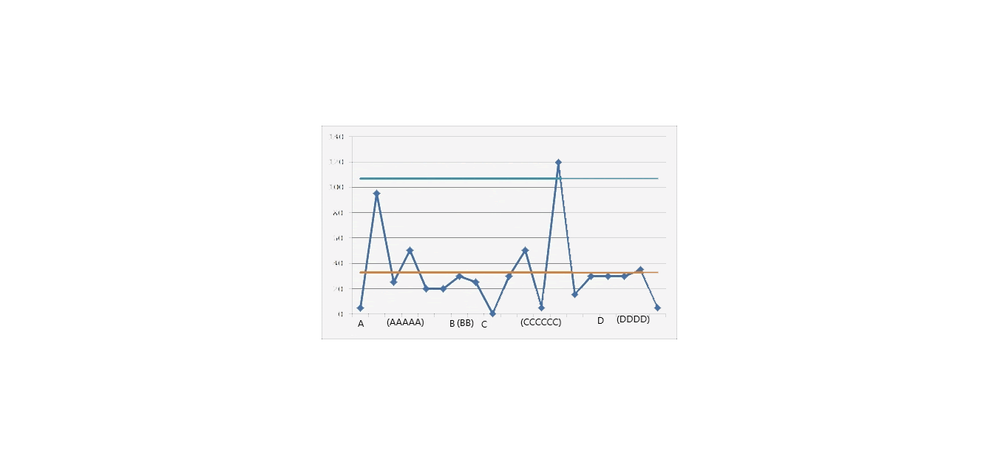
You can find attached a picture of what I expect.
The batches are represented into letters A, B, C, D. The letter without brackets is the label of the batch when the first value of the batch appeared, so what I want. The letters between brackets indicate the label of the batch within the number of values for this batch, I don't want them but it is to illustrate that each batch may not have the same number of values.
Tell me if is suits to you.
Best regards
Arkawa

- Mark as New
- Bookmark
- Subscribe
- Mute
- Subscribe to RSS Feed
- Get Direct Link
- Report Inappropriate Content
Re: Paramétrage axe X des I chart
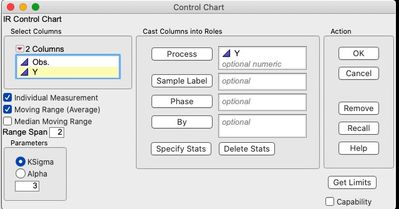
You have the option (certainly in the Legacy Control Charts platform) of designating Sample Label and Phase.

- Mark as New
- Bookmark
- Subscribe
- Mute
- Subscribe to RSS Feed
- Get Direct Link
- Report Inappropriate Content
Re: Paramétrage axe X des I chart
Welcome to the community. You can select to subgroup by Sample Label and put batch in that box.
Of course, this would not be the desired approach. The rational subgroup should consist of the same X's changing over time. If you change subgroup size, you potentially violate this assumption. Remember the Range chart answers the question: Is the within subgroup variation consistency and stable? That variation is a function the X's changing within subgroup. The Xbar chart answers the question: Is the variation between subgroup more than that predicted by the within subgroup? Effectively to determine which source has the greatest leverage on the recorded value (Y). If you change the variables within subgroup, the control charts can no longer answer those questions.
- Mark as New
- Bookmark
- Subscribe
- Mute
- Subscribe to RSS Feed
- Get Direct Link
- Report Inappropriate Content
Re: Paramétrage axe X des I chart
To go further detail, my control chart includes 3 phases, in which I have to follow-up individual values and not the mean, each phase includes some different numbers of batches, and to finalize it, all was dispatched within a condition (Stop/Run). Thus at term, I have 2 control charts (Run/Stop) within the 3 phases, only the control chart Run includes the batches (because it is justly the Run condition). I cannot share my control chart for confidentiality.
Thank you.
Best regards
Arkawa
- Mark as New
- Bookmark
- Subscribe
- Mute
- Subscribe to RSS Feed
- Get Direct Link
- Report Inappropriate Content
Re: Paramétrage axe X des I chart
If you are using the Control Chart Builder (CCB) then you can drag multiple x-axis columns into the x-axis box. It might be convenient to drag you batch ID column below the individual run ID on the x-axis.
e.g. drag individual ID first, then drag batch ID below (a blue box will show up) the individual ID.
Alternatively, you can drag Batch ID into the Phase role at the top of the CCB graph. This will divide the control chart into separate divisions for each batch
Luckily the JMP Community engine does a good job of translation.
- Mark as New
- Bookmark
- Subscribe
- Mute
- Subscribe to RSS Feed
- Get Direct Link
- Report Inappropriate Content
Re: Paramétrage axe X des I chart
I well tried the X axis by using the control chart builder and finally I succeeded it (example matching date and batch numbers) ;) thank you very much for your help (and yes I agree tha the translator is really efficient).
The JMP community is very responsive, it is very appreciated. I will return for sure.
Good evening from France :)
Arkawa
Recommended Articles
- © 2026 JMP Statistical Discovery LLC. All Rights Reserved.
- Terms of Use
- Privacy Statement
- Contact Us