Turn on suggestions
Auto-suggest helps you quickly narrow down your search results by suggesting possible matches as you type.
- Discovery Summit 2026: Early User Edition - September 23-24.Register. It's free.
- Graph Builder Toolbar streamlines interactive graphing. Creates shortcuts on Report and GraphBuilder Helpers toolbars. Download and install the extension.
Options
- Subscribe to RSS Feed
- Mark Topic as New
- Mark Topic as Read
- Float this Topic for Current User
- Bookmark
- Subscribe
- Mute
- Printer Friendly Page
Discussions
Solve problems, and share tips and tricks with other JMP users.- User Community
- :
- Discussions
- :
- Re: Parallel Plot > Ribbon / River Plot > Change Size with Each X Category?


Super User
- Mark as New
- Bookmark
- Subscribe
- Mute
- Subscribe to RSS Feed
- Get Direct Link
- Report Inappropriate Content
Parallel Plot > Ribbon / River Plot > Change Size with Each X Category?
Created:
Jul 25, 2020 06:41 PM
| Last Modified: Jun 11, 2023 4:03 AM
(4155 views)
Hi JMP Community
Is it possible in Graph Builder > Parallel Plot > Ribbon/River Plot to assign a different Size value for each X axis category?
In the example below (see also table attached), I can easily set the Size to one column but it would be greatly advantageous to be able to set different size values for the DATA1 and DATA2.
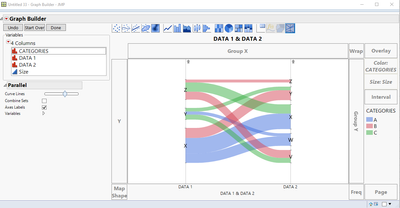
Thank you for your input.
Best,
TS
Thierry R. Sornasse
- Tags:
- Mass Customization
3 REPLIES 3
Super User
- Mark as New
- Bookmark
- Subscribe
- Mute
- Subscribe to RSS Feed
- Get Direct Link
- Report Inappropriate Content
Re: Parallel Plot > Ribbon / River Plot > Change Size with Each X Category?
Of note: the official name for this type of graph is "sankey diagram"
Thierry R. Sornasse


Staff
- Mark as New
- Bookmark
- Subscribe
- Mute
- Subscribe to RSS Feed
- Get Direct Link
- Report Inappropriate Content
Re: Parallel Plot > Ribbon / River Plot > Change Size with Each X Category?
Perhaps you can synthesize a new variable for the Size role from the DATA1 and DATA2 variables.
Super User
- Mark as New
- Bookmark
- Subscribe
- Mute
- Subscribe to RSS Feed
- Get Direct Link
- Report Inappropriate Content
Re: Parallel Plot > Ribbon / River Plot > Change Size with Each X Category?
Hi Mark,
Thanks for your feedback. This is indeed a possible work around but it would still assign one size per ribbon along the X categories. I'm looking for an approach that would allow me to set a starting size and an ending size for each ribbon.
Best,
TS
Thanks for your feedback. This is indeed a possible work around but it would still assign one size per ribbon along the X categories. I'm looking for an approach that would allow me to set a starting size and an ending size for each ribbon.
Best,
TS
Thierry R. Sornasse
Recommended Articles
- © 2026 JMP Statistical Discovery LLC. All Rights Reserved.
- Terms of Use
- Privacy Statement
- Contact Us