- Don’t miss your chance to experience Discovery Summit Europe at our best available rate! Early bird registration through 31 Oct.
- Graph Builder Toolbar streamlines interactive graphing. Creates shortcuts on Report and GraphBuilder Helpers toolbars. Download and install the extension.
- Subscribe to RSS Feed
- Mark Topic as New
- Mark Topic as Read
- Float this Topic for Current User
- Bookmark
- Subscribe
- Mute
- Printer Friendly Page
Discussions
Solve problems, and share tips and tricks with other JMP users.- User Community
- :
- Discussions
- :
- Outlier (👽) screening with Jmp Dashboards - how?

- Mark as New
- Bookmark
- Subscribe
- Mute
- Subscribe to RSS Feed
- Get Direct Link
- Report Inappropriate Content
Outlier (👽) screening with Jmp Dashboards - how?
I want to do some Outlier screening by listing the aliens in my class.
First attempt: Local Data Filter
I was quite shocked with all the aliens in Big Class!
... but then I noticed that the data filter was just ignored (because on day 1 there were no aliens in the class - and with no matching rows, the Data Filter is just reset - instead of showing 0 matching rows !!!).
This seems to be related to Data filter: how to specify the limits :
If a value is just used in the data filter but not in the data table, it is removed from the data filer.
This behavior interferes with another behavior of Jmp: if the last filter value is deselected, all rows get selected (instead of none).
So, with the current behavior of Data Filters, this approach doesn't work :(
Next, I used a Where() clause to restrict the Tabulate Report.
Unfortunately, if one day there are no aliens in the class, the Where clause produces an error message - instead of restricting the data set to 0 rows:
This Where-clause for data table 'Big Class' resulted in no rows: :alien == 1
List of "aliens" for the 4 cases:
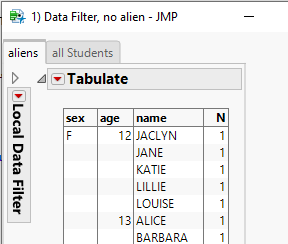
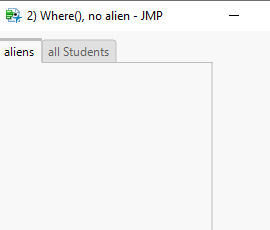
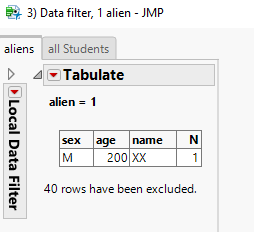
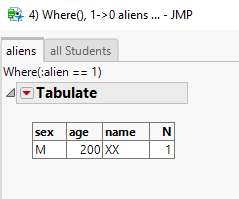
Please note:
For the case with Where(), there is another issue:
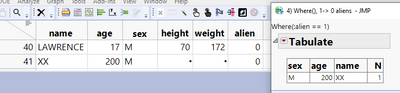
The row selection for the report is static.
After XX changed to non-alien - he is still listed in the report:
Names Default To Here( 1 );
dt = Open( "$SAMPLE_DATA/Big Class.jmp" );
dt << New Column( "alien", nominal, set each value( 0 ) );


myDashboard = Function( {myTitle, withWhereClause},
	New Window( myTitle,
		<<Show Menu( 0 ),
		<<ShowToolbars( 0 ),
		Tab Box(
			Tab Page Box(
				"aliens",
				Eval(
					Substitute(
							Expr(
								Tabulate(
									Show Control Panel( 0 ),
									Add Table( Row Table( Grouping Columns( :sex, :age, :name ) ) ),
									__selectAliens__
								)
							),
						Expr( __selectAliens__ ),
							If( withWhereClause,
								Expr( Where( :alien == 1 ) ),
								Expr(
									Local Data Filter( Close Outline( 1 ), Add Filter( columns( :alien ), Where( :alien == 1 ) ) )
								)
							)
					)
				)
			),
			Tab Page Box(
				"all Students",
				Tabulate( Show Control Panel( 0 ), Add Table( Row Table( Grouping Columns( :sex, :age, :name ) ) ) )
			)
		)
	)
);

// 1) Data Filter --> so many aliens ?!?! no, Data filter was ignored (filter is OK, see below)
myDashboard( "1) Data Filter, no alien", 0 );

// 2) Where Cause  + no matching row --> error message instead of a report
myDashboard( "2) Where(), no alien", 1 );

dt << add rows( {name = "XX", alien = 1, sex = "M", age = 200} );

// 3) Data Filter + 1 alien
myDashboard( "3) Data filter, 1 alien", 0 ); // new test: --> filter OK --> works

myDashboard( "4) Where(), 1->0 aliens ...", 1 ); // Where Clause  + matching row --> dashboard is created, but ...


// XX gets human -> Dashboard  #4  stays the same :(
//dt[41, {"alien"}] = 0;
;


- Mark as New
- Bookmark
- Subscribe
- Mute
- Subscribe to RSS Feed
- Get Direct Link
- Report Inappropriate Content
Re: Outlier screening with Jmp Dashboards - how?
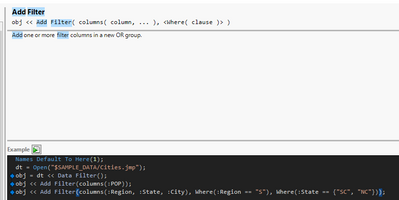
Have you made sure your brackets are where they should be?

- Mark as New
- Bookmark
- Subscribe
- Mute
- Subscribe to RSS Feed
- Get Direct Link
- Report Inappropriate Content
Re: Outlier screening with Jmp Dashboards - how?
@jthi , right.
I corrected the code
... and added screenshots how the lists of aliens look on my system for the different cases.
- Mark as New
- Bookmark
- Subscribe
- Mute
- Subscribe to RSS Feed
- Get Direct Link
- Report Inappropriate Content
Re: Outlier screening with Jmp Dashboards - how?
Depending on what you wish to do in the end you do have some possible workarounds:
- Add "blank" row with :alien = 1 (all other values missing except for the alien being 1)
- Create custom filter using List Box (or something else) and then you can have your own logic and options
- Use some sort of inverse filter if no ones are found
- Use different view if no ones are found
- Don't hide data filter to make it more obvious what is being filtered (or not being filtered in this case)
- Mark as New
- Bookmark
- Subscribe
- Mute
- Subscribe to RSS Feed
- Get Direct Link
- Report Inappropriate Content
Re: Outlier screening with Jmp Dashboards - how?
@jthi wrote:
- Don't hide data filter to make it more obvious what is being filtered (or not being filtered in this case)
?
- Mark as New
- Bookmark
- Subscribe
- Mute
- Subscribe to RSS Feed
- Get Direct Link
- Report Inappropriate Content
Re: Outlier screening with Jmp Dashboards - how?
Is it a workaround to show the user that there is an issue in Jmp - I want the user to work with Jmp without seeing issues :)
Concerning the other workarounds:
I don't like it to reinvent the wheel (create my own Data Filter) - just to prevent Jmp from "doing something wrong".
So what remains is option # 1:
add dummy rows to the data table such that the Data Filter doesn't get cleared by not finding any matching rows.
with some nasty disadvantages: the dummy rows have to be "removed" manually everywhere else...
- Col Number (if(:dummy_row, ., :alien), ...);
- Graph Builder (..., Where(Ismissing(:dummy_row));
- dfRows = myDataFilter << Get Filtered Rows;
NRowsAfterDummyScreening=NItems(Loc(-dt[dfRows,"dummy"]+1));
And it will just work as long as the user doesn't activate
Include missing for grouping columns( 1 ).
For future versions of Jmp, I hope that there will be an option to prevent the Data Filter from resetting when no matches are found. Here is the wish:
Local Data Filter: option to adjust to current data
- Mark as New
- Bookmark
- Subscribe
- Mute
- Subscribe to RSS Feed
- Get Direct Link
- Report Inappropriate Content
Re: Outlier screening with Jmp Dashboards - how?
Some insights why the approach via Where() is not dynamic
Using Where() to filter down analysis creates new linked private data table :
a private subset of the data table is generated
- Mark as New
- Bookmark
- Subscribe
- Mute
- Subscribe to RSS Feed
- Get Direct Link
- Report Inappropriate Content
Re: Outlier screening with Jmp Dashboards - how?
I found a way to tackle the issue with the
Include missing for grouping columns( 1 )
Use a Data filter with alien = 1 and dummy = 0 - and in addition set Count Excluded rows(1) [the default].
Then the data filter won't notice that for many age groups there are no rows with alien=1 and dummy=0.
Since it doesn't notice, it doesn't reset the selection :)
Names Default to Here(1);
dt = Open( "$SAMPLE_DATA/Big Class.jmp" );

	dt << New Column( "dummy", Nominal );
	dt << New Column( "alien", Nominal );

For( myAge = 12, myAge <= 17, myAge++,
	dt << add rows( {:name = "xxx", :age = myAge, :dummy = 1, :alien = 1} )
);

:alien[12]=1;
:sex[12]="";
:alien[39]=1;


New Window( "Outlier Screening",
	Data Filter Context Box(
		H List Box(
			dt << Data Filter(
		Local,
				Add Filter( columns( :age ), Where( :age == 13 ), Display( :age, N Items( 6 ) ) )

			),

			dt << Tabulate(
				Show Control Panel( 0 ),
				Include missing for grouping columns( 1 ),
				Add Table(Row Table( Grouping Columns( :name, :sex ) ) ),
				Local Data Filter(
					Close Outline( 1 ),
					Mode( Show( 0 ) ),
					//Count Excluded Rows( 0 ),
					Add Filter( columns( :dummy, :alien ), Where( Is Missing( :dummy ) ), Where( :alien == 1 ) )
				)
			)
		)
	)
);
NB: This solution will fail *) if one day there is not a single alien in the whole data set.
For this case ...
- one could hide an additional alien with dummy = 0 in a dummy age group ("-99")
... and take care that nobody counts the non-dummy aliens for the whole class - or: split the data filter into two:
then both of them get enough matching rows so that they don't reset.
Names Default To Here( 1 );
dt = Open( "$SAMPLE_DATA/Big Class.jmp" );

dt << New Column( "dummy", Nominal );
dt << New Column( "alien", Nominal );

For( myAge = 12, myAge <= 17, myAge++,
	dt << add rows( {:name = "xxx", :age = myAge, :dummy = 1, :alien = 1} )
);

:sex[12] = "";


New Window( "Outlier Screening with worarounds",
	Data Filter Context Box(
		H List Box(
			dt << Data Filter( Local, Add Filter( columns( :age ), Where( :age == 13 ), Display( :age, N Items( 6 ) ) ) ),
			Data Filter Context Box(
				H List Box(
					dt << Data Filter( Local, Add Filter( columns( :dummy ), Where( Is Missing( :dummy ) ), Display( :age, N Items( 6 ) ) ) ),
					dt << Tabulate(
						Show Control Panel( 0 ),
						Include missing for grouping columns( 1 ),
						Add Table( Row Table( Grouping Columns( :name, :sex ) ) ),
						Local Data Filter( Close Outline( 1 ), Mode( Show( 0 ) ), Add Filter( columns( :alien ), Where( :alien == 1 ) ) )
					)
				)
			)
		)
	)
);
- Mark as New
- Bookmark
- Subscribe
- Mute
- Subscribe to RSS Feed
- Get Direct Link
- Report Inappropriate Content
Re: Outlier screening with Jmp Dashboards - how?
@hogi wrote:
NB: This solution will fail *)
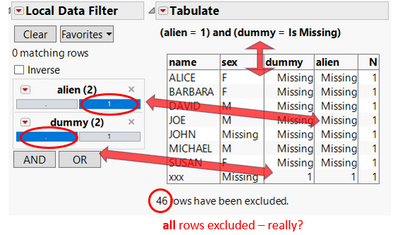
... with a quite surprising result.
According to the data filter and the subtitle, Tabulate should list aliens - but in the list are all rows with the respective age, independent of the values in column alien and dummy.
Names Default to Here(1);
dt = Open( "$SAMPLE_DATA/Big Class.jmp" );

	dt << New Column( "dummy", Nominal );
	dt << New Column( "alien", Nominal );

For( myAge = 12, myAge <= 17, myAge++,
	dt << add rows( {:name = "xxx", :age = myAge, :dummy = 1, :alien = 1} )
);


New Window( "Outlier Screening",
	Data Filter Context Box(
		H List Box(
			dt << Data Filter(
				Local,
				Add Filter( columns( :age ), Where( :age == 13 ), Display( :age, N Items( 6 ) ) )

			),

			dt << Tabulate(
				Show Control Panel( 0 ),
				Include missing for grouping columns( 1 ),
				Add Table(Row Table( Grouping Columns( :name, :sex, :dummy, alien ) ) ),
				Local Data Filter(
					Close Outline( 1 ),
					Mode( Show( 0 ) ),
					//Count Excluded Rows( 0 ),
					Add Filter( columns( :dummy, :alien ), Where( Is Missing( :dummy ) ), Where( :alien == 1 ) )
				)
			)
		)
	)
);
- Mark as New
- Bookmark
- Subscribe
- Mute
- Subscribe to RSS Feed
- Get Direct Link
- Report Inappropriate Content
Re: Outlier screening with Jmp Dashboards - how?
I prepared this script for internal discussions about Outlier Screening in Jmp.
It shows most of the aspects and can be used as a starting point for further development of workarounds ...
Names Default To Here( 1 );
dt = Open( "$SAMPLE_DATA/Big Class.jmp" );

dt << New Column( "dummy", Nominal );
dt << New Column( "alien", Nominal );

:alien[12] = 1;
:sex[12] = "";
:alien[39] = 1;

New Window( "alien screeing",
		<<Show Menu( 0 ),
		<<ShowToolbars( 0 ),
	H List Box(
		V List Box(
			Button Box( "shuffle",
				students = Loc( dt[0, "dummy"], . );
				dt[students, "alien"] = J( N Items( students ), 1, If( Random Integer( 100 ) < 5, 1, . ) );
			),
			Button Box( "no aliens today",
				students = Loc( dt[0, "dummy"], . );
				dt[students, "alien"] = J( N Items( students ), 1, . );
			),
			Button Box( "- 1 student", dt << Select Rows( Random Integer( N Rows( Current Data Table() ) ) ) << Delete Rows ),
			Button Box( "- Linda",  dt << Select Rows( Loc(dt[0,"name"],"LINDA") ) << Delete Rows  ),
			Button Box( "add dummys",
				For( myAge = 12, myAge <= 17, myAge++,
					dt << add rows( {:name = "xxx", :age = myAge, :dummy = 1, :alien = 1} )
				)
			),
			Button Box( "remove dummys", dt << Select Rows( Loc( dt[0, "alien"] ) ) << Delete Rows ),
			Tabulate(
				Show Control Panel( 0 ),
				Include missing for grouping columns( 1 ),
				Add Table( Row Table( Grouping Columns( :dummy, :name, :age, :sex, :alien ) ) )
			)
		),
		V List Box(
			Data Filter Context Box(
				Panel Box( "my subset",
					<<Background color( -12040119 ),
					H List Box(
						dt << Data Filter( Local, Add Filter( columns( :age, :sex ), Where( :age == 17 ) ) ),

						dt << Graph Builder(
							title( "students/age" ),
							Show Control Panel( 0 ),
							Size( 300, 300 ),
							Show Legend( 0 ),
							Fit to Window,
							Variables( X( :age ) ),
							Elements( Bar( X, Legend( 7 ), Bar Style( "Stacked" ), Summary Statistic( "N" ) ) ),
							Local Data Filter(Count Excluded Rows( 0 ), Add Filter( columns( :dummy ) ) ),
							SendToReport( Dispatch( {}, "", ScaleBox, {Min( 0 ), Max( 15 ), Inc( 1 ), Minor Ticks( 0 )} ) )
						)

					,
						dt << Tabulate(
							Title( "Aliens in the subset" ),
							Show Control Panel( 0 ),
							Include missing for grouping columns( 1 ),
							Add Table( Row Table( Grouping Columns( :alien, :age, :name ) ) ),
							Local Data Filter(Count Excluded Rows( 0 ), Add Filter( columns( :alien ), Where( :alien == 1 ) ) )
						)
					)
				)
			),
			dt << Graph Builder(
				title( "all my aliens" ),
				Size( 700, 350 ),
				Show Control Panel( 0 ),
				Show Legend( 0 ),
				Variables( X( :age ) ),
				Elements( Bar( X, Legend( 7 ), Summary Statistic( "N" ) ) ),
				Local Data Filter( Add Filter( columns( :alien, :dummy ), Where( :alien == 1 ) ) )

			),
			dt << Graph Builder(
				title( "all students" ),
				Size( 700, 350 ),
				Show Control Panel( 0 ),
				Show Legend( 0 ),
				Variables( X( :age ) ),
				Elements( Bar( X, Legend( 7 ), Summary Statistic( "N" ) ) ),
				Local Data Filter( Add Filter( columns( :dummy ) ) )
			)

		)
	),
	<<OnClose( Close( dt, NoSave ) )
);Recommended Articles
- © 2026 JMP Statistical Discovery LLC. All Rights Reserved.
- Terms of Use
- Privacy Statement
- Contact Us