- JMP will suspend normal business operations for our Winter Holiday beginning on Wednesday, Dec. 24, 2025, at 5:00 p.m. ET (2:00 p.m. ET for JMP Accounts Receivable).
Regular business hours will resume at 9:00 a.m. EST on Friday, Jan. 2, 2026. - We’re retiring the File Exchange at the end of this year. The JMP Marketplace is now your destination for add-ins and extensions.
- RSS フィードを購読する
- トピックを新着としてマーク
- トピックを既読としてマーク
- このトピックを現在のユーザーにフロートします
- ブックマーク
- 購読
- ミュート
- 印刷用ページ
Discussions
Solve problems, and share tips and tricks with other JMP users.- JMP User Community
- :
- Discussions
- :
- New data added in excel - how to refresh in JMP

- 新着としてマーク
- ブックマーク
- 購読
- ミュート
- RSS フィードを購読する
- ダイレクトリンクを取得
- 印刷
- 不適切なコンテンツを報告
New data added in excel - how to refresh in JMP
My source data is in excel. I created a script to import the data with wizard into JMP and then further scripts do many things in JMP, ultimately creating graphs. And the scripts re-run just fine as long as I just look at the original data. But when I add new rows in the excel and run the scripts, the new data is not included there. I just see the same data that was in the excel when I created the scripts for the first time.
I have not worked for a long with JMP and never written a script of my own.
- 新着としてマーク
- ブックマーク
- 購読
- ミュート
- RSS フィードを購読する
- ダイレクトリンクを取得
- 印刷
- 不適切なコンテンツを報告
Re: New data added in excel - how to refresh in JMP
I have JMP 17. I'm not yet familiar with Source Script and Workflow builder so I need to look into those. Thanks for the advice. Any recommendations where to start?
Then answers:
- Yes, all the data comes from the excel file
- Individual old data points in the excel may be removed/modified (=corrected) whenever excel table is updated. But 99% of time it is just adding new data (=rows) at the bottom of existing columns.
- All the data points from the excel are pulled out every time when we update our status. We want to observe cumulative results. Each column includes (and is labeled accordingly) values for a specific parameter.
- People (who do not work with JMP) manually fill in the data into the excel file.


- 新着としてマーク
- ブックマーク
- 購読
- ミュート
- RSS フィードを購読する
- ダイレクトリンクを取得
- 印刷
- 不適切なコンテンツを報告
Re: New data added in excel - how to refresh in JMP
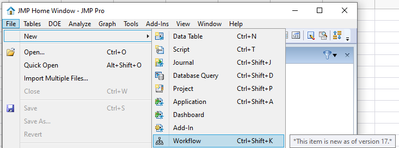
In your case, I feel like creating Workflow might be the easiest option to get started as you don't really want to update JMP table but rather always re-create new table.
Create new workflow
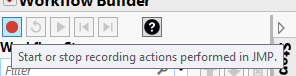
Start recording actions
Here I have excel opened and I have added new column
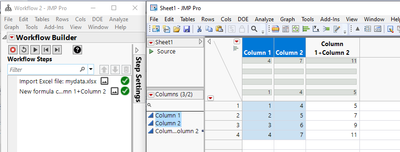
You can stop recording at this point, as I feel like this is all you need.
Then you can save your workflow and just rerun it to create new table whenever you need one.
- 新着としてマーク
- ブックマーク
- 購読
- ミュート
- RSS フィードを購読する
- ダイレクトリンクを取得
- 印刷
- 不適切なコンテンツを報告
Re: New data added in excel - how to refresh in JMP
Thanks for the advice Jarmo, this looks quite clear. In the real JMP table I need to do more data manipulation and then create several graphs but if the whole thing can be managed simply by recording the steps in the workflow, then this looks indeed like a viable solution. I will try this out, thank you!
- 新着としてマーク
- ブックマーク
- 購読
- ミュート
- RSS フィードを購読する
- ダイレクトリンクを取得
- 印刷
- 不適切なコンテンツを報告
Re: New data added in excel - how to refresh in JMP
Now it works! The structure and flow which I created are perhaps a little bit clumsy - but they serve the purpose and now I have a way forward, to further refine the solution. Thank you again Jarmo.
- 新着としてマーク
- ブックマーク
- 購読
- ミュート
- RSS フィードを購読する
- ダイレクトリンクを取得
- 印刷
- 不適切なコンテンツを報告
Re: New data added in excel - how to refresh in JMP
You can also export it as a script and it might be easier to modify that way.
Also, if you start modifying JMP created scripts, this video can be very helpful
おすすめの記事
- © 2026 JMP Statistical Discovery LLC. All Rights Reserved.
- 利用規約
- 個人情報の取り扱いについて
- お問い合わせ