- JMP will suspend normal business operations for our Winter Holiday beginning on Wednesday, Dec. 24, 2025, at 5:00 p.m. ET (2:00 p.m. ET for JMP Accounts Receivable).
Regular business hours will resume at 9:00 a.m. EST on Friday, Jan. 2, 2026. - We’re retiring the File Exchange at the end of this year. The JMP Marketplace is now your destination for add-ins and extensions.
- Subscribe to RSS Feed
- Mark Topic as New
- Mark Topic as Read
- Float this Topic for Current User
- Bookmark
- Subscribe
- Mute
- Printer Friendly Page
Discussions
Solve problems, and share tips and tricks with other JMP users.- JMP User Community
- :
- Discussions
- :
- New data added in excel - how to refresh in JMP

- Mark as New
- Bookmark
- Subscribe
- Mute
- Subscribe to RSS Feed
- Get Direct Link
- Report Inappropriate Content
New data added in excel - how to refresh in JMP
My source data is in excel. I created a script to import the data with wizard into JMP and then further scripts do many things in JMP, ultimately creating graphs. And the scripts re-run just fine as long as I just look at the original data. But when I add new rows in the excel and run the scripts, the new data is not included there. I just see the same data that was in the excel when I created the scripts for the first time.
I have not worked for a long with JMP and never written a script of my own.


- Mark as New
- Bookmark
- Subscribe
- Mute
- Subscribe to RSS Feed
- Get Direct Link
- Report Inappropriate Content
Re: New data added in excel - how to refresh in JMP
Remove or comment out the line
Add Rows(14),Then run the script and see if you get the data you want.
The new column called "1", what is that all about? What is it's function?
- Mark as New
- Bookmark
- Subscribe
- Mute
- Subscribe to RSS Feed
- Get Direct Link
- Report Inappropriate Content
Re: New data added in excel - how to refresh in JMP
Thank you for all your advice!
- Mark as New
- Bookmark
- Subscribe
- Mute
- Subscribe to RSS Feed
- Get Direct Link
- Report Inappropriate Content
Re: New data added in excel - how to refresh in JMP
I must have made some error here because I am not familiar with the scripts. Now it seems to work, doing like this:
When I open a new data table in JMP (let it be JMP1) to get data from the excel for the first time, the wizard generates another JMP data table (let it be JMP2) where the data appears. The script appears automatically as "Source" in JMP2. I copy that and paste it into the JMP1 and save it. Then I close both JMP1 and JMP2 (without saving JMP2). Then I add rows into excel. When I open JMP1 and run the script, I do get full data. Not sure what I have messed but seems to work now.
- Mark as New
- Bookmark
- Subscribe
- Mute
- Subscribe to RSS Feed
- Get Direct Link
- Report Inappropriate Content
Re: New data added in excel - how to refresh in JMP
- Excel includes data elements A, B and C.
- I have saved in JMP data table X. It includes Script 1 which imports the data into JMP, creating a new JMP table Y. This works as it should.
- I manipulate data in table Y.
- I save the manipulation script as Script 2 in Table X, with intention to use it every time when I bring in new data into JMP. At this time I note that Script 2 specifies set values for data: A, B and C.
- I close Table Y without saving it (because Y must be generated again every time with new data)
- I add in excel a new data element, D.
- I run Script 1 (from Table X) to bring into JMP all data elements (A, B, C, D), in a new table Y .
- When I run Script 2 (from Table X), it only considers set values A, B and C, as they are defined set values in Script 2. Thus, new data D is not included.
- Mark as New
- Bookmark
- Subscribe
- Mute
- Subscribe to RSS Feed
- Get Direct Link
- Report Inappropriate Content
Re: New data added in excel - how to refresh in JMP
I think I am finally understanding the issue. Your Script 2 that you are saving is "hard wired" to work only with the columns that present in the Excel file when Script 2 was generated. You want to know what has to be changed to make Script 2 generic to work with the Excel file, no matter what new columns or rows have been added to the Excel file.
What changes that will have to be made are going to be dependent upon the specifics that are in your Script 2. It will have to be examined, and then the code that it will take to look into the new data table and see what the changes in columns are and then have the JSL create the new commands to generate the results. You will need to share the complete Script 2 that is currently being generated, and also, the JSL or the steps that you go through to generate Script 2. Only then can someone help with what it will take to make the JSL work in a generic fashion.
- Mark as New
- Bookmark
- Subscribe
- Mute
- Subscribe to RSS Feed
- Get Direct Link
- Report Inappropriate Content
Re: New data added in excel - how to refresh in JMP
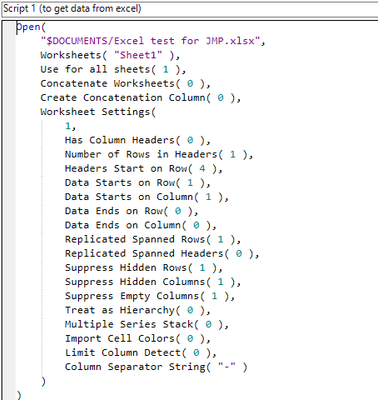
Ok, it goes like this. Here is Script 1 I use to import data from excel. That works just fine.
- Mark as New
- Bookmark
- Subscribe
- Mute
- Subscribe to RSS Feed
- Get Direct Link
- Report Inappropriate Content
Re: New data added in excel - how to refresh in JMP
This is the data I get into JMP (one point missing in Column 2 because there was no data in excel)
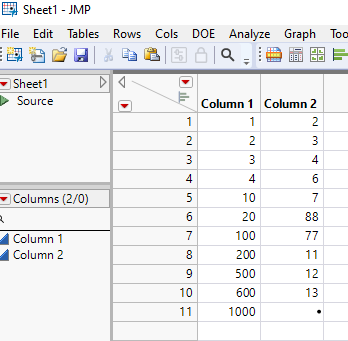
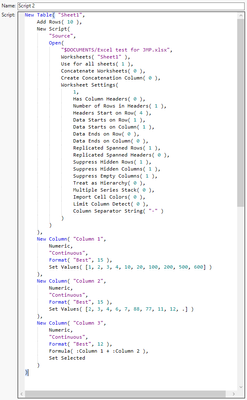
Then I use Script 2 to manipulate that data I brought into JMP. And the script uses fixed set values which have been saved in the script, instead of getting every time all the values, old and new.
- Mark as New
- Bookmark
- Subscribe
- Mute
- Subscribe to RSS Feed
- Get Direct Link
- Report Inappropriate Content
Re: New data added in excel - how to refresh in JMP
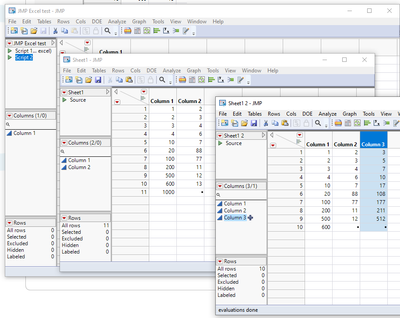
In this simplified example I am just summing Col1 + Col 2. This is how the screen looks like. I have save both Scripts in "JMP Excel test" table. Then I run Script to bring data into Sheet 1. Then I run Script 2 to sum Col1 +Col2 into Col3. The outcome appears in new Sheet 2. The last data point (1000 in Col1 of Sheet 1) was added into excel after Script 2 was created. So even though it is brought into Sheet1 by Script1, it is not anymore noted by Script 2 (using only set values). Thus, row 11 has no values in Table 2.
- Mark as New
- Bookmark
- Subscribe
- Mute
- Subscribe to RSS Feed
- Get Direct Link
- Report Inappropriate Content
Re: New data added in excel - how to refresh in JMP
I created Script 2 like this.
When working for the first time with data in Sheet 1, I sum Col 1 with Col 2. Then, under red triangle, I copy the script with "Copy Table Script". This will be the Script 2.
Then I go to table "JMP Excel test", and under red triangle I give "New script" and paste Script 2 there and save it in "JMP Excel test".
I'm just learning about scripts so perhaps there is some fundamental mistakes I have made here?

- Mark as New
- Bookmark
- Subscribe
- Mute
- Subscribe to RSS Feed
- Get Direct Link
- Report Inappropriate Content
Re: New data added in excel - how to refresh in JMP
You want to use Source script and not the table script. Which JMP version you have? If you have JMP16+ you can Enhanced Log to capture your actions and if you have JMP17+ you could also try using Workflow builder. Few questions, these do affect how you might have to handle this as JMP cannot know what the excel did look like earlier.:
- Do you always pull all the data from the excel file?
- Or does some data get removed from your excel file and new data added?
- If data gets removed, how would you know what data to pull? Does your excel have some sort of ID column?
- Where does the data come from to the excel file?
Recommended Articles
- © 2026 JMP Statistical Discovery LLC. All Rights Reserved.
- Terms of Use
- Privacy Statement
- Contact Us