cancel
Showing results for 
Show  only  | Search instead for 
Did you mean: 
  • JMP will suspend normal business operations for our Winter Holiday beginning on Wednesday, Dec. 24, 2025, at 5:00 p.m. ET (2:00 p.m. ET for JMP Accounts Receivable).
    Regular business hours will resume at 9:00 a.m. EST on Friday, Jan. 2, 2026.
  • We’re retiring the File Exchange at the end of this year. The JMP Marketplace is now your destination for add-ins and extensions.

Discussions

Solve problems, and share tips and tricks with other JMP users.
%3CLINGO-SUB%20id%3D%22lingo-sub-525419%22%20slang%3D%22en-US%22%20mode%3D%22UPDATE%22%3E%E9%9C%80%E8%A6%81%E6%98%BE%E7%A4%BA%E5%B9%B6%E4%BB%8E%E7%BA%BF%E6%80%A7%E6%8B%9F%E5%90%88%E4%B8%AD%E6%8F%90%E5%8F%96%20x%20%E6%88%AA%E8%B7%9D%3C%2FLINGO-SUB%3E%3CLINGO-BODY%20id%3D%22lingo-body-525419%22%20slang%3D%22en-US%22%20mode%3D%22UPDATE%22%3E%3CP%3E%E6%88%91%E6%AD%A3%E5%9C%A8%E6%9B%B2%E7%BA%BF%E7%9A%84%E7%9B%B4%E7%BA%BF%E9%83%A8%E5%88%86%E5%91%A8%E5%9B%B4%E9%87%87%E9%9B%86%E4%B8%80%E5%AE%9A%E8%8C%83%E5%9B%B4%E5%86%85%E7%9A%84%E6%95%B0%E6%8D%AE%E7%82%B9%EF%BC%8C%E5%B9%B6%E5%B0%9D%E8%AF%95%E4%BD%BF%E7%94%A8%E7%BA%BF%E6%80%A7%E6%8B%9F%E5%90%88%E4%BB%8E%E4%B8%AD%E6%8F%90%E5%8F%96%20x%20%E6%88%AA%E8%B7%9D%E3%80%82%E6%88%91%E5%8F%AF%E4%BB%A5%E6%98%BE%E7%A4%BA%E7%9B%B4%E7%BA%BF%E6%96%B9%E7%A8%8B%EF%BC%8C%E4%BD%86%E4%BC%BC%E4%B9%8E%E6%97%A0%E6%B3%95%E7%94%A8%E5%AE%83%E5%81%9A%E5%BE%88%E5%A4%9A%E4%BA%8B%E6%83%85%E3%80%82%3C%2FP%3E%3CP%3E%20%3C%2FP%3E%3CP%3E%E8%87%B3%E5%B0%91%EF%BC%8C%E6%88%91%E6%83%B3%E8%A6%81%E6%8A%93%E4%BD%8F%E9%82%A3%E4%B8%AA%E6%96%B9%E7%A8%8B%EF%BC%8C%E5%9C%A8%20y%20%3D%200%20%E6%97%B6%E6%B1%82%E8%A7%A3%20x%20%E7%84%B6%E5%90%8E%E5%9C%A8%E5%9B%BE%E8%A1%A8%E4%B8%8B%E6%96%B9%E6%98%BE%E7%A4%BA%E8%AF%A5%E6%95%B0%E5%AD%97%E3%80%82%3C%2FP%3E%3CP%3E%20%3C%2FP%3E%3CP%3E%E6%8F%90%E5%8F%96%E8%BF%99%E4%BA%9B%E4%BF%A1%E6%81%AF%E7%9A%84%E6%9C%80%E4%BD%B3%E6%96%B9%E6%B3%95%E6%98%AF%E4%BB%80%E4%B9%88%EF%BC%9F%3C%2FP%3E%3CP%3E%20%3C%2FP%3E%3CP%3E%E5%9C%A8%E7%90%86%E6%83%B3%E6%83%85%E5%86%B5%E4%B8%8B%EF%BC%8C%E6%88%91%E5%8F%AF%E4%BB%A5%E6%98%BE%E7%A4%BA%E6%95%B4%E4%B8%AA%E6%95%B0%E6%8D%AE%E8%8C%83%E5%9B%B4%EF%BC%8C%E4%BD%86%E4%B9%9F%E5%8F%AA%E9%80%82%E5%90%88%E6%88%91%E5%BD%93%E5%89%8D%E6%98%BE%E7%A4%BA%E7%9A%84%E6%95%B0%E6%8D%AE%E7%82%B9%E8%8C%83%E5%9B%B4%E3%80%82%3C%2FP%3E%3CP%3E%20%3C%2FP%3E%3CP%3E%20%3C%2FP%3E%3CP%3E%E8%B0%A2%E8%B0%A2%E4%BD%A0%E7%9A%84%E5%B8%AE%E5%8A%A9%E3%80%82%3C%2FP%3E%3CP%3E%20%3C%2FP%3E%3CP%3E%20%3C%2FP%3E%3CP%3E%E7%90%86%E6%83%B3%E6%83%85%E5%86%B5%E4%B8%8B%E5%BA%94%E8%AF%A5%E6%98%AF%E8%BF%99%E6%A0%B7%E7%9A%84%EF%BC%9A%3C%2FP%3E%3CP%3E%3CSPAN%20class%3D%22lia-inline-image-display-wrapper%20lia-image-align-inline%22%20image-alt%3D%22Turn-onVoltage.png%22%20style%3D%22width%3A%20400px%3B%22%3E%3Cspan%20class%3D%22lia-inline-image-display-wrapper%22%20image-alt%3D%22Turn-onVoltage.png%22%20style%3D%22width%3A%20400px%3B%22%3E%3Cimg%20src%3D%22https%3A%2F%2Fcommunity.jmp.com%2Ft5%2Fimage%2Fserverpage%2Fimage-id%2F44249iE86A61C8E2603F0E%2Fimage-size%2Fmedium%3Fv%3Dv2%26amp%3Bpx%3D400%22%20role%3D%22button%22%20title%3D%22Turn-onVoltage.png%22%20alt%3D%22Turn-onVoltage.png%22%20%2F%3E%3C%2Fspan%3E%3C%2FSPAN%3E%3C%2FP%3E%3CP%3E%E2%80%83%3C%2FP%3E%3CP%3E%E6%88%91%E7%9A%84%E5%B8%A6%E6%9C%89%E6%95%B0%E6%8D%AE%E8%BF%87%E6%BB%A4%E5%99%A8%E7%9A%84%E7%BB%98%E5%9B%BE%EF%BC%9A%3C%2FP%3E%3CP%3E%3CSPAN%20class%3D%22lia-inline-image-display-wrapper%20lia-image-align-inline%22%20image-alt%3D%22x-intercept.png%22%20style%3D%22width%3A%20400px%3B%22%3E%3Cspan%20class%3D%22lia-inline-image-display-wrapper%22%20image-alt%3D%22x-intercept.png%22%20style%3D%22width%3A%20400px%3B%22%3E%3Cimg%20src%3D%22https%3A%2F%2Fcommunity.jmp.com%2Ft5%2Fimage%2Fserverpage%2Fimage-id%2F44248iA8AA2813F49F44D1%2Fimage-size%2Fmedium%3Fv%3Dv2%26amp%3Bpx%3D400%22%20role%3D%22button%22%20title%3D%22x-intercept.png%22%20alt%3D%22x-intercept.png%22%20%2F%3E%3C%2Fspan%3E%3C%2FSPAN%3E%3C%2FP%3E%3CP%3E%E2%80%83%3C%2FP%3E%3CP%3E%E4%BB%A3%E7%A0%81%EF%BC%9A%3C%2FP%3E%3CPRE%3E%3CCODE%20class%3D%22%20language-jsl%22%3EGraph%20Builder(%0A%09Size(%20618%2C%20525%20)%2C%0A%09Show%20Control%20Panel(%200%20)%2C%0A%09Show%20Legend(%200%20)%2C%0A%09Variables(%20X(%20%3AV1%20)%2C%20Y(%20%3AI1%20)%2C%20Page(%20%3ASweep%20Name%20)%2C%20Overlay(%20%3ATest%20Count%20)%20)%2C%0A%09Elements(%0A%09%09Line%20Of%20Fit(%20X%2C%20Y%2C%20Legend(%2018%20)%2C%20Confidence%20of%20Fit(%200%20)%20)%2C%0A%09%09Points(%20X%2C%20Y%2C%20Legend(%2019%20)%20)%0A%09)%2C%0A%09Local%20Data%20Filter(%0A%09%09Add%20Filter(%0A%09%09%09columns(%20%3AI1%2C%20%3ATest%20Count%20)%2C%0A%09%09%09Where(%20%3AI1%20%26gt%3B%3D%200.003%20%26amp%3B%20%3AI1%20%26lt%3B%3D%200.008%20)%2C%0A%09%09%09Where(%20%3ATest%20Count%20%3D%3D%20%221%22%20)%2C%0A%09%09%09Display(%20%3ATest%20Count%2C%20N%20Items(%2015%20)%2C%20Find(%20Set%20Text(%20%22%22%20)%20)%20)%0A%09%09)%0A%09)%2C%0A%09SendToReport(%0A%09%09Dispatch(%0A%09%09%09%7B%7D%2C%0A%09%09%09%22I1%22%2C%0A%09%09%09ScaleBox(%202%20)%2C%0A%09%09%09%7BMin(%200%20)%2C%20Max(%200.008%20)%2C%20Inc(%200.001%20)%2C%20Minor%20Ticks(%201%20)%7D%0A%09%09)%2C%0A%09%09Dispatch(%20%7B%7D%2C%20%22graph%20title%22%2C%20TextEditBox%2C%20%7BSet%20Text(%20%22On%20Voltage%22%20)%7D%20)%0A%09)%0A)%3B%3C%2FCODE%3E%20%20%3C%2FPRE%3E%3CP%3E%20%3C%2FP%3E%3C%2FLINGO-BODY%3E%3CLINGO-LABS%20id%3D%22lingo-labs-525419%22%20slang%3D%22en-US%22%20mode%3D%22UPDATE%22%3E%3CLINGO-LABEL%3E%E6%95%B0%E6%8D%AE%E6%8E%A2%E7%B4%A2%E4%B8%8E%E5%8F%AF%E8%A7%86%E5%8C%96%3C%2FLINGO-LABEL%3E%3CLINGO-LABEL%3E%E5%A4%A7%E8%A7%84%E6%A8%A1%E5%AE%9A%E5%88%B6%3C%2FLINGO-LABEL%3E%3CLINGO-LABEL%3E%E8%B4%A8%E9%87%8F%E4%B8%8E%E5%B7%A5%E8%89%BA%E5%B7%A5%E7%A8%8B%3C%2FLINGO-LABEL%3E%3CLINGO-LABEL%3E%E8%A7%86%E7%AA%97%3C%2FLINGO-LABEL%3E%3C%2FLINGO-LABS%3E%3CLINGO-SUB%20id%3D%22lingo-sub-525459%22%20slang%3D%22en-US%22%20mode%3D%22NONE%22%3E%E5%9B%9E%E5%A4%8D%EF%BC%9A%E9%9C%80%E8%A6%81%E4%BB%8E%E7%BA%BF%E6%80%A7%E6%8B%9F%E5%90%88%E4%B8%AD%E6%98%BE%E7%A4%BA%E5%92%8C%E6%8B%89%E5%8F%96%20x%20%E6%88%AA%E8%B7%9D%3C%2FLINGO-SUB%3E%3CLINGO-BODY%20id%3D%22lingo-body-525459%22%20slang%3D%22en-US%22%20mode%3D%22NONE%22%3E%3CP%3E%E7%94%B1%E4%BA%8E%E6%82%A8%E6%AD%A3%E5%9C%A8%E4%BD%BF%E7%94%A8%E8%BF%87%E6%BB%A4%E5%99%A8%EF%BC%8C%E7%84%B6%E5%90%8E%E5%B0%86%E4%B8%80%E6%9D%A1%E7%BA%BF%E6%8B%9F%E5%90%88%E5%88%B0%E8%AF%A5%E5%B0%8F%E5%AD%90%E9%9B%86%EF%BC%8C%E5%9B%A0%E6%AD%A4%E8%AF%B7%E4%BD%BF%E7%94%A8%E6%8B%9F%E5%90%88%E6%A8%A1%E5%9E%8B%E6%9D%A5%E6%8B%9F%E5%90%88%E8%AF%A5%E7%BA%BF%E3%80%82%20%E8%BF%99%E6%A0%B7%EF%BC%8C%E6%82%A8%E5%B0%B1%E5%8F%AF%E4%BB%A5%E4%BB%8E%20Estimates%20%26gt%3B%20Inverse%20Prediction%20%E4%B8%8B%E7%9A%84%E7%BA%A2%E8%89%B2%E5%BC%B9%E5%87%BA%E8%8F%9C%E5%8D%95%E4%B8%AD%E8%8E%B7%E5%BE%97%20Inverse%20Prediction%20%E9%80%89%E9%A1%B9%E3%80%82%20%E5%B0%86%E6%82%A8%E7%9A%84%20Y%20%E8%AE%BE%E4%B8%BA%200%EF%BC%8CJMP%20%E5%B0%86%E6%89%BE%E5%88%B0%E6%82%A8%E7%9A%84%20X%EF%BC%8C%E7%94%9A%E8%87%B3%E4%B8%BA%20X%20%E6%8F%90%E4%BE%9B%2095%25%20%E7%9A%84%E7%BD%AE%E4%BF%A1%E5%8C%BA%E9%97%B4%E3%80%82%3C%2FP%3E%3C%2FLINGO-BODY%3E%3CLINGO-SUB%20id%3D%22lingo-sub-525477%22%20slang%3D%22en-US%22%20mode%3D%22NONE%22%3E%E5%9B%9E%E5%A4%8D%EF%BC%9A%E9%9C%80%E8%A6%81%E4%BB%8E%E7%BA%BF%E6%80%A7%E6%8B%9F%E5%90%88%E4%B8%AD%E6%98%BE%E7%A4%BA%E5%92%8C%E6%8B%89%E5%8F%96%20x%20%E6%88%AA%E8%B7%9D%3C%2FLINGO-SUB%3E%3CLINGO-BODY%20id%3D%22lingo-body-525477%22%20slang%3D%22en-US%22%20mode%3D%22NONE%22%3E%3CP%3E%E6%89%A7%E8%A1%8C%E4%BC%9F%E5%A4%A7%E7%9A%84%E6%83%B3%E6%B3%95%3CA%20href%3D%22https%3A%2F%2Fcommunity.jmp.com%2Ft5%2Fuser%2Fviewprofilepage%2Fuser-id%2F3194%22%20target%3D%22_blank%22%3E%40Dan_Obermiller%3C%2FA%3E%E8%BF%99%E5%8F%AF%E8%83%BD%E5%A6%82%E4%B8%8B%E6%89%80%E7%A4%BA%EF%BC%9A%3C%2FP%3E%0A%3CPRE%3E%3CCODE%20class%3D%22%20language-jsl%22%3ENames%20Default%20To%20Here(%201%20)%3B%0A%0A%2F%2F%20generate%20data%0Adt%20%3D%20New%20Table(%20%22Characteristic%20curve%22%2C%0A%20add%20rows(%2021%20)%2C%0A%20New%20Column(%20%22V%22%2C%20set%20values(%20Matrix(%20-10%20%3A%3A%2010%20)%20%2F%2010%20)%20)%2C%0A%20New%20Column(%20%22I%22%2C%20set%20each%20value(%20If(%20Exp(%20%3AV%20)%20%26lt%3B%201.5%2C%200%2C%20Exp(%20%3AV%20)%20-%201.5%20)%20)%20)%0A)%3B%0Adt%20%26lt%3B%26lt%3B%20show%20window(%200%20)%3B%0A%0A%2F%2F%20create%20a%20dashboard%20to%20display%20all%20windows%0Anw%20%3D%20New%20Window(%20%22Dashboard%20Inverse%20Prediction%22%2C%0A%20H%20List%20Box(%20vlb_left%20%3D%20V%20List%20Box()%2C%20vlb_right%20%3D%20V%20List%20Box()%20)%2C%0A%20%26lt%3B%3CON%20close%3D%22%22%3E%3D%200.2%20)%20)%20)%0A%20)%0A)%3B%0A%0A%2F%2F%20get%20report%20and%20make%20into%20data%20table%0Atb_lst%20%3D%20Report(%20fm_obj%20)%20%26lt%3B%26lt%3B%20xpath(%20%22%2F%2FTableBox%22%20)%3B%0Aresult_dt%20%3D%20tb_lst%5BN%20Items(%20tb_lst%20)%5D%20%26lt%3B%26lt%3B%20make%20data%20table%3B%0Aresult_dt%20%26lt%3B%26lt%3B%20show%20window(%200%20)%3B%0A%0A%2F%2F%20and%20fill%20into%20dashboard%0Avlb_left%20%26lt%3B%26lt%3B%20append(%20outline%20box(%22Inverse%20Prediction%22%2C%20dg1%20%3D%20result_dt%20%26lt%3B%26lt%3B%20new%20data%20box())%20)%3B%0Adg1%20%26lt%3B%26lt%3B%20close%20side%20panels(%201%20)%3B%0Adg1%20%26lt%3B%26lt%3B%20set%20height(%2030%20)%3B%0A%0A%2F%2F%20place%20GraphBuilder%20into%20dashboard%0Avlb_left%20%26lt%3B%26lt%3B%20append(%2F%2F%20visualize%0A%20dt%20%26lt%3B%26lt%3B%20Graph%20Builder(%0A%20%20show%20control%20panel(%200%20)%2C%0A%20%20Variables(%20X(%20%3AV%20)%2C%20Y(%20%3AI%20)%20)%2C%0A%20%20Elements(%20Points(%20X%2C%20Y%2C%20Legend(%203%20)%20)%2C%20Smoother(%20X%2C%20Y%2C%20Legend(%204%20)%20)%20)%0A%20)%0A)%3B%0Avlb_left%20%26lt%3B%26lt%3B%20append(%20dg2%20%3D%20dt%20%26lt%3B%26lt%3B%20new%20data%20box()%20)%3B%0Adg2%20%26lt%3B%26lt%3B%20close%20side%20panels(%201%20)%3B%0A%0A%0A%0A%0A%0A%3C%2FON%3E%3C%2FCODE%3E%3C%2FPRE%3E%3C%2FLINGO-BODY%3E
Choose Language Hide Translation Bar
trevorphysics
Level III

Need to display and pull x-intercept from a linear fit

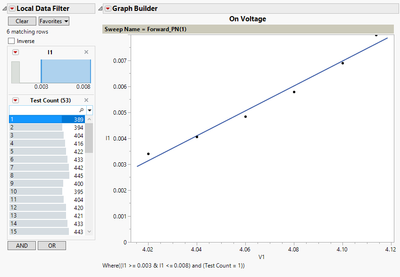
I am taking a certain range of data points around the straight part of my curve, and attempting to extract an x-intercept out of it using a linear fit. I can display an equation for the line but can't seem to do much with it.


At the very least, I want to grab that equation, solve for x when y = 0 and then display that number below the graph.


What would be the best way to go about pulling this information out?


In an ideal scenario, I could display the entire data range, but only fit the range of data points that I have currently shown as well.


Thanks you for your help.


What it ideally should look like:
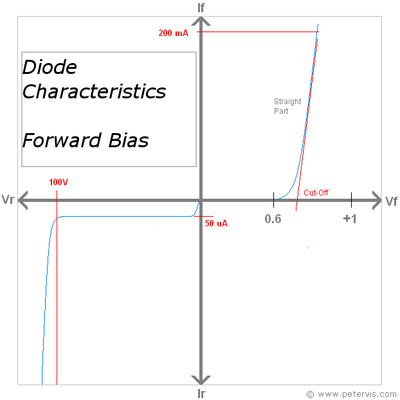
Turn-onVoltage.png

My Plot with the data filter:

x-intercept.png

The code:

Graph Builder(
	Size( 618, 525 ),
	Show Control Panel( 0 ),
	Show Legend( 0 ),
	Variables( X( :V1 ), Y( :I1 ), Page( :Sweep Name ), Overlay( :Test Count ) ),
	Elements(
		Line Of Fit( X, Y, Legend( 18 ), Confidence of Fit( 0 ) ),
		Points( X, Y, Legend( 19 ) )
	),
	Local Data Filter(
		Add Filter(
			columns( :I1, :Test Count ),
			Where( :I1 >= 0.003 & :I1 <= 0.008 ),
			Where( :Test Count == "1" ),
			Display( :Test Count, N Items( 15 ), Find( Set Text( "" ) ) )
		)
	),
	SendToReport(
		Dispatch(
			{},
			"I1",
			ScaleBox( 2 ),
			{Min( 0 ), Max( 0.008 ), Inc( 0.001 ), Minor Ticks( 1 )}
		),
		Dispatch( {}, "graph title", TextEditBox, {Set Text( "On Voltage" )} )
	)
);  


2 ACCEPTED SOLUTIONS

Accepted Solutions

Re: Need to display and pull x-intercept from a linear fit

Since you are using a filter and then fitting a line to that small subset, use Fit Model to fit the line. That way you have the Inverse Prediction option from the red popup menu under Estimates > Inverse Prediction. Put your Y as 0 and JMP will find your X and even provide a 95% confidence interval for the X.

Dan Obermiller

View solution in original post

Georg
Level VII

Re: Need to display and pull x-intercept from a linear fit

Performing the great idea of @Dan_Obermiller this may look as follows:

Names Default To Here( 1 );

// generate data
dt = New Table( "Characteristic curve",
	add rows( 21 ),
	New Column( "V", set values( Matrix( -10 :: 10 ) / 10 ) ),
	New Column( "I", set each value( If( Exp( :V ) < 1.5, 0, Exp( :V ) - 1.5 ) ) )
);
dt << show window( 0 );

// create a dashboard to display all windows
nw = New Window( "Dashboard Inverse Prediction",
	H List Box( vlb_left = V List Box(), vlb_right = V List Box() ),
	<<on close(
		Close( dt, NoSave );
		Close( result_dt, NoSave );
	)
);

// fit model with inverse prediction and place into dashboard 
vlb_right << append(
	fm_obj = dt << Fit Model(
		Y( :I ),
		Effects( :V ),
		Personality( "Standard Least Squares" ),
		Emphasis( "Effect Leverage" ),
		Run(
			:I << {Summary of Fit( 1 ), Analysis of Variance( 1 ), Parameter Estimates( 1 ), Lack of Fit( 0 ), Scaled Estimates( 0 ),
			Plot Actual by Predicted( 1 ), Plot Residual by Predicted( 1 ), Plot Studentized Residuals( 0 ), Plot Effect Leverage( 1 ),
			Plot Residual by Normal Quantiles( 0 ), Box Cox Y Transformation( 0 ), Inverse Prediction( Response( 0 ), Term Value( V( . ) ) )}
		),
		Local Data Filter( Conditional, Close Outline( 1 ), Add Filter( columns( :I ), Where( :I >= 0.2 ) ) )
	)
);

// get report and make into data table
tb_lst = Report( fm_obj ) << xpath( "//TableBox" );
result_dt = tb_lst[N Items( tb_lst )] << make data table;
result_dt << show window( 0 );

// and fill into dashboard
vlb_left << append( outline box("Inverse Prediction", dg1 = result_dt << new data box()) );
dg1 << close side panels( 1 );
dg1 << set height( 30 );

// place GraphBuilder into dashboard
vlb_left << append(// visualize
	dt << Graph Builder(
		show control panel( 0 ),
		Variables( X( :V ), Y( :I ) ),
		Elements( Points( X, Y, Legend( 3 ) ), Smoother( X, Y, Legend( 4 ) ) )
	)
);
vlb_left << append( dg2 = dt << new data box() );
dg2 << close side panels( 1 );


Georg

View solution in original post

2 REPLIES 2

Re: Need to display and pull x-intercept from a linear fit

Since you are using a filter and then fitting a line to that small subset, use Fit Model to fit the line. That way you have the Inverse Prediction option from the red popup menu under Estimates > Inverse Prediction. Put your Y as 0 and JMP will find your X and even provide a 95% confidence interval for the X.

Dan Obermiller
Georg
Level VII

Re: Need to display and pull x-intercept from a linear fit

Performing the great idea of @Dan_Obermiller this may look as follows:

Names Default To Here( 1 );

// generate data
dt = New Table( "Characteristic curve",
	add rows( 21 ),
	New Column( "V", set values( Matrix( -10 :: 10 ) / 10 ) ),
	New Column( "I", set each value( If( Exp( :V ) < 1.5, 0, Exp( :V ) - 1.5 ) ) )
);
dt << show window( 0 );

// create a dashboard to display all windows
nw = New Window( "Dashboard Inverse Prediction",
	H List Box( vlb_left = V List Box(), vlb_right = V List Box() ),
	<<on close(
		Close( dt, NoSave );
		Close( result_dt, NoSave );
	)
);

// fit model with inverse prediction and place into dashboard 
vlb_right << append(
	fm_obj = dt << Fit Model(
		Y( :I ),
		Effects( :V ),
		Personality( "Standard Least Squares" ),
		Emphasis( "Effect Leverage" ),
		Run(
			:I << {Summary of Fit( 1 ), Analysis of Variance( 1 ), Parameter Estimates( 1 ), Lack of Fit( 0 ), Scaled Estimates( 0 ),
			Plot Actual by Predicted( 1 ), Plot Residual by Predicted( 1 ), Plot Studentized Residuals( 0 ), Plot Effect Leverage( 1 ),
			Plot Residual by Normal Quantiles( 0 ), Box Cox Y Transformation( 0 ), Inverse Prediction( Response( 0 ), Term Value( V( . ) ) )}
		),
		Local Data Filter( Conditional, Close Outline( 1 ), Add Filter( columns( :I ), Where( :I >= 0.2 ) ) )
	)
);

// get report and make into data table
tb_lst = Report( fm_obj ) << xpath( "//TableBox" );
result_dt = tb_lst[N Items( tb_lst )] << make data table;
result_dt << show window( 0 );

// and fill into dashboard
vlb_left << append( outline box("Inverse Prediction", dg1 = result_dt << new data box()) );
dg1 << close side panels( 1 );
dg1 << set height( 30 );

// place GraphBuilder into dashboard
vlb_left << append(// visualize
	dt << Graph Builder(
		show control panel( 0 ),
		Variables( X( :V ), Y( :I ) ),
		Elements( Points( X, Y, Legend( 3 ) ), Smoother( X, Y, Legend( 4 ) ) )
	)
);
vlb_left << append( dg2 = dt << new data box() );
dg2 << close side panels( 1 );


Georg

Recommended Articles