- Don’t miss your chance to experience Discovery Summit Europe at our best available rate! Early bird registration through 31 Oct.
- Image to Table JMP extension imports single or batch images as data tables. Useful to extract curves from pictures or convert image data to curve data to use in analyses like Functional Data Explorer. Download and install the extension.
- Subscribe to RSS Feed
- Mark Topic as New
- Mark Topic as Read
- Float this Topic for Current User
- Bookmark
- Subscribe
- Mute
- Printer Friendly Page
Discussions
Solve problems, and share tips and tricks with other JMP users.- User Community
- :
- Discussions
- :
- Need One Column to be both a Character and Numeric Data Type

- Mark as New
- Bookmark
- Subscribe
- Mute
- Subscribe to RSS Feed
- Get Direct Link
- Report Inappropriate Content
Need One Column to be both a Character and Numeric Data Type
Hi Everyone-
I'm a fairly new user of JMP 17 Pro, and I am working on a project where I have one column of data that I need to have as both a Character Data Type AND as a Numeric Data Type. I need both columns as I want to 1) concat two different columns together (using Character) while at the same time having this same data as Numeric in a second column. Currently if I change the one column to Character I am able to successfully use the Concat function but then after I create this I go to change the column to Numeric my Concat column goes blank on me. Thank you for your help!
Accepted Solutions


- Mark as New
- Bookmark
- Subscribe
- Mute
- Subscribe to RSS Feed
- Get Direct Link
- Report Inappropriate Content
Re: Need One Column to be both a Character and Numeric Data Type
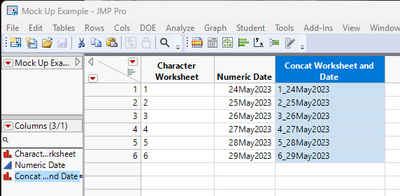
You can concatenate together your Character Worksheet column with your Numeric Date column by using the following formula
:Character Worksheet || "_" || Format(
	:Numeric Date,
	"ddMonyyyy",
	9
)
or in using the Concat() function
Concat( :Character Worksheet,  "_",
	Format( :Numeric Date, "ddMonyyyy", 9 )
);
The Format() function returns the date as a character string

- Mark as New
- Bookmark
- Subscribe
- Mute
- Subscribe to RSS Feed
- Get Direct Link
- Report Inappropriate Content
Re: Need One Column to be both a Character and Numeric Data Type
Could you post a mockup of what you have and what you want?
When concatenating columns, the inputs and outputs are a character type. If you wrap your concatenation in num( your concat formula here ), in the formula editor, if the resulting data is able to be converted into a number, it will be. If you force a character type to become a number via column properties, it will be erased because character types are not numbers.

- Mark as New
- Bookmark
- Subscribe
- Mute
- Subscribe to RSS Feed
- Get Direct Link
- Report Inappropriate Content
Re: Need One Column to be both a Character and Numeric Data Type
@StarfruitBob points out the num(...) function will convert character data to numeric. There is also a char(...) function that converts numeric data to character.
You might want to use a formula column for the concatenation of two numeric columns. The formula column's formula might be
char(a) || char(b)for the numeric columns a and b. You'll probably want to keep numeric data in numeric columns for further work. Converting it to character will cause platforms like fit y by x to produce the wrong report for numeric data.
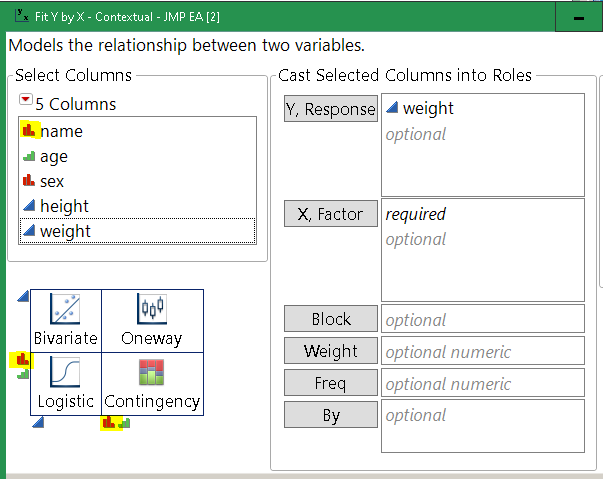
Fix Y by X produces the expected Bivariate for two numeric columns.
- Mark as New
- Bookmark
- Subscribe
- Mute
- Subscribe to RSS Feed
- Get Direct Link
- Report Inappropriate Content
Re: Need One Column to be both a Character and Numeric Data Type
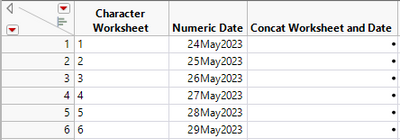
Thanks to you both for reaching out! I have attached a mock example of what I am trying to do. Basically I need both worksheet and Date to be available in both Numeric and Character so I can concat both together to get my desired result: Ex: 1_24May2023, 2_25May2023, etc. Under the Concat Worksheet and Date Column. I am ok with having additional columns with the same data as well so for instance having Character Worksheet having a new column created and it can be labelled Numeric Worksheet and vice versa with Numeric Date with creating a new column labelled Character Date. It seems so simple but I'm just able to do something as easy as Insert a New Column and then Paste the Column into a new column and rename.


- Mark as New
- Bookmark
- Subscribe
- Mute
- Subscribe to RSS Feed
- Get Direct Link
- Report Inappropriate Content
Re: Need One Column to be both a Character and Numeric Data Type
This seems like an XY problem. What are you actually trying to do?
- Mark as New
- Bookmark
- Subscribe
- Mute
- Subscribe to RSS Feed
- Get Direct Link
- Report Inappropriate Content
Re: Need One Column to be both a Character and Numeric Data Type
You can concatenate together your Character Worksheet column with your Numeric Date column by using the following formula
:Character Worksheet || "_" || Format(
	:Numeric Date,
	"ddMonyyyy",
	9
)
or in using the Concat() function
Concat( :Character Worksheet,  "_",
	Format( :Numeric Date, "ddMonyyyy", 9 )
);
The Format() function returns the date as a character string
- Mark as New
- Bookmark
- Subscribe
- Mute
- Subscribe to RSS Feed
- Get Direct Link
- Report Inappropriate Content
Re: Need One Column to be both a Character and Numeric Data Type
right-click the top of the new column, pick formula from the pop up menu. Add the formula to do what you need.
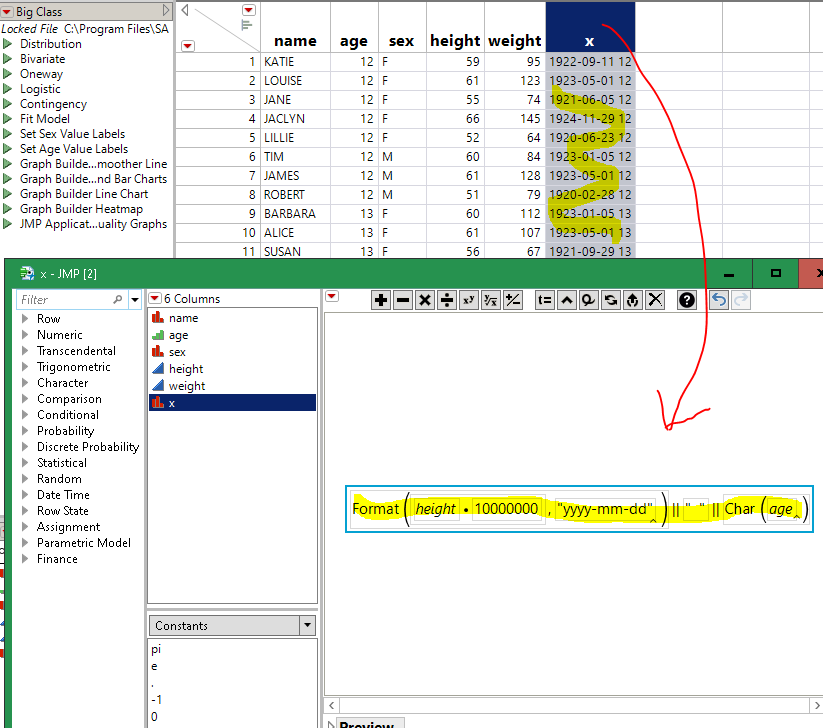
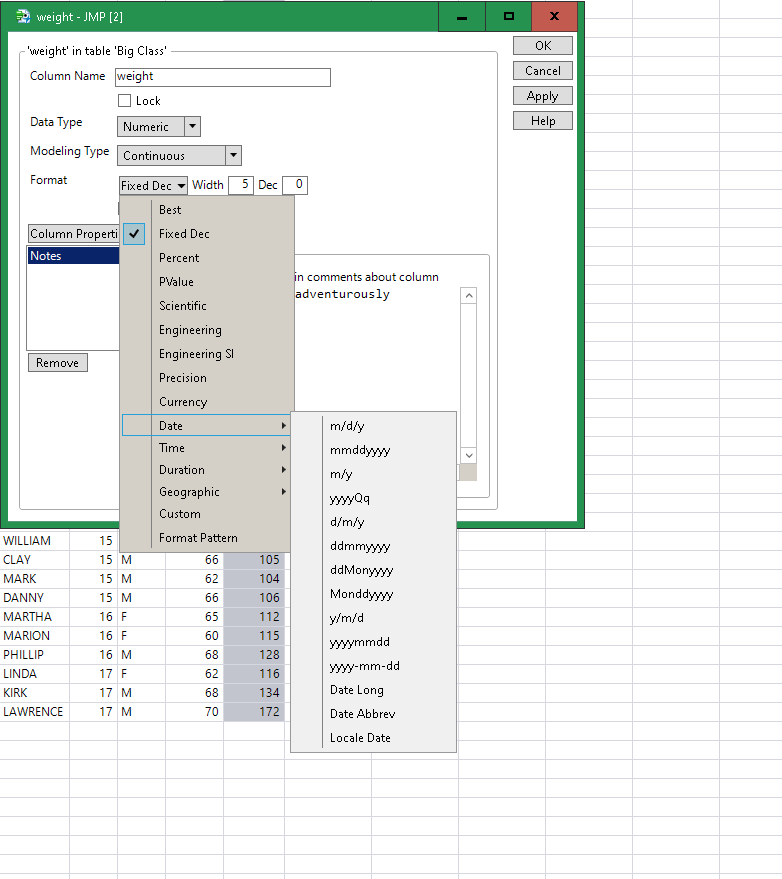
Right-click a column->Column Info is the way I usually re-discover the format names. I'd recommend making names that sort well for most purposes; probably put the year first, then month, day, and sheet number last. Unless you need all the sheet 1s to sort together.
Recommended Articles
- © 2026 JMP Statistical Discovery LLC. All Rights Reserved.
- Terms of Use
- Privacy Statement
- Contact Us