- JMP will suspend normal business operations for our Winter Holiday beginning on Wednesday, Dec. 24, 2025, at 5:00 p.m. ET (2:00 p.m. ET for JMP Accounts Receivable).
Regular business hours will resume at 9:00 a.m. EST on Friday, Jan. 2, 2026. - We’re retiring the File Exchange at the end of this year. The JMP Marketplace is now your destination for add-ins and extensions.
- Subscribe to RSS Feed
- Mark Topic as New
- Mark Topic as Read
- Float this Topic for Current User
- Bookmark
- Subscribe
- Mute
- Printer Friendly Page
Discussions
Solve problems, and share tips and tricks with other JMP users.- JMP User Community
- :
- Discussions
- :
- Mosaic Plots Question

- Mark as New
- Bookmark
- Subscribe
- Mute
- Subscribe to RSS Feed
- Get Direct Link
- Report Inappropriate Content
Mosaic Plots Question
Is it possible to condtruct Mosaic Plots with equal widths for the X factors similar to what can be done with Box Plots?
Accepted Solutions


 Community Manager
- Mark as New
- Bookmark
- Subscribe
- Mute
- Subscribe to RSS Feed
- Get Direct Link
- Report Inappropriate Content
Re: Mosaic Plots Question
Hi Smoore2,
Using graph builder you can create a mosaic plot with either proportionally sized or equally sized x categories.
If you use your X variable in the X drop zone, you will produce the typical mosaic plot with proportionally sized categories on the X
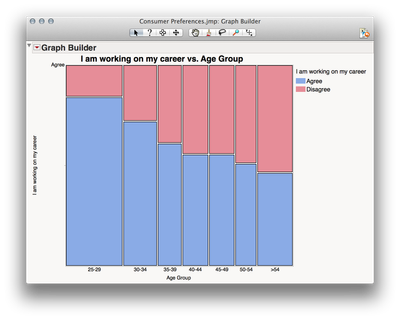
But, if you use your X variable in the "Group X" drop zone at the top, JMP will size the categories equally.
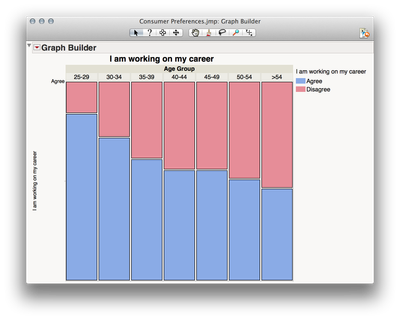
If you right click the category labels on the top, then select "X Group Edge" you can move the labels to the bottom (to most closely resemble the original mosaic plot).
I hope this helps!
Julian
- Mark as New
- Bookmark
- Subscribe
- Mute
- Subscribe to RSS Feed
- Get Direct Link
- Report Inappropriate Content
Re: Mosaic Plots Question
Sorry for the typo: "Is it possible to construct...."

- Mark as New
- Bookmark
- Subscribe
- Mute
- Subscribe to RSS Feed
- Get Direct Link
- Report Inappropriate Content
Re: Mosaic Plots Question
In a Mosaic Plot, the proportions on the x-axis represent the number of observations for each level of the X-variable. This is for explanatory value afforded by the plot to explain an additional dimension to the visualized graphic.
- Mark as New
- Bookmark
- Subscribe
- Mute
- Subscribe to RSS Feed
- Get Direct Link
- Report Inappropriate Content
Re: Mosaic Plots Question
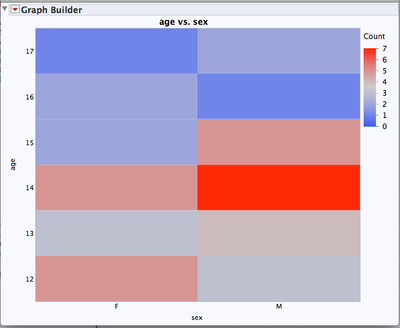
An alternative view that I like using graph builder is a heat map with the frequency color scale. This view uses equal real estate for the x-axis.
- Mark as New
- Bookmark
- Subscribe
- Mute
- Subscribe to RSS Feed
- Get Direct Link
- Report Inappropriate Content
Re: Mosaic Plots Question
LouV, Yes, I understand why the columns are not the same width. Boxplots can do the same thing, but you can have the boxes the same width if desired. I was hoping this ability could be envoked for mosaic plots as well.
Thanks for your response.
- Mark as New
- Bookmark
- Subscribe
- Mute
- Subscribe to RSS Feed
- Get Direct Link
- Report Inappropriate Content
Re: Mosaic Plots Question
smoore2,
Have you shared your desire with support@jmp.com so that it can be considered in the future?
- Mark as New
- Bookmark
- Subscribe
- Mute
- Subscribe to RSS Feed
- Get Direct Link
- Report Inappropriate Content
Re: Mosaic Plots Question
I will do that. Thanks!
Community Manager
- Mark as New
- Bookmark
- Subscribe
- Mute
- Subscribe to RSS Feed
- Get Direct Link
- Report Inappropriate Content
Re: Mosaic Plots Question
Hi Smoore2,
Using graph builder you can create a mosaic plot with either proportionally sized or equally sized x categories.
If you use your X variable in the X drop zone, you will produce the typical mosaic plot with proportionally sized categories on the X
But, if you use your X variable in the "Group X" drop zone at the top, JMP will size the categories equally.
If you right click the category labels on the top, then select "X Group Edge" you can move the labels to the bottom (to most closely resemble the original mosaic plot).
I hope this helps!
Julian
- Mark as New
- Bookmark
- Subscribe
- Mute
- Subscribe to RSS Feed
- Get Direct Link
- Report Inappropriate Content
Re: Mosaic Plots Question
Thank-you, Julian!

- Mark as New
- Bookmark
- Subscribe
- Mute
- Subscribe to RSS Feed
- Get Direct Link
- Report Inappropriate Content
Re: Mosaic Plots Question
This is a good solution for the simple situation as discussed.
If I want to generate a plot combining several variables, then I usually must put one variable in the X drop zone and then the proportional sizing is no longer available for this variable.
By the way, I usually am not free to select which variable is dropped in the x-zone because of the fixed priorization of x and Group x drop zones in the set-up of the plot.
Recommended Articles
- © 2025 JMP Statistical Discovery LLC. All Rights Reserved.
- Terms of Use
- Privacy Statement
- Contact Us