cancel
Showing results for 
Show  only  | Search instead for 
Did you mean: 
  • Don’t miss your chance to experience Discovery Summit Europe at our best available rate! Early bird registration through 31 Oct.
  • Graph Builder Toolbar streamlines interactive graphing. Creates shortcuts on Report and GraphBuilder Helpers toolbars. Download and install the extension.
  • JMP will suspend normal business operations for our Rest and Recharge Day on Friday, October 2, 2026.
    Regular business hours will resume on Monday, October 5, 2026.

Discussions

Solve problems, and share tips and tricks with other JMP users.
Choose Language Hide Translation Bar
hogi
Level XIII

Missing entries - modelling type: continuous

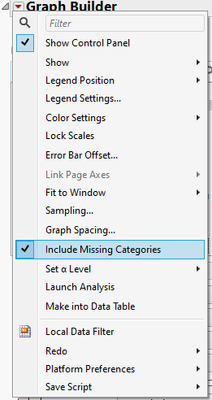
For nominal values there is the setting in GraphBuilder to Include Missing Categories
hogi_0-1708408303865.png

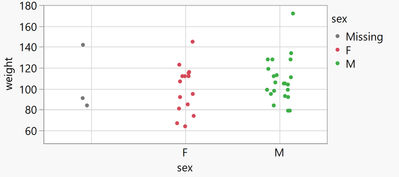
Then, instead of ignoring rows with missing values, Graph Builder will display an additional item on the axis and/or in the legend - and SHOW the entries:
hogi_1-1708408418193.png


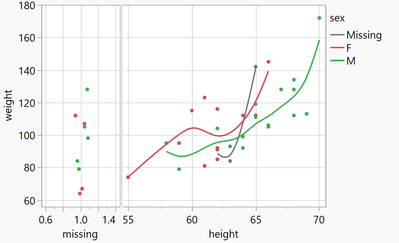
If there are missing entries in a column that has continuous values - the values will not be displayed, even with Include Missing Categories enabled. Where should they?


As a workaround, the user could create a transform column (is missing -> 1) and display it in addition to the continuous values.
hogi_7-1708408983877.png


Is there an official / more straightforward / nicer solution?


Graph Builder(
	Transform Column(
		"missing",
		Format( "Fixed Dec", 5, 0 ),
		Formula( If( Is Missing( :height ), 1, . ) )
	),
	Size( 566, 413 ),
	Set α Level( 0.01 ),
	Summary Statistic( "Median" ),
	Graph Spacing( 4 ),
	Variables( X( :missing ), X( :height ), Y( :weight ), Overlay( :sex ) ),
	Relative Sizes( "X", [58 151] ),
	Elements(
		Position( 1, 1 ),
		Points( X, Y, Legend( 20 ) ),
		Smoother( X, Y, Legend( 23 ) )
	),
	Elements(
		Position( 2, 1 ),
		Points( X, Y, Legend( 21 ) ),
		Smoother( X, Y, Legend( 22 ) )
	)
)

1 REPLY 1
jthi
Super User

Re: Missing entries - data type: continuous

Include missing categories, continuous variables aren't categorical which is most likely the reason why they aren't show.

jthi_0-1708411376910.png

So I think your option if creating categorical column for those missing values is most likely the correct choice

-Jarmo

Recommended Articles

