- Discovery Summit 2026: Early User Edition - September 23-24.Register. It's free.
- Graph Builder Toolbar streamlines interactive graphing. Creates shortcuts on Report and GraphBuilder Helpers toolbars. Download and install the extension.
- Subscribe to RSS Feed
- Mark Topic as New
- Mark Topic as Read
- Float this Topic for Current User
- Bookmark
- Subscribe
- Mute
- Printer Friendly Page
Discussions
Solve problems, and share tips and tricks with other JMP users.- User Community
- :
- Discussions
- :
- Merge data of two cells in one by Serial Number

- Mark as New
- Bookmark
- Subscribe
- Mute
- Subscribe to RSS Feed
- Get Direct Link
- Report Inappropriate Content
Merge data of two cells in one by Serial Number
I have a product manufacturing data. Some products are made using the material using two different lot. I need to merge all the lot information in one cell by SN.
Accepted Solutions



- Mark as New
- Bookmark
- Subscribe
- Mute
- Subscribe to RSS Feed
- Get Direct Link
- Report Inappropriate Content
Re: Merge data of two cells in one by Serial Number
I think there are some wish list items regarding this (some might be even mine but I cannot find them now)... but currently I would go with SQL query using GROUP_CONCAT (it is not the only option)
Names Default To Here(1);

dt = New Table("Untitled",
	Add Rows(7),
	Compress File When Saved(1),
	New Column("S", Character, "Nominal", Set Values({"1", "2", "3", "3", "5", "6", "6"})),
	New Column("M", Character, "Nominal", Set Values({"A1", "A2", "A3", "A4", "A5", "A6", "A7"}))
);

dt2 = Query(
	Table(dt, "t"),
"select S, GROUP_CONCAT(M, ', ') M
from t
group by S"
);
Edit:
Found the wish list item Add Listagg/Concatenate/GROUP_CONCAT to Summary platform and I have also created add-in for this Group Listagg Columns which does use Query() to build the table

- Mark as New
- Bookmark
- Subscribe
- Mute
- Subscribe to RSS Feed
- Get Direct Link
- Report Inappropriate Content
Re: Merge data of two cells in one by Serial Number
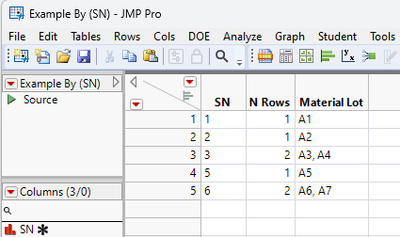
Not as eloquent as Jarmo's, but it shows a different approach
Names Default To Here( 1 );

dt = New Table( "Example",
	Add Rows( 7 ),
	Compress File When Saved( 1 ),
	New Column( "SN",
		Character,
		"Nominal",
		Set Values( {"1", "2", "3", "3", "5", "6", "6"} )
	),
	New Column( "Material Lot",
		Character,
		"Nominal",
		Set Values( {"A1", "A2", "A3", "A4", "A5", "A6", "A7"} )
	)
);

dtCombine = dt << Summary(
	Group( :SN ),
	Freq( "None" ),
	Weight( "None" ),
	Link to original data table( 0 )
);

dtCombine << New Column( "Material Lot",
	Character,
	set each value(
		Eval(
			Eval Expr(
				Concat Items(
					dt:Material Lot[dt <<
					get rows where( dt:SN == Expr( dtCombine:SN[Row()] ) )],
					", "
				)
			)
		);
	)
);
- Mark as New
- Bookmark
- Subscribe
- Mute
- Subscribe to RSS Feed
- Get Direct Link
- Report Inappropriate Content
Re: Merge data of two cells in one by Serial Number
I think there are some wish list items regarding this (some might be even mine but I cannot find them now)... but currently I would go with SQL query using GROUP_CONCAT (it is not the only option)
Names Default To Here(1);

dt = New Table("Untitled",
	Add Rows(7),
	Compress File When Saved(1),
	New Column("S", Character, "Nominal", Set Values({"1", "2", "3", "3", "5", "6", "6"})),
	New Column("M", Character, "Nominal", Set Values({"A1", "A2", "A3", "A4", "A5", "A6", "A7"}))
);

dt2 = Query(
	Table(dt, "t"),
"select S, GROUP_CONCAT(M, ', ') M
from t
group by S"
);
Edit:
Found the wish list item Add Listagg/Concatenate/GROUP_CONCAT to Summary platform and I have also created add-in for this Group Listagg Columns which does use Query() to build the table
- Mark as New
- Bookmark
- Subscribe
- Mute
- Subscribe to RSS Feed
- Get Direct Link
- Report Inappropriate Content
Re: Merge data of two cells in one by Serial Number
Not as eloquent as Jarmo's, but it shows a different approach
Names Default To Here( 1 );

dt = New Table( "Example",
	Add Rows( 7 ),
	Compress File When Saved( 1 ),
	New Column( "SN",
		Character,
		"Nominal",
		Set Values( {"1", "2", "3", "3", "5", "6", "6"} )
	),
	New Column( "Material Lot",
		Character,
		"Nominal",
		Set Values( {"A1", "A2", "A3", "A4", "A5", "A6", "A7"} )
	)
);

dtCombine = dt << Summary(
	Group( :SN ),
	Freq( "None" ),
	Weight( "None" ),
	Link to original data table( 0 )
);

dtCombine << New Column( "Material Lot",
	Character,
	set each value(
		Eval(
			Eval Expr(
				Concat Items(
					dt:Material Lot[dt <<
					get rows where( dt:SN == Expr( dtCombine:SN[Row()] ) )],
					", "
				)
			)
		);
	)
);
- Mark as New
- Bookmark
- Subscribe
- Mute
- Subscribe to RSS Feed
- Get Direct Link
- Report Inappropriate Content
Re: Merge data of two cells in one by Serial Number
I have some table with two material column. See atteched example.
My current logic is splitting this table in to two.
1. SN, M1
2. SN, M2
And than use Group_Contcat function, and than use update function to merge both table. It is working fine. But I was wondering if there is any batter (Short) way to do it.


- Mark as New
- Bookmark
- Subscribe
- Mute
- Subscribe to RSS Feed
- Get Direct Link
- Report Inappropriate Content
Re: Merge data of two cells in one by Serial Number
Thanks you, This exactly what I was look for
Recommended Articles
- © 2026 JMP Statistical Discovery LLC. All Rights Reserved.
- Terms of Use
- Privacy Statement
- Contact Us