- JMP will suspend normal business operations for our Winter Holiday beginning on Wednesday, Dec. 24, 2025, at 5:00 p.m. ET (2:00 p.m. ET for JMP Accounts Receivable).
Regular business hours will resume at 9:00 a.m. EST on Friday, Jan. 2, 2026. - We’re retiring the File Exchange at the end of this year. The JMP Marketplace is now your destination for add-ins and extensions.
- Subscribe to RSS Feed
- Mark Topic as New
- Mark Topic as Read
- Float this Topic for Current User
- Bookmark
- Subscribe
- Mute
- Printer Friendly Page
Discussions
Solve problems, and share tips and tricks with other JMP users.- JMP User Community
- :
- Discussions
- :
- Manipulating Timestamp

- Mark as New
- Bookmark
- Subscribe
- Mute
- Subscribe to RSS Feed
- Get Direct Link
- Report Inappropriate Content
Manipulating Timestamp
Hi I am struggling to convert a Timestamp into numeric format. I basically want to use the timestamp to create an Elapsed Time column. I am having difficultly achieving this with JMP16. Below is an example of the format. The change from 12:59 to 01:00 also seems to cause issues for me.
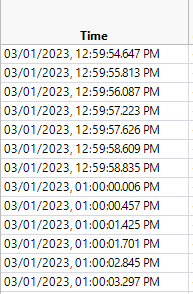
I was able to work with excel and manipulate the data to give me an Elapsed time in minutes (from row 1 as starting point). But I would prefer to use JMP and to create a script for it.
Thanks
Accepted Solutions


- Mark as New
- Bookmark
- Subscribe
- Mute
- Subscribe to RSS Feed
- Get Direct Link
- Report Inappropriate Content
Re: Manipulating Timestamp
See if this works for you, if you keep your setting to UK.
Names Default To Here( 1 );
dt = Current Data Table();

dt << New Column( "time 2",
	Format( "m/d/y h:m:s", 23,3 ),
	set each value(
		date = Informat( Word( 1, :time, "," ) );

		hours = Num( Word( 2, :time, ",:" ) );
		If( hours == 12, hours = 0 );
		If( Word( -1, :time, " " ) == "PM",
			hours = hours + 12
		);

		:time 2 = date + In Hours( hours ) + In Minutes( Num( Word( 3, :time, ",:" ) ) )
		+Num( Word( 4, :time, ",: " ) );
	)
);
Additionally, I suggest that you submit your issue to JMP Support, so they can get it into their formal review of the issue.
support@jmp.com
- Mark as New
- Bookmark
- Subscribe
- Mute
- Subscribe to RSS Feed
- Get Direct Link
- Report Inappropriate Content
Re: Manipulating Timestamp
Here is a little script that will do the conversion.
Names Default To Here( 1 );
dt = Current Data Table();

// The comma in the time column's data does not fit into any
// standard JMP time formats, but if removed it does
For Each Row( :time = Substitute( :time, ",", " " ) );

// Convert to numeric and format it
:time<<data type(numeric)<<modeling type(continuous)<<Format( "Locale Date Time h:m:s", 23, 0 );- Mark as New
- Bookmark
- Subscribe
- Mute
- Subscribe to RSS Feed
- Get Direct Link
- Report Inappropriate Content
Re: Manipulating Timestamp
Thanks for quick reply and helping with the format. I ran your script and also created and elapsed time column which is basically the following formula..
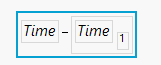
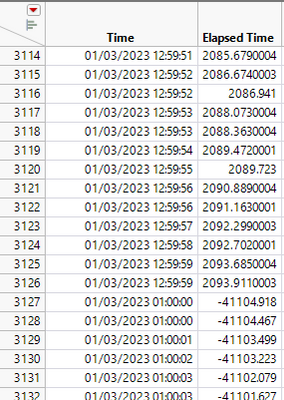
This gives me the elapsed time in seconds. However I have this issue when the timestamp moves from 12:59pm to 1pm. It is not picking up the AM/PM information. Therefore it thinks it is 01:00AM in error.
- Mark as New
- Bookmark
- Subscribe
- Mute
- Subscribe to RSS Feed
- Get Direct Link
- Report Inappropriate Content
Re: Manipulating Timestamp
Please attach a sample data table that has not yet been converted, and I will take a look at it.
- Mark as New
- Bookmark
- Subscribe
- Mute
- Subscribe to RSS Feed
- Get Direct Link
- Report Inappropriate Content
Re: Manipulating Timestamp
thanks - I am attaching an example.
- Mark as New
- Bookmark
- Subscribe
- Mute
- Subscribe to RSS Feed
- Get Direct Link
- Report Inappropriate Content
Re: Manipulating Timestamp
I found no error with the data table you supplied. It appears that your error occurred at row 3127. The table you supplied only has 1356 rows. I suspect that I need a sample of data that includes the error rows.
Additionally,
What OS are you using?
What JMP Version?
- Mark as New
- Bookmark
- Subscribe
- Mute
- Subscribe to RSS Feed
- Get Direct Link
- Report Inappropriate Content
Re: Manipulating Timestamp
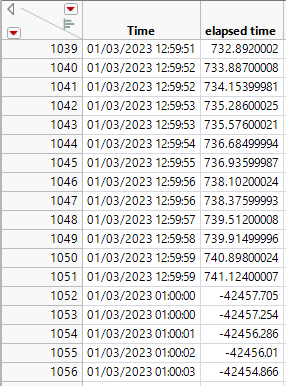
I am still seeing the issue with the sample file i sent you. for example row 1052 onwards. I am using JMP 16 and Windows 10 OS.

- Mark as New
- Bookmark
- Subscribe
- Mute
- Subscribe to RSS Feed
- Get Direct Link
- Report Inappropriate Content
Re: Manipulating Timestamp
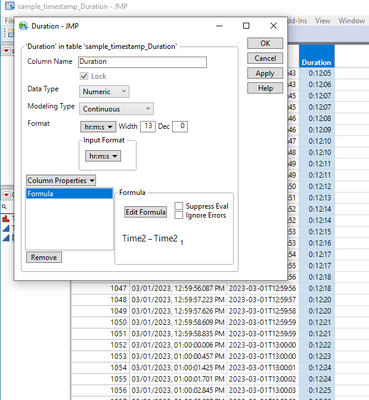
I did the following in JMP 17 on MS win with the formula provided.
It worked on JMP16.2 on MS Win too.
Formulas are in the columns.
- Mark as New
- Bookmark
- Subscribe
- Mute
- Subscribe to RSS Feed
- Get Direct Link
- Report Inappropriate Content
Re: Manipulating Timestamp
Hi, thanks for sending this on to me. When i opened it all looked good. However i went into Time 2 and reapplied your formula and the results changed to what i had been seeing before. See below. The 13:00hrs data is changed to 01:00hrs.
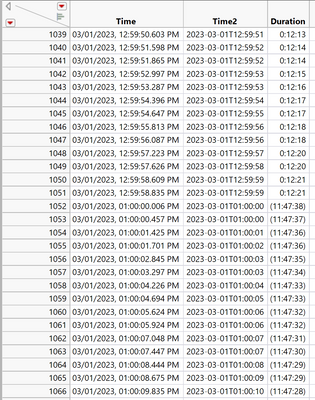
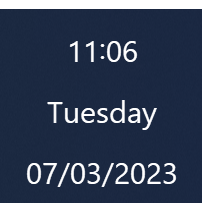
I found the source of the issue. My PC settings are on United Kingdom Date and Time. When I restarted JMP after changing to US date and time settings - the formula is worked correct for me.
The formula will not work when my PC time is set for UK.
At least I know where the issue is coming from now. But still don't have a resolution unless I keep my PC settings on US.
- Mark as New
- Bookmark
- Subscribe
- Mute
- Subscribe to RSS Feed
- Get Direct Link
- Report Inappropriate Content
Re: Manipulating Timestamp
See if this works for you, if you keep your setting to UK.
Names Default To Here( 1 );
dt = Current Data Table();

dt << New Column( "time 2",
	Format( "m/d/y h:m:s", 23,3 ),
	set each value(
		date = Informat( Word( 1, :time, "," ) );

		hours = Num( Word( 2, :time, ",:" ) );
		If( hours == 12, hours = 0 );
		If( Word( -1, :time, " " ) == "PM",
			hours = hours + 12
		);

		:time 2 = date + In Hours( hours ) + In Minutes( Num( Word( 3, :time, ",:" ) ) )
		+Num( Word( 4, :time, ",: " ) );
	)
);
Additionally, I suggest that you submit your issue to JMP Support, so they can get it into their formal review of the issue.
support@jmp.com
Recommended Articles
- © 2025 JMP Statistical Discovery LLC. All Rights Reserved.
- Terms of Use
- Privacy Statement
- Contact Us