- Don’t miss your chance to experience Discovery Summit Europe at our best available rate! Early bird registration through 31 Oct.
- Graph Builder Toolbar streamlines interactive graphing. Creates shortcuts on Report and GraphBuilder Helpers toolbars. Download and install the extension.
- Subscribe to RSS Feed
- Mark Topic as New
- Mark Topic as Read
- Float this Topic for Current User
- Bookmark
- Subscribe
- Mute
- Printer Friendly Page
Discussions
Solve problems, and share tips and tricks with other JMP users.- User Community
- :
- Discussions
- :
- Make 'smoother' lines transparent in Graph Builder?

- Mark as New
- Bookmark
- Subscribe
- Mute
- Subscribe to RSS Feed
- Get Direct Link
- Report Inappropriate Content
Make 'smoother' lines transparent in Graph Builder?
As the subject says, is there any way to make the "smoother" lines in Graph Builder transparent? Right-click > Graph > Transparency... only affects the points, not the lines.
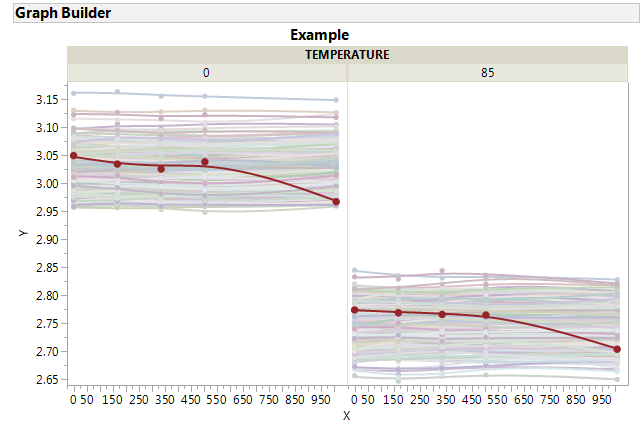
I would like to be able to build a graph with hundreds of lines overlaid, and make those lines transparent so that they are not overplotted and it's easier to see the "distribution" of trends.
Likewise, is there a way to change the line width/style of all the lines at once? You can change individual lines in the Customize... window, but that is infeasible for hundreds or thousands of lines.
I am currently using JMP 13.2.
Thanks!


- Mark as New
- Bookmark
- Subscribe
- Mute
- Subscribe to RSS Feed
- Get Direct Link
- Report Inappropriate Content
Re: Make 'smoother' lines transparent in Graph Builder?
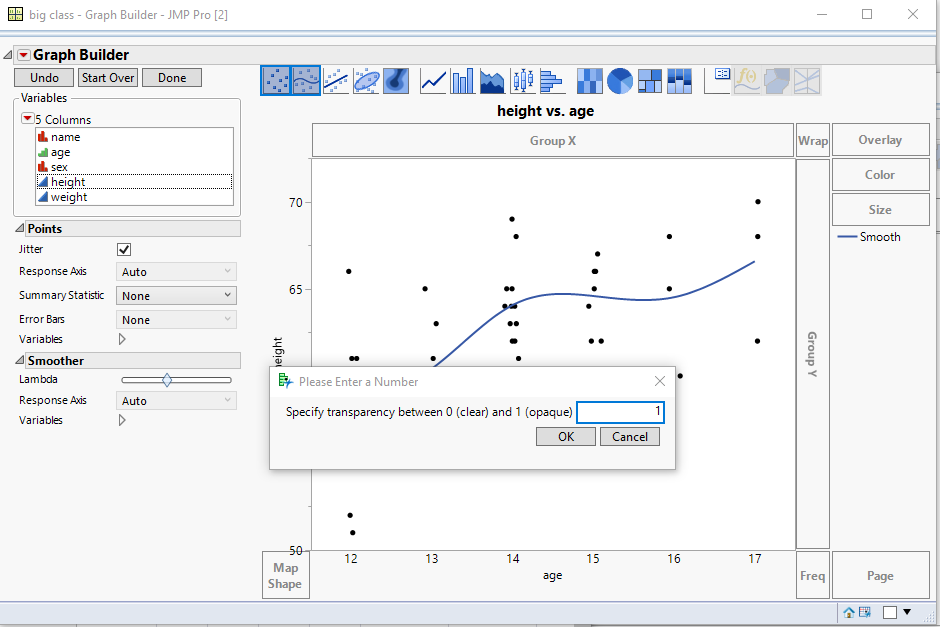
You can right click on the smoother legend and select Transparency, to change it


- Mark as New
- Bookmark
- Subscribe
- Mute
- Subscribe to RSS Feed
- Get Direct Link
- Report Inappropriate Content
Re: Make 'smoother' lines transparent in Graph Builder?
Erik,
Regarding widening the lines all at once, try this, assuming the reference variable for your graph builder is called gb
_xx = gb << Xpath("//LineSeg");
_xx << Line Width(3);
One method to view one line (one overlay variable) at a time is to add a Local Data Filter. The only problem I saw was the line and symbol colors are not maintained in the few examples I tried.
Attached is a script from Chapter 7 of our book, demonstrating interactive graphs. This script enhances a graphbuilder plot that has a many level overlay variable, U. S. states. The enhancements include:
- a scrollable legend, so the legend box is not taller than the graph, and
- a mousebox, that hides all but the state of interest; when the mouse is hovered near a state's name in the legend, only that state's curve/points are displayed.
I modified the book example with the JSL shown above, that is, it is modified to have wide lines.
Recommended Articles
- © 2026 JMP Statistical Discovery LLC. All Rights Reserved.
- Terms of Use
- Privacy Statement
- Contact Us