- JMP will suspend normal business operations for our Winter Holiday beginning on Wednesday, Dec. 24, 2025, at 5:00 p.m. ET (2:00 p.m. ET for JMP Accounts Receivable).
Regular business hours will resume at 9:00 a.m. EST on Friday, Jan. 2, 2026. - We’re retiring the File Exchange at the end of this year. The JMP Marketplace is now your destination for add-ins and extensions.
- Subscribe to RSS Feed
- Mark Topic as New
- Mark Topic as Read
- Float this Topic for Current User
- Bookmark
- Subscribe
- Mute
- Printer Friendly Page
Discussions
Solve problems, and share tips and tricks with other JMP users.- JMP User Community
- :
- Discussions
- :
- Make combined data table with script

- Mark as New
- Bookmark
- Subscribe
- Mute
- Subscribe to RSS Feed
- Get Direct Link
- Report Inappropriate Content
Make combined data table with script
Hi I'm using the Variability chart and looking at the variance components. When I right click the Variance components table it gives me the option to make combined data table, is it possible to translate this step to jsl instead of the manual right click?
Thank you
Accepted Solutions


- Mark as New
- Bookmark
- Subscribe
- Mute
- Subscribe to RSS Feed
- Get Direct Link
- Report Inappropriate Content
Re: Make combined data table with script
Do it manually and take a look at the table that is produced. It will contain a table script which contains the JSL to produce the same outcome.
- Mark as New
- Bookmark
- Subscribe
- Mute
- Subscribe to RSS Feed
- Get Direct Link
- Report Inappropriate Content
Re: Make combined data table with script
This fixed it:
platform[1][Outline Box( "Variance Components" )][Table Box( 1 )]<<
Make Combined Data Table;- Mark as New
- Bookmark
- Subscribe
- Mute
- Subscribe to RSS Feed
- Get Direct Link
- Report Inappropriate Content
Re: Make combined data table with script
Do it manually and take a look at the table that is produced. It will contain a table script which contains the JSL to produce the same outcome.
- Mark as New
- Bookmark
- Subscribe
- Mute
- Subscribe to RSS Feed
- Get Direct Link
- Report Inappropriate Content
Re: Make combined data table with script
Hi David, how do I look at the table script? I tried using the log functionality but it didn't show anything.
Thanks
- Mark as New
- Bookmark
- Subscribe
- Mute
- Subscribe to RSS Feed
- Get Direct Link
- Report Inappropriate Content
Re: Make combined data table with script
Hi I found what you meant however when I try to run it this error comes up:
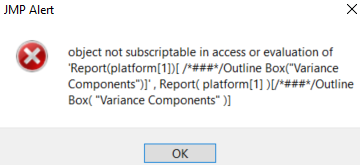
Names Default To Here( 1 );
platform = Data Table(
	"table"
) << Variability Chart(
	Y( :measurement ),
	X( :Lot, :Instrument, :Operator, :Site ),
	Model( "Main Effect" ),
	Variance Components( 1 ),
	SendToReport(
		Dispatch(
			{"Variance Components"},
			"CV",
			NumberColBox,
			{Visibility( "Visible" )}
		)
	)
);
Wait( 0 );
Report( platform[1] )[Outline Box( "Variance Components" )][Table Box( 1 )] <<
Make Combined Data Table;
Report( platform[1] ) << Close Window;
That's the code for reference, firstly it's missing several variability charts, but even when I add them manually the same error pops up. Any ideas?
- Mark as New
- Bookmark
- Subscribe
- Mute
- Subscribe to RSS Feed
- Get Direct Link
- Report Inappropriate Content
Re: Make combined data table with script
This fixed it:
platform[1][Outline Box( "Variance Components" )][Table Box( 1 )]<<
Make Combined Data Table;Recommended Articles
- © 2025 JMP Statistical Discovery LLC. All Rights Reserved.
- Terms of Use
- Privacy Statement
- Contact Us