- Don’t miss your chance to experience Discovery Summit Europe at our best available rate! Early bird registration through 31 Oct.
- Graph Builder Toolbar streamlines interactive graphing. Creates shortcuts on Report and GraphBuilder Helpers toolbars. Download and install the extension.
- Subscribe to RSS Feed
- Mark Topic as New
- Mark Topic as Read
- Float this Topic for Current User
- Bookmark
- Subscribe
- Mute
- Printer Friendly Page
Discussions
Solve problems, and share tips and tricks with other JMP users.- User Community
- :
- Discussions
- :
- Re: Journal in 2 or 3 columns

- Mark as New
- Bookmark
- Subscribe
- Mute
- Subscribe to RSS Feed
- Get Direct Link
- Report Inappropriate Content
Journal in 2 or 3 columns
Hello guys,
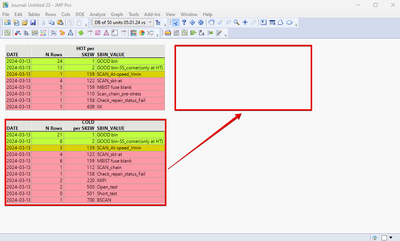
I calculated 2 tables HOT_per_skew and COLD_per_skew
when I added these 2 tables to the Journal, I got the vertical position.
My question is, how can I present these 2 tables in a Horizontal position by JSL script?
HOT_per_skew << Journal ( ) << Close Window ( );
COLD_per_skew<< Journal ( ) << Close Window ( );
Accepted Solutions


- Mark as New
- Bookmark
- Subscribe
- Mute
- Subscribe to RSS Feed
- Get Direct Link
- Report Inappropriate Content
Re: Journal in 2 or 3 columns
I think you can just wrap them in H List Box (Or Lineup Box(N Col(2))
Names Default To Here(1);

dt1 = open("$SAMPLE_DATA/Big Class.jmp");
dt2 = open("$SAMPLE_DATA/Big Class Families.jmp");

Current Journal();

H List Box(dt1 << get as report, dt2 << get as report) << journal;

Close(dt1, nosave);
Close(dt2, nosave);
- Mark as New
- Bookmark
- Subscribe
- Mute
- Subscribe to RSS Feed
- Get Direct Link
- Report Inappropriate Content
Re: Journal in 2 or 3 columns
You can use Text boxes
Names Default To Here(1);

dt1 = open("$SAMPLE_DATA/Big Class.jmp");
dt2 = open("$SAMPLE_DATA/Big Class Families.jmp");

Current Journal();

H List Box(dt1 << get as report, dt2 << get as report) << journal;

Close(dt1, nosave);
Close(dt2, nosave);

Text Box("My text") << Journal;
but I would suggest you build your report in new window and then turn it into journal when it is ready (this can be a bit difficult with reports)
Names Default To Here(1);

dt1 = open("$SAMPLE_DATA/Big Class.jmp");
dt2 = open("$SAMPLE_DATA/Big Class Families.jmp");

nw = New Window("",
	V List Box(
		Text Box("My Text")
	),
	H List Box(
		dt1 << get as report,
		dt2 << get as report
	);
);

nw << journal;
nw << close window
https://www.jmp.com/support/help/en/17.2/#page/jmp/display-trees.shtml#
- Mark as New
- Bookmark
- Subscribe
- Mute
- Subscribe to RSS Feed
- Get Direct Link
- Report Inappropriate Content
Re: Journal in 2 or 3 columns
I think you can just wrap them in H List Box (Or Lineup Box(N Col(2))
Names Default To Here(1);

dt1 = open("$SAMPLE_DATA/Big Class.jmp");
dt2 = open("$SAMPLE_DATA/Big Class Families.jmp");

Current Journal();

H List Box(dt1 << get as report, dt2 << get as report) << journal;

Close(dt1, nosave);
Close(dt2, nosave);
- Mark as New
- Bookmark
- Subscribe
- Mute
- Subscribe to RSS Feed
- Get Direct Link
- Report Inappropriate Content
Re: Journal in 2 or 3 columns
Thank you!
BTW also, do I have the option to add text in the Journal by script JSL?
- Mark as New
- Bookmark
- Subscribe
- Mute
- Subscribe to RSS Feed
- Get Direct Link
- Report Inappropriate Content
Re: Journal in 2 or 3 columns
You can use Text boxes
Names Default To Here(1);

dt1 = open("$SAMPLE_DATA/Big Class.jmp");
dt2 = open("$SAMPLE_DATA/Big Class Families.jmp");

Current Journal();

H List Box(dt1 << get as report, dt2 << get as report) << journal;

Close(dt1, nosave);
Close(dt2, nosave);

Text Box("My text") << Journal;
but I would suggest you build your report in new window and then turn it into journal when it is ready (this can be a bit difficult with reports)
Names Default To Here(1);

dt1 = open("$SAMPLE_DATA/Big Class.jmp");
dt2 = open("$SAMPLE_DATA/Big Class Families.jmp");

nw = New Window("",
	V List Box(
		Text Box("My Text")
	),
	H List Box(
		dt1 << get as report,
		dt2 << get as report
	);
);

nw << journal;
nw << close window
https://www.jmp.com/support/help/en/17.2/#page/jmp/display-trees.shtml#
Recommended Articles
- © 2026 JMP Statistical Discovery LLC. All Rights Reserved.
- Terms of Use
- Privacy Statement
- Contact Us