- JMP will suspend normal business operations for our Winter Holiday beginning on Wednesday, Dec. 24, 2025, at 5:00 p.m. ET (2:00 p.m. ET for JMP Accounts Receivable).
Regular business hours will resume at 9:00 a.m. EST on Friday, Jan. 2, 2026. - We’re retiring the File Exchange at the end of this year. The JMP Marketplace is now your destination for add-ins and extensions.
- Subscribe to RSS Feed
- Mark Topic as New
- Mark Topic as Read
- Float this Topic for Current User
- Bookmark
- Subscribe
- Mute
- Printer Friendly Page
Discussions
Solve problems, and share tips and tricks with other JMP users.- JMP User Community
- :
- Discussions
- :
- JSL - dynamic chart legend change

- Mark as New
- Bookmark
- Subscribe
- Mute
- Subscribe to RSS Feed
- Get Direct Link
- Report Inappropriate Content
JSL - dynamic chart legend change
Hello friends,
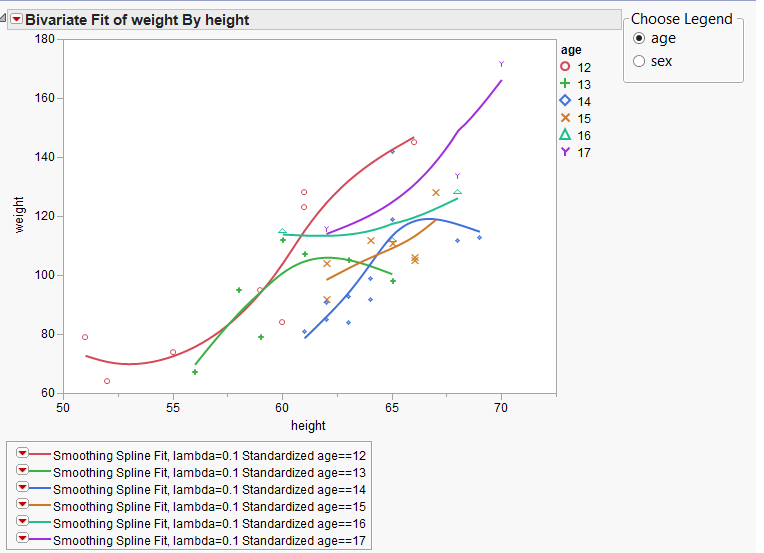
I'm using code below to change legend & splines in bivirate chart per radio box user selection.
The splines part works fine but the legend won't change :(
Any ideas?
//Begin Script;
Names Default To Here( 1 );
dt = Open( "$SAMPLE_DATA/Big Class.jmp" );
variables = {"age", "sex"};
// Initial nlevels is the number of levels of 'age', as it is the first by-group used.
nlevels=6;

// Creating the legend. For each selection, the previous spline fits are removed, then
// new ones are generated.
BC_legend = Panel Box( "Choose Legend",
     legend = Radio Box(
           {"age", "sex"},
       fitVar = legend << Get Selected;

       Match( fitVar,

           "age",
			(Summarize(vals = By( :age ), c=count );
			For(ii = 1, ii <=nlevels, ii++,
			obj << (Curve[1] << Remove Fit );
				);
			obj << Group By( :age ) << Fit Spline( 0.1, standardized );
			nlevels = nItems(vals);

			),

           "sex",
			(Summarize(vals = By( :sex ), c=count );
			For(ii = 1, ii <=nlevels, ii++,
			obj << (Curve[1] << Remove Fit );
				);
			obj << Group By( :sex ) << Fit Spline( 0.1, standardized );
			nlevels = nItems(vals); )
           );

           ));

// Fitting the initial Bivariate fit with 'age' as the by-group, adding the legend
// to control the selections.
nw = New Window( "BigClassBivariate",
	HListBox(

	obj = dt << Bivariate(
		Y( :weight ),
		X( :height ),
		Group By( :age ),
		Fit Spline( 0.1, standardized ),
		SendToReport(
		Dispatch(
			{},
			"Bivar Plot",
			FrameBox,
			{Frame Size( 493, 354 ),Marker Size( 2 ), Marker Drawing Mode( "Normal" ), Row Legend(
                                                            dt:(fitVar),
                                                            Color( 1 ),
                                                            Color Theme( "JMP Default" ),
                                                            Marker( 0 ),
                                                            Marker Theme( "Standard" ),
                                                            Continuous Scale( Cont ),
                                                            Reverse Scale( 0 ),
                                                            Excluded Rows( 0 )
                                                     )}

		)
	)
		);   ,


    BC_legend
    ));

//End Script;
Accepted Solutions


- Mark as New
- Bookmark
- Subscribe
- Mute
- Subscribe to RSS Feed
- Get Direct Link
- Report Inappropriate Content
Re: JSL - dynamic chart legend change
@RB,
The legend must be removed and added by your script. Also, I think it is safer to remove items from last to first.
Attached are 2 scripts:
- DynamicChartLegend_Working.jsl which is makes a few changes to your script.
- DynamicChartLegend_Generic.jsl makes more changes so that you do not have to use "cookie cutter" code for each of your variables. This is done by using reference variables and by creating and using the function GetLevels().
You did not mention which version of JMP that you are currently using. If these scripts do not work, please provide information about version of JMP.
- Mark as New
- Bookmark
- Subscribe
- Mute
- Subscribe to RSS Feed
- Get Direct Link
- Report Inappropriate Content
Re: JSL - dynamic chart legend change
@RB,
The legend must be removed and added by your script. Also, I think it is safer to remove items from last to first.
Attached are 2 scripts:
- DynamicChartLegend_Working.jsl which is makes a few changes to your script.
- DynamicChartLegend_Generic.jsl makes more changes so that you do not have to use "cookie cutter" code for each of your variables. This is done by using reference variables and by creating and using the function GetLevels().
You did not mention which version of JMP that you are currently using. If these scripts do not work, please provide information about version of JMP.

- Mark as New
- Bookmark
- Subscribe
- Mute
- Subscribe to RSS Feed
- Get Direct Link
- Report Inappropriate Content
Re: JSL - dynamic chart legend change
Hi Great Script
How do i use this script on simple variability chart?
Best R
Ilan
- Mark as New
- Bookmark
- Subscribe
- Mute
- Subscribe to RSS Feed
- Get Direct Link
- Report Inappropriate Content
Re: JSL - dynamic chart legend change
I think i found a way to run this on variability chart.
What need to add if i want multiple(using by:***) variability chart with dynamic legend?
//Begin Script;
Names Default To Here( 1 );
dt = Open( "$SAMPLE_DATA/Big Class.jmp" );
variables = {"age", "sex"};
// Initial nlevels is the number of levels of 'age', as it is the first by-group used.
fitVar = "age";
nlevels = 6;

// Creating the legend. For each selection, the previous spline fits are removed, then
// new ones are generated.
BC_legend = Panel Box( "Choose Legend",
	legend = Radio Box(
		{"age", "sex"},
		fitVar = legend << Get Selected;

		Match( fitVar,

			"age",
				(Summarize( vals = By( :age ), c = count ) ; Report( obj )[Border Box( 2 )] << Delete ;
				Report( obj )[FrameBox( 1 )] << Row Legend( "age", color( 1 ), Marker( 1 ) ) ;
// obj << Group By( :sex );
				nlevels = N Items( vals ) ; ;

				),

			"sex",
				(Summarize( vals = By( :sex ), c = count ) ; Report( obj )[Border Box( 2 )] << Delete ;
				Report( obj )[FrameBox( 1 )] << Row Legend( "sex", color( 1 ), Marker( 1 ) ) ;
// obj << Group By( :sex );
				nlevels = N Items( vals ) ; )
		);
	)
);

// Fitting the initial Bivariate fit with 'age' as the by-group, adding the legend
// to control the selections.
nw = New Window( "BigClassBivariate",
	H List Box(

		obj = dt <<

		Variability Chart(
			Y( :weight ),
			X( :height ),
			Analysis Type( "Choose best analysis (EMS REML Bayesian)" ),
			Connect Cell Means( 1 ),
			Std Dev Chart( 0 ),
			Points Jittered( 1 ),
			SendToReport(
				Dispatch(
					{},
					"Variability Chart",
					FrameBox,
					{Marker Size( 8 ), Marker Drawing Mode( "Normal" ) ;
					Row Legend(
						dt:(fitVar),
						Color( 1 ),
						Color Theme( "JMP Default" ),
						Marker( 0 ),
						Marker Theme( "Classic" ),
						Continuous Scale( Cont ),
						Reverse Scale( 0 ),
						Excluded Rows( 0 )
					)}
				)
			)
		),

		BC_legend
	)
);

//End Script;
Recommended Articles
- © 2025 JMP Statistical Discovery LLC. All Rights Reserved.
- Terms of Use
- Privacy Statement
- Contact Us