- JMP will suspend normal business operations for our Winter Holiday beginning on Wednesday, Dec. 24, 2025, at 5:00 p.m. ET (2:00 p.m. ET for JMP Accounts Receivable).
Regular business hours will resume at 9:00 a.m. EST on Friday, Jan. 2, 2026. - We’re retiring the File Exchange at the end of this year. The JMP Marketplace is now your destination for add-ins and extensions.
- Subscribe to RSS Feed
- Mark Topic as New
- Mark Topic as Read
- Float this Topic for Current User
- Bookmark
- Subscribe
- Mute
- Printer Friendly Page
Discussions
Solve problems, and share tips and tricks with other JMP users.- JMP User Community
- :
- Discussions
- :
- JSL: How to close data tables after analysis

- Mark as New
- Bookmark
- Subscribe
- Mute
- Subscribe to RSS Feed
- Get Direct Link
- Report Inappropriate Content
JSL: How to close data tables after analysis
I am new to JSL just started 2 weeks ago.
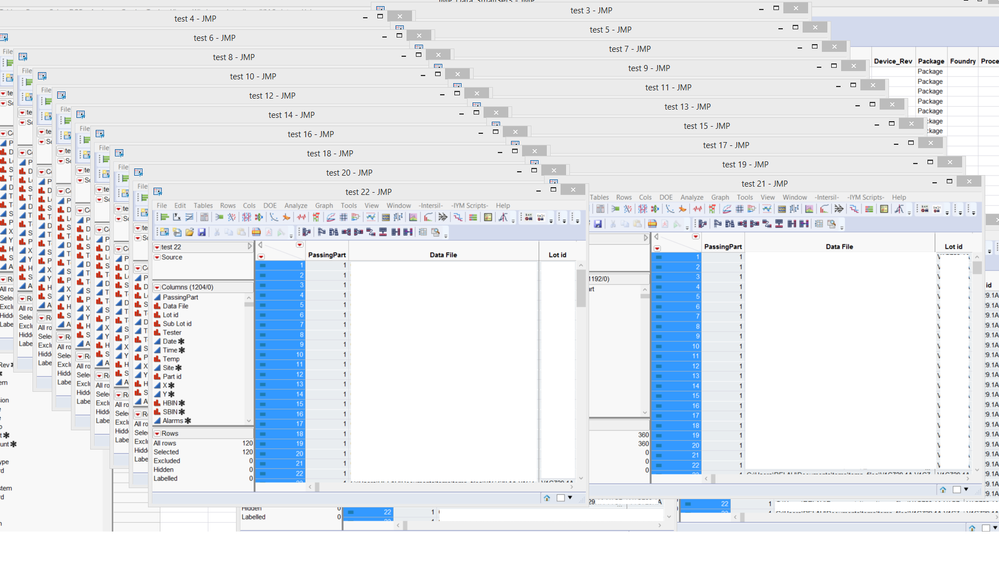
I am trying to create analysis for many tests, few tests are stacked togehter at a time in a new data table everytime; by the time the script is done I end up with many opened data tables. I cannot close these data tables after the analysis is done. is there a way to close these open files without closing the original data file or the actual chart?
Because now, I am ending up with over 30 data files, named test, test1,...
here is a snap of my code:
dt = Current Data Table();
NW = New Window( "TRIM_CHARTS",

dt << Stack(
            columns(
                  :TRIM_TARGET,
                  :Emulate_0000__,
                  :Emulate_0001__,
                  :Emulate_0010___,
                  :Emulate_0011__,
                  :Emulate_0100__,
                  :Emulate_0101__,
                  :Emulate_0110__,
                  :Emulate_0111__,
                  :Emulate_1000__,
                  :Emulate_1001__,
                  :Emulate_1010__,
                  :Emulate_1011__,
                  :Emulate_1100___,
                  :Emulate_1101__,
                  :Emulate_1110___,
                  :Emulate_1111__,
                  : _BEST_VALUE
            ),
            Source Label Column( "Label" ),
            Stacked Data Column( "Data" ),
            Output Table( "test" )
      );
      Oneway(
            Y( :Data ),
            X( :Label ),
            Name( "Means/Anova" )(1),
            Means and Std Dev( 1 ),
            Mean Diamonds( 1 ),
            Mean Error Bars( 1 ),
            Std Dev Lines( 1 ),
            Connect Means( 1 ),
            X Axis Proportional( 0 ),
            Points Spread( 1 ),
            Grand Mean( 0 ),
            SendToReport(
            Dispatch(
                  {},
                  "Oneway Plot",
                  FrameBox,
                  {Row Legend(
                        Temp,
                        Color( 1 ),
                        Color Theme( "Blue to Green to Red" ),
                        Marker( 0 ),
                        Marker Theme( "" ),
                        Continuous Scale( 0 ),
                        Reverse Scale( 0 ),
                        Excluded Rows( 0 )
                  )}
                  )
            )
      );
      dt << Stack(

      columns(
                  :Ilim__TRIM_TARGET,
                  :Emulate_0000_Ilim_,
                  :Emulate_0001_Ilim_,
                  :Emulate_0010_Ilim_,
                  :_iLIM_BEST_VALUE
            ),
            Source Label Column( "Label" ),
            Stacked Data Column( "Data" ),
            Output Table( "test" )
      );
      Oneway(
            Y( :Data ),
            X( :Label ),
            Name( "Means/Anova" )(1),
            Means and Std Dev( 1 ),
            Mean Diamonds( 1 ),
            Mean Error Bars( 1 ),
            Std Dev Lines( 1 ),
            Connect Means( 1 ),
            X Axis Proportional( 0 ),
            Points Spread( 1 ),
            Grand Mean( 0 ),
            SendToReport(
            Dispatch(
                  {},
                  "Oneway Plot",
                  FrameBox,
                  {Row Legend(
                        Temp,
                        Color( 1 ),
                        Color Theme( "Blue to Green to Red" ),
                        Marker( 0 ),
                        Marker Theme( "" ),
                        Continuous Scale( 0 ),
                        Reverse Scale( 0 ),
                        Excluded Rows( 0 )
                  )}
                  )
            )
      );
);
nw  <<     Set page setup(
    margins( 0.5, 0.5, 0.5, 0.5 ),
    scale( 0.8 ),
    portrait( 0 ),
    paper size( "A3" )
);
jrn = NW << Journal;
NW << save PDF( "C:\My Documents\Trim_CHARTS.pdf" );
Thanks
Sam
Accepted Solutions


- Mark as New
- Bookmark
- Subscribe
- Mute
- Subscribe to RSS Feed
- Get Direct Link
- Report Inappropriate Content
JSL: How to close data tables after analysis
When you create your stacked data tables, simply make them invisible. They will appear in the JMP Home window, but they will not have a visible window created.
 dt << Stack(invisible,
      columns(
                  :Ilim__TRIM_TARGET,
                  :Emulate_0000_Ilim_,
                  :Emulate_0001_Ilim_,
                  :Emulate_0010_Ilim_,
                  :_iLIM_BEST_VALUE
            ),
            Source Label Column( "Label" ),
            Stacked Data Column( "Data" ),
            Output Table( "test" )
);- Mark as New
- Bookmark
- Subscribe
- Mute
- Subscribe to RSS Feed
- Get Direct Link
- Report Inappropriate Content
JSL: How to close data tables after analysis
- Mark as New
- Bookmark
- Subscribe
- Mute
- Subscribe to RSS Feed
- Get Direct Link
- Report Inappropriate Content
JSL: How to close data tables after analysis
this is what I end up when the final report/jrn is completed!
- Mark as New
- Bookmark
- Subscribe
- Mute
- Subscribe to RSS Feed
- Get Direct Link
- Report Inappropriate Content
JSL: How to close data tables after analysis
When you create your stacked data tables, simply make them invisible. They will appear in the JMP Home window, but they will not have a visible window created.
 dt << Stack(invisible,
      columns(
                  :Ilim__TRIM_TARGET,
                  :Emulate_0000_Ilim_,
                  :Emulate_0001_Ilim_,
                  :Emulate_0010_Ilim_,
                  :_iLIM_BEST_VALUE
            ),
            Source Label Column( "Label" ),
            Stacked Data Column( "Data" ),
            Output Table( "test" )
);- Mark as New
- Bookmark
- Subscribe
- Mute
- Subscribe to RSS Feed
- Get Direct Link
- Report Inappropriate Content
JSL: How to close data tables after analysis
Thanks Jim. it worked.
Appreciated.

- Mark as New
- Bookmark
- Subscribe
- Mute
- Subscribe to RSS Feed
- Get Direct Link
- Report Inappropriate Content
JSL: How to close data tables after analysis
It is noice to hide them, but is there any way to close all the tables without specifying their names and without closing the final output (e.g. a close all except kind of thinking).
Thanks

- Mark as New
- Bookmark
- Subscribe
- Mute
- Subscribe to RSS Feed
- Get Direct Link
- Report Inappropriate Content
JSL: How to close data tables after analysis
This may not be the most efficient way to get what you want done - but it will work .
openDTs = List(); // Define an empty list to collect names of all open data tables
TableNames = List();
For( i = 1, i <= N Table(), i++,
        Insert Into( openDTs, Data Table( i ) );
        Insert Into(TableNames,Data Table(i) << get name);
    );

// By now openDTs contains references of all tables that you have open
DontClose = {"Test1","Result"};   // Example names of tables you want to leave open
For( i = 1, i <= N Items(openDTs) , i++,
		TabName = openDTs[i] << Get Name ;
        If(Contains(DontClose,TabName),
            Continue();
            ,
            Close(openDTs[i],"No Save");
          );
    );
Uday
- Mark as New
- Bookmark
- Subscribe
- Mute
- Subscribe to RSS Feed
- Get Direct Link
- Report Inappropriate Content
JSL: How to close data tables after analysis
Uday's code will work great, the code below just simplifies the same code
Names Default To Here( 1 );

DontClose = {"Test1", "Result"};   // Example names of tables you want to leave

// Loop backwards through the list, so the table numbers do not change
For( i = N Table(), i >= 0, i--,
	If( Contains( DontClose, Data Table( i ) << get name ),
		Continue(),
		Close( Data Table( i ), "No Save" )
	)
);
- Mark as New
- Bookmark
- Subscribe
- Mute
- Subscribe to RSS Feed
- Get Direct Link
- Report Inappropriate Content
Re: JSL: How to close data tables after analysis
I am running a script that ends with this bit of script you have. In my case I am only interested in keeping 1 data table. When I run the script it does what is intended. However, when I use the JSL Debugger it stops on the If statement with the following red message: Cannot locate data table in access or evaluation of 'Data Table', Data Table/*###*/(i)
I was wondering if you know what this means?
I am just concerned that if I extend the script to do other things it will stop here regardless.
Recommended Articles
- © 2025 JMP Statistical Discovery LLC. All Rights Reserved.
- Terms of Use
- Privacy Statement
- Contact Us