- JMP Statement Regarding Critical PHP Remote Code Execution Vulnerabilities (CVE-2026-109618, CVE-2026-109619)
- Don’t miss your chance to experience Discovery Summit Europe at our best available rate! Early bird registration through 31 Oct.
- Graph Builder Toolbar streamlines interactive graphing. Creates shortcuts on Report and GraphBuilder Helpers toolbars. Download and install the extension.
- Subscribe to RSS Feed
- Mark Topic as New
- Mark Topic as Read
- Float this Topic for Current User
- Bookmark
- Subscribe
- Mute
- Printer Friendly Page
Discussions
Solve problems, and share tips and tricks with other JMP users.- User Community
- :
- Discussions
- :
- Re: JSL: How to call outlinebox on calculated string, like: Report(platform)[Ou...

- Mark as New
- Bookmark
- Subscribe
- Mute
- Subscribe to RSS Feed
- Get Direct Link
- Report Inappropriate Content
JSL: How to call outlinebox on calculated string, like: Report(platform)[OutlineBox(parse("Stepwise Fit for " || yparm))]
Hello, i try to call my outlinebox report by substituting with the table variable name (character string) I want to look at.
I first tried without substitution and it worked well.
Then i did:
NamesDefaultToHere(1);

yparm = "MyResponse1";

dt = DataTable("MyDataTable");

...

platform = dt << Fit Model( ... , Personality("Stepwise"), ... );
wait(0) ;

TableToGet = Report(platform)[OutlineBox(parse("Stepwise Fit for " || yparm))] ... ;
Which gives:
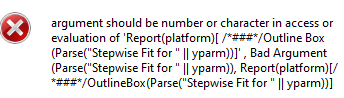
How to tackle this ?
Accepted Solutions
- Mark as New
- Bookmark
- Subscribe
- Mute
- Subscribe to RSS Feed
- Get Direct Link
- Report Inappropriate Content
Re: JSL: How to call outlinebox on calculated string, like: Report(platform)[OutlineBox(parse("Stepwise Fit for " || yparm))]
Found,
The problem was upstream when calling the Y variable. After solving that one as follows it works:
platform = dt1 << Fit Model(
   /*Y( "Challenge1Sim"),*/
	Y(parse(evalinsert("\[:Name("^yparm^")]\"));),

- Mark as New
- Bookmark
- Subscribe
- Mute
- Subscribe to RSS Feed
- Get Direct Link
- Report Inappropriate Content
Re: JSL: How to call outlinebox on calculated string, like: Report(platform)[OutlineBox(parse("Stepwise Fit for " || yparm))]
Try removing Parse
Edit:
Simple example
Names Default To Here(1);
dt = Open("$SAMPLE_DATA/Drug.jmp");
fit = dt << Fit Model(
	Y(:y),
	Effects(:Drug, :x),
	Personality(Standard Least Squares),
	Run Model()
);

ob = Report(fit)[OutlineBox("Residual by Predicted Plot")];
myvar = "Predicted Plot";
ob2 = Report(fit)[OutlineBox("Residual by " || myvar)];

show(ob, ob2, ob == ob2);

// ob3 = Report(fit)[OutlineBox(Parse("Residual by " || myvar))];
- Mark as New
- Bookmark
- Subscribe
- Mute
- Subscribe to RSS Feed
- Get Direct Link
- Report Inappropriate Content
Re: JSL: How to call outlinebox on calculated string, like: Report(platform)[OutlineBox(parse("Stepwise Fit for " || yparm))]
Nope, that does not work.
I also tried:
[OutlineBox(evalinsert("\[Stepwise Fit for ^yparm^]\");)]
Did also not work
Variable name has special characters, but i would not expect it to be a problem:
yparm = "Challenge1+E(N(0,1))";
Because: Performing manually: rmb 'Make into Data Table ' -> open script 'Make into Data Table'
Gives me entry:
Report(platform)[OutlineBox("Stepwise Fit for Challenge1+E(N(0,1))")]And that runs.
It goes south once i try to do it dynamically.
Any other suggestions?
- Mark as New
- Bookmark
- Subscribe
- Mute
- Subscribe to RSS Feed
- Get Direct Link
- Report Inappropriate Content
Re: JSL: How to call outlinebox on calculated string, like: Report(platform)[OutlineBox(parse("Stepwise Fit for " || yparm))]
Found,
The problem was upstream when calling the Y variable. After solving that one as follows it works:
platform = dt1 << Fit Model(
   /*Y( "Challenge1Sim"),*/
Y(parse(evalinsert("\[:Name("^yparm^")]\"));),Recommended Articles
- © 2026 JMP Statistical Discovery LLC. All Rights Reserved.
- Terms of Use
- Privacy Statement
- Contact Us