- Image to Table JMP extension imports single or batch images as data tables. Useful to extract curves from pictures or convert image data to curve data to use in analyses like Functional Data Explorer. Download and install the extension.
- Subscribe to RSS Feed
- Mark Topic as New
- Mark Topic as Read
- Float this Topic for Current User
- Bookmark
- Subscribe
- Mute
- Printer Friendly Page
Discussions
Solve problems, and share tips and tricks with other JMP users.- User Community
- :
- Discussions
- :
- Re: JSL: How to call outlinebox on calculated string, like: Report(platform)[Ou...

- Mark as New
- Bookmark
- Subscribe
- Mute
- Subscribe to RSS Feed
- Get Direct Link
- Report Inappropriate Content
JSL: How to call outlinebox on calculated string, like: Report(platform)[OutlineBox(parse("Stepwise Fit for " || yparm))]
Hello, i try to call my outlinebox report by substituting with the table variable name (character string) I want to look at.
I first tried without substitution and it worked well.
Then i did:
NamesDefaultToHere(1);

yparm = "MyResponse1";

dt = DataTable("MyDataTable");

...

platform = dt << Fit Model( ... , Personality("Stepwise"), ... );
wait(0) ;

TableToGet = Report(platform)[OutlineBox(parse("Stepwise Fit for " || yparm))] ... ;
Which gives:
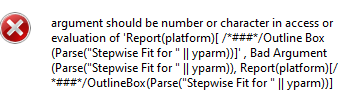
How to tackle this ?
Accepted Solutions
- Mark as New
- Bookmark
- Subscribe
- Mute
- Subscribe to RSS Feed
- Get Direct Link
- Report Inappropriate Content
Re: JSL: How to call outlinebox on calculated string, like: Report(platform)[OutlineBox(parse("Stepwise Fit for " || yparm))]
Found,
The problem was upstream when calling the Y variable. After solving that one as follows it works:
platform = dt1 << Fit Model(
   /*Y( "Challenge1Sim"),*/
	Y(parse(evalinsert("\[:Name("^yparm^")]\"));),

- Mark as New
- Bookmark
- Subscribe
- Mute
- Subscribe to RSS Feed
- Get Direct Link
- Report Inappropriate Content
Re: JSL: How to call outlinebox on calculated string, like: Report(platform)[OutlineBox(parse("Stepwise Fit for " || yparm))]
Try removing Parse
Edit:
Simple example
Names Default To Here(1);
dt = Open("$SAMPLE_DATA/Drug.jmp");
fit = dt << Fit Model(
	Y(:y),
	Effects(:Drug, :x),
	Personality(Standard Least Squares),
	Run Model()
);

ob = Report(fit)[OutlineBox("Residual by Predicted Plot")];
myvar = "Predicted Plot";
ob2 = Report(fit)[OutlineBox("Residual by " || myvar)];

show(ob, ob2, ob == ob2);

// ob3 = Report(fit)[OutlineBox(Parse("Residual by " || myvar))];
- Mark as New
- Bookmark
- Subscribe
- Mute
- Subscribe to RSS Feed
- Get Direct Link
- Report Inappropriate Content
Re: JSL: How to call outlinebox on calculated string, like: Report(platform)[OutlineBox(parse("Stepwise Fit for " || yparm))]
Nope, that does not work.
I also tried:
[OutlineBox(evalinsert("\[Stepwise Fit for ^yparm^]\");)]
Did also not work
Variable name has special characters, but i would not expect it to be a problem:
yparm = "Challenge1+E(N(0,1))";
Because: Performing manually: rmb 'Make into Data Table ' -> open script 'Make into Data Table'
Gives me entry:
Report(platform)[OutlineBox("Stepwise Fit for Challenge1+E(N(0,1))")]And that runs.
It goes south once i try to do it dynamically.
Any other suggestions?
- Mark as New
- Bookmark
- Subscribe
- Mute
- Subscribe to RSS Feed
- Get Direct Link
- Report Inappropriate Content
Re: JSL: How to call outlinebox on calculated string, like: Report(platform)[OutlineBox(parse("Stepwise Fit for " || yparm))]
Found,
The problem was upstream when calling the Y variable. After solving that one as follows it works:
platform = dt1 << Fit Model(
   /*Y( "Challenge1Sim"),*/
Y(parse(evalinsert("\[:Name("^yparm^")]\"));),Recommended Articles
- © 2026 JMP Statistical Discovery LLC. All Rights Reserved.
- Terms of Use
- Privacy Statement
- Contact Us