- Don’t miss your chance to experience Discovery Summit Europe at our best available rate! Early bird registration through 31 Oct.
- Graph Builder Toolbar streamlines interactive graphing. Creates shortcuts on Report and GraphBuilder Helpers toolbars. Download and install the extension.
- Subscribe to RSS Feed
- Mark Topic as New
- Mark Topic as Read
- Float this Topic for Current User
- Bookmark
- Subscribe
- Mute
- Printer Friendly Page
Discussions
Solve problems, and share tips and tricks with other JMP users.- User Community
- :
- Discussions
- :
- JSL: Customize Control Chart

- Mark as New
- Bookmark
- Subscribe
- Mute
- Subscribe to RSS Feed
- Get Direct Link
- Report Inappropriate Content
JSL: Customize Control Chart
Hello,
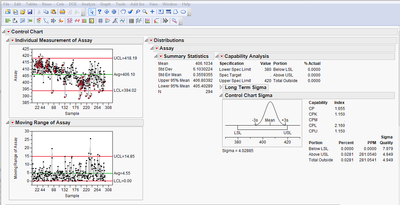
I would like to customize the control chart output like the screen below in my JSL script:
The settings in the prefrences and my script were not successful.
my biggest problem is, i can hide histogram and normal quantile plot and unhide the summary statistics only manualy-
Currently I'm working with the version 10.0.2
repWin = New Window( tableName, container = V List Box() );

For( k = 1, k <= N Items( dataColName ), k++,
	content = V List Box(
		dt_data_sub << Control Chart(
			Group Size( 1 ),
			KSigma( 3 ),
			Chart Col(
				dataColName,
				Individual Measurement( Test 1( 1 ), Test 2( 1 ), Test 3( 1 ) ),
				Moving Range,
				Capability(
					Distribution(
						Continuous Distribution(
							Column( dataColName ),
							Quantiles( 0 ),
							Summary Statistics( 1 ),
							Horizontal Layout( 1 ),
							Histogram( 0 ),
							Vertical( 0 ),
							Outlier Box Plot( 0 ),
							Normal Quantile Plot( 0 ),
							PpK Capability Labeling( 1 ),
							Capability Analysis()
						)
					)
				)
			),

			SendToReport(
				Dispatch(
					{"Individual Measurement of Assay"},
					"IR Chart of IM",
					FrameBox( 2 ),
					{Frame Size( 75, 162 )}
				),
				Dispatch(
					{"Moving Range of Assay"},
					"IR Chart of MR",
					FrameBox( 2 ),
					{Frame Size( 75, 162 )}
				),
				Dispatch( {"Capability Analysis"}, "Long Term Sigma", OutlineBox, {Close( 1 )} ),
				Dispatch( {"Capability Analysis"}, "Control Chart Sigma", )
			)
		)
	);
	container << Append( content );
);


- Mark as New
- Bookmark
- Subscribe
- Mute
- Subscribe to RSS Feed
- Get Direct Link
- Report Inappropriate Content
Re: JSL: Customize Control Chart
If you do not want these elements in the platform, send the << Delete message to the display box responsible for the content to be removed. One way to identify the object is to right-click on the open-close button (triangle shaped icon) just to the left of an outline close to the information, then select Show Display Tree. So if I wanted to remove the Long Term Sigma as shown in your example, I would evaluate content["Long Term Sigma"] << Delete.
It seems, though, that you should be able to use launch options to disable the features that you mentioned, though.

- Mark as New
- Bookmark
- Subscribe
- Mute
- Subscribe to RSS Feed
- Get Direct Link
- Report Inappropriate Content
Re: JSL: Customize Control Chart
This problem still continues in JMP 14.
Are there any plans to correct this?
Recommended Articles
- © 2026 JMP Statistical Discovery LLC. All Rights Reserved.
- Terms of Use
- Privacy Statement
- Contact Us