cancel
Showing results for 
Show  only  | Search instead for 
Did you mean: 
  • New to JMP? Join us Sept. 23-24 for the Early User Edition of Discovery Summit, tailor-made for new users. Register now for free!
  • Your voice matters! Tell us how you prefer to receive JMP updates, so we can tailor our communication to your needs. Take short survey.
  • See how to access JMP Marketplace - and - find, create & share add-ins to extend your JMP. Watch video.

Discussions

Solve problems, and share tips and tricks with other JMP users.
Choose Language Hide Translation Bar

JMP import csv, shows as empty

Hi team, 


The table shows as empty when i choose to import through csv file. I saw couple posts before showing there is a issue with uploading with csv, just wondered if there is a workaround for this issue? Or do I have to upload through xlsx file?  


Thanks

Jason

1 REPLY 1
txnelson
Super User

Re: JMP import csv, shows as empty

You should try using Preview when opening your csv file.  It will let you see what JMP is doing with the data

  1. Go to   File=>Open
  2. At the far right, lower portion of the window, click on the File Type drop down arrow and select                                              "Text Files (*.txt,*.csv,*.dat,*.tsv)
  3. Select in the "Open as"  area, "Data (Using Preview)
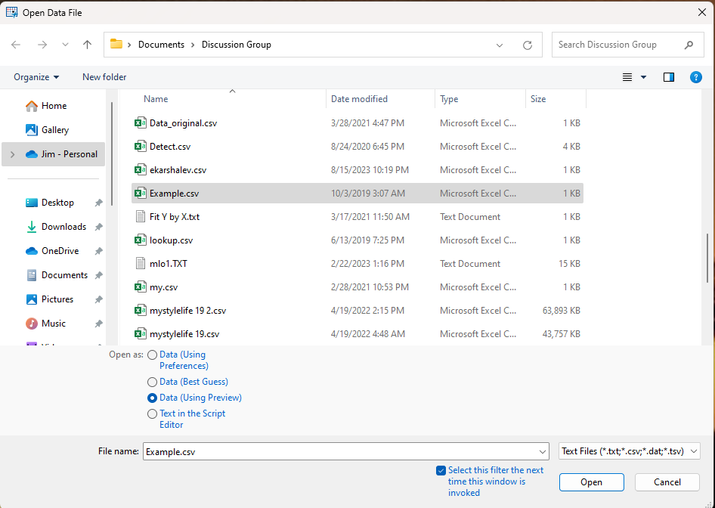
txnelson_1-1707171450073.png


After you select the file you want, and click on Open, the Preview Wizard will guide you through the .csv import process, and you will see a preview of how JMP is interpreting the data


Jim

Recommended Articles