- Image to Table JMP extension imports single or batch images as data tables. Useful to extract curves from pictures or convert image data to curve data to use in analyses like Functional Data Explorer. Download and install the extension.
- Subscribe to RSS Feed
- Mark Topic as New
- Mark Topic as Read
- Float this Topic for Current User
- Bookmark
- Subscribe
- Mute
- Printer Friendly Page
Discussions
Solve problems, and share tips and tricks with other JMP users.- User Community
- :
- Discussions
- :
- JMP copy paste error

- Mark as New
- Bookmark
- Subscribe
- Mute
- Subscribe to RSS Feed
- Get Direct Link
- Report Inappropriate Content
JMP copy paste error
Hi I am copying a cell containing the text
| 48-pin ultra-thin fine pitch quad flat package no leads (UFQFPN) |
from excel into JMP. The file is originally a csv file opened in excel.
In JMP it ends up in two rows instead of one cell as:

How can I avoid this. I have already tried formatting excel column as text and setting JMP column to character type.
This happens in lines when there is a bracket (square / parentheses / angled brackets) inside the text. Why is JMP doing this?
Accepted Solutions
- Mark as New
- Bookmark
- Subscribe
- Mute
- Subscribe to RSS Feed
- Get Direct Link
- Report Inappropriate Content
Re: JMP copy paste error
Thanks @Craige_Hales for the response. But, I am copy pasting a huge excel sheet and I cannot apply that to each cell.
However I opened the csv file directly in JMP and the lines don't jumble up when I do that. I then save it as a jmp file.


- Mark as New
- Bookmark
- Subscribe
- Mute
- Subscribe to RSS Feed
- Get Direct Link
- Report Inappropriate Content
Re: JMP copy paste error
If you peek at the CSV with a text editor like notepad, is there a new line in the value?
You might be able to work around the problem manually with find/replace after importing the data.
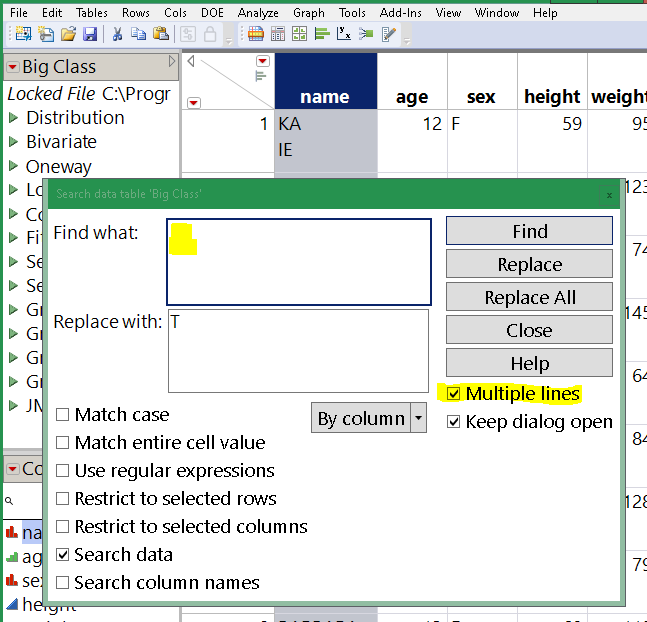
Depending where the data came from the newline sequence may be CR, LF, or CRLF. Depending on your OS, typing a newline might not match. Worst case, regex might be needed:
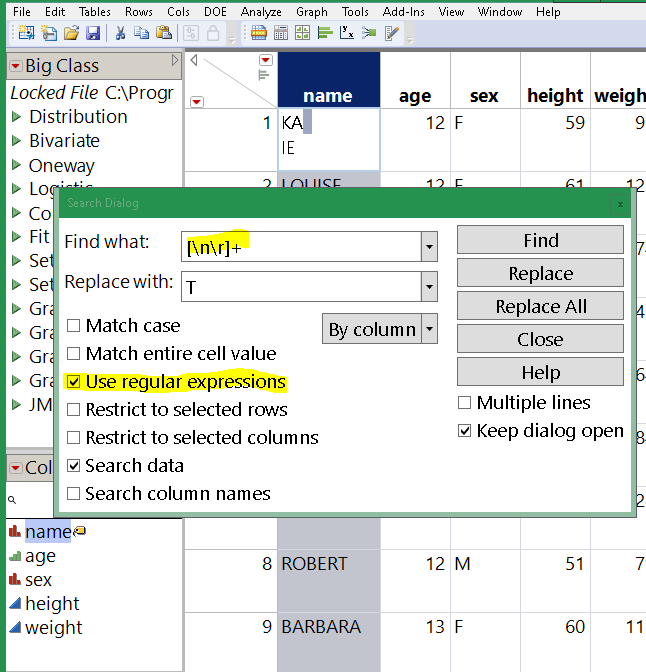
Try a couple before you hit Replace All. Consider choosing Restrict To Selected Column.
Edit: @SharathPS I suspect I've misunderstood your question. Try double-clicking the cell in the JMP table before pasting. When you double click, you'll see a text edit box and the entire paste will go into that box. Otherwise, when the cell is single-click selected and not showing the edit box, newlines in the paste data will advance to the next cell.
- Mark as New
- Bookmark
- Subscribe
- Mute
- Subscribe to RSS Feed
- Get Direct Link
- Report Inappropriate Content
Re: JMP copy paste error
Thanks @Craige_Hales for the response. But, I am copy pasting a huge excel sheet and I cannot apply that to each cell.
However I opened the csv file directly in JMP and the lines don't jumble up when I do that. I then save it as a jmp file.
Recommended Articles
- © 2026 JMP Statistical Discovery LLC. All Rights Reserved.
- Terms of Use
- Privacy Statement
- Contact Us