- Don’t miss your chance to experience Discovery Summit Europe at our best available rate! Early bird registration through 31 Oct.
- Graph Builder Toolbar streamlines interactive graphing. Creates shortcuts on Report and GraphBuilder Helpers toolbars. Download and install the extension.
- Subscribe to RSS Feed
- Mark Topic as New
- Mark Topic as Read
- Float this Topic for Current User
- Bookmark
- Subscribe
- Mute
- Printer Friendly Page
Discussions
Solve problems, and share tips and tricks with other JMP users.- User Community
- :
- Discussions
- :
- Re: JMP copy paste error

- Mark as New
- Bookmark
- Subscribe
- Mute
- Subscribe to RSS Feed
- Get Direct Link
- Report Inappropriate Content
JMP copy paste error
Hi I am copying a cell containing the text
| 48-pin ultra-thin fine pitch quad flat package no leads (UFQFPN) |
from excel into JMP. The file is originally a csv file opened in excel.
In JMP it ends up in two rows instead of one cell as:

How can I avoid this. I have already tried formatting excel column as text and setting JMP column to character type.
This happens in lines when there is a bracket (square / parentheses / angled brackets) inside the text. Why is JMP doing this?
Accepted Solutions
- Mark as New
- Bookmark
- Subscribe
- Mute
- Subscribe to RSS Feed
- Get Direct Link
- Report Inappropriate Content
Re: JMP copy paste error
Thanks @Craige_Hales for the response. But, I am copy pasting a huge excel sheet and I cannot apply that to each cell.
However I opened the csv file directly in JMP and the lines don't jumble up when I do that. I then save it as a jmp file.


- Mark as New
- Bookmark
- Subscribe
- Mute
- Subscribe to RSS Feed
- Get Direct Link
- Report Inappropriate Content
Re: JMP copy paste error
If you peek at the CSV with a text editor like notepad, is there a new line in the value?
You might be able to work around the problem manually with find/replace after importing the data.
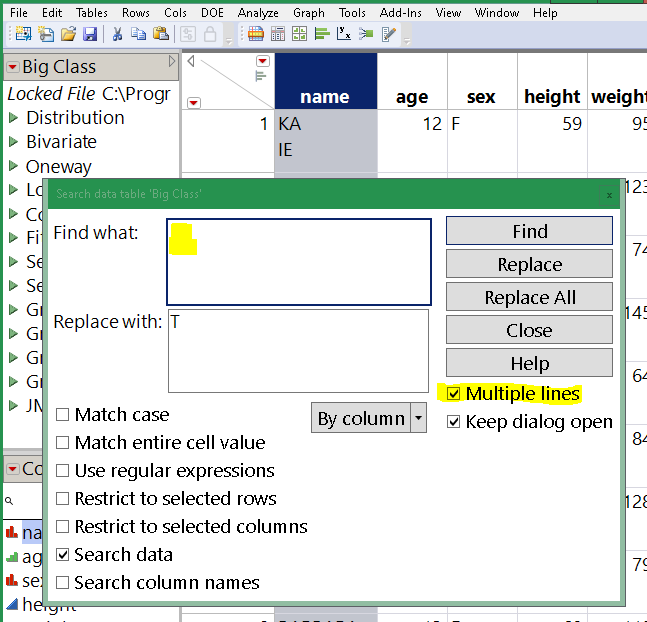
Depending where the data came from the newline sequence may be CR, LF, or CRLF. Depending on your OS, typing a newline might not match. Worst case, regex might be needed:
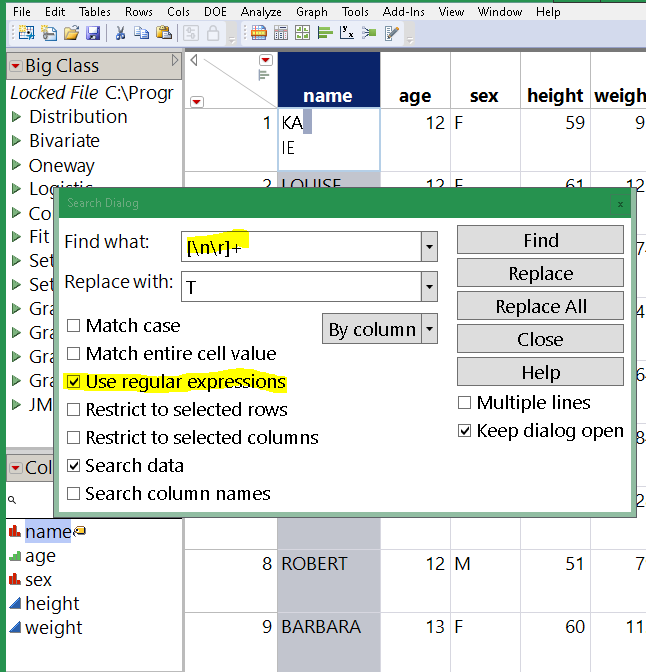
Try a couple before you hit Replace All. Consider choosing Restrict To Selected Column.
Edit: @SharathPS I suspect I've misunderstood your question. Try double-clicking the cell in the JMP table before pasting. When you double click, you'll see a text edit box and the entire paste will go into that box. Otherwise, when the cell is single-click selected and not showing the edit box, newlines in the paste data will advance to the next cell.
- Mark as New
- Bookmark
- Subscribe
- Mute
- Subscribe to RSS Feed
- Get Direct Link
- Report Inappropriate Content
Re: JMP copy paste error
Thanks @Craige_Hales for the response. But, I am copy pasting a huge excel sheet and I cannot apply that to each cell.
However I opened the csv file directly in JMP and the lines don't jumble up when I do that. I then save it as a jmp file.
Recommended Articles
- © 2026 JMP Statistical Discovery LLC. All Rights Reserved.
- Terms of Use
- Privacy Statement
- Contact Us