cancel
Showing results for 
Show  only  | Search instead for 
Did you mean: 
  • Learn how to build custom Python data connectors and further customize JMP’s Data Connector Framework with the Python Data Connector Demo, available now in the JMP Marketplace!
  • See how to create experiments to support product design and ID useful product features. Register for June 12 webinar, 2pm US Eastern Time.

Discussions

Solve problems, and share tips and tricks with other JMP users.
Choose Language Hide Translation Bar
cchueng
Level IV

JMP Live: Publish .PNG files

Is it possible to publish .PNG files onto JMP Live? I am finding that sometimes reports can be huge and maybe if I save them into .PNG format, it will be more managable.


Thanks!

1 REPLY 1

Re: JMP Live: Publish .PNG files

Hi @cchueng!


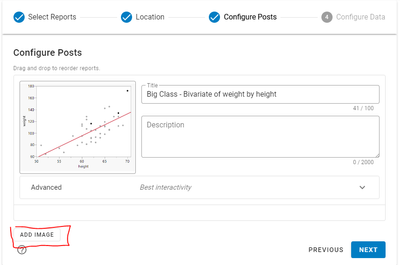
Yes, you can add an image to a publish to JMP Live. If you step through the publish dialog, on the Configure Posts screen at the bottom there's an Add Image button:
Michael_Goff_1-1711382305633.png


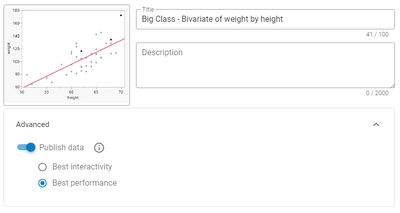
However, if your report is very large I'd recommend trying out Best Performance mode under the advanced menu. This will disable some of the report interactivity to gain additional performance in JMP Live. 
Michael_Goff_2-1711382370233.png


Recommended Articles