- Don’t miss your chance to experience Discovery Summit Europe at our best available rate! Early bird registration through 31 Oct.
- Graph Builder Toolbar streamlines interactive graphing. Creates shortcuts on Report and GraphBuilder Helpers toolbars. Download and install the extension.
- JMP will suspend normal business operations for our Rest and Recharge Day on Friday, October 2, 2026.
Regular business hours will resume on Monday, October 5, 2026.
- Subscribe to RSS Feed
- Mark Topic as New
- Mark Topic as Read
- Float this Topic for Current User
- Bookmark
- Subscribe
- Mute
- Printer Friendly Page
Discussions
Solve problems, and share tips and tricks with other JMP users.- User Community
- :
- Discussions
- :
- JMP HOME WINDOWS

- Mark as New
- Bookmark
- Subscribe
- Mute
- Subscribe to RSS Feed
- Get Direct Link
- Report Inappropriate Content
JMP HOME WINDOWS
Hello guys,
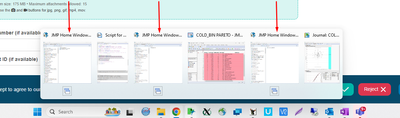
I had a strange issue the last week. When I click on any JMP file, the file opens with a new Home Window of JMP.
The problem is, when I would like to analyze between 2 opened files, I cannot do it because it looks like I've opened them in separate JMP apps, and there isn't any connection between them.
so I found a solution to open the first file regularly by double clicking and following JMP files to drop into the Home Window of JMP
but it's not comfortable to do, and I don't know how I can open files in the same the Home Window of JMP by double clicking?
Accepted Solutions


- Mark as New
- Bookmark
- Subscribe
- Mute
- Subscribe to RSS Feed
- Get Direct Link
- Report Inappropriate Content
Re: JMP HOME WINDOWS
Known issue and I don't know of any way of totally solving it . You can try steps here JMP Note 639556 - Problem Note 52261: New instance of JMP® is opened each time a new file is opened . They have never worked for me and I ALWAYS open all of my JMP files by holding Ctrl + drag and drop to JMP window.
- Mark as New
- Bookmark
- Subscribe
- Mute
- Subscribe to RSS Feed
- Get Direct Link
- Report Inappropriate Content
Re: JMP HOME WINDOWS
Known issue and I don't know of any way of totally solving it . You can try steps here JMP Note 639556 - Problem Note 52261: New instance of JMP® is opened each time a new file is opened . They have never worked for me and I ALWAYS open all of my JMP files by holding Ctrl + drag and drop to JMP window.
Recommended Articles
- © 2026 JMP Statistical Discovery LLC. All Rights Reserved.
- Terms of Use
- Privacy Statement
- Contact Us