cancel
Showing results for 
Show  only  | Search instead for 
Did you mean: 
  • JMP will suspend normal business operations for our Winter Holiday beginning on Wednesday, Dec. 24, 2025, at 5:00 p.m. ET (2:00 p.m. ET for JMP Accounts Receivable).
    Regular business hours will resume at 9:00 a.m. EST on Friday, Jan. 2, 2026.
  • We’re retiring the File Exchange at the end of this year. The JMP Marketplace is now your destination for add-ins and extensions.

Discussions

Solve problems, and share tips and tricks with other JMP users.
%3CLINGO-SUB%20id%3D%22lingo-sub-474818%22%20slang%3D%22en-US%22%20mode%3D%22NONE%22%3EJMP%20-%20%E6%8E%A7%E5%88%B6%E5%9B%BE%20-%20%E8%84%9A%E6%9C%AC%20-%20LSL%3C%2FLINGO-SUB%3E%3CLINGO-BODY%20id%3D%22lingo-body-474818%22%20slang%3D%22en-US%22%20mode%3D%22NONE%22%3E%3CP%3E%E5%A4%A7%E5%AE%B6%E5%A5%BD%EF%BC%8C%3C%2FP%3E%3CP%3E%E6%88%91%E6%83%B3%E5%88%B6%E4%BD%9C%E4%B8%80%E4%B8%AA%E6%B2%A1%E6%9C%89%20LCL%20%E9%99%90%E5%88%B6%E7%9A%84%E6%8E%A7%E5%88%B6%E5%9B%BE%E3%80%82%3C%2FP%3E%3CP%3E%E6%98%AF%E5%90%A6%E5%8F%AF%E4%BB%A5%E5%88%A0%E9%99%A4%E5%AE%83%EF%BC%9F%3C%2FP%3E%3CP%3E%E8%BF%99%E6%98%AF%E6%88%91%E7%9A%84%E8%84%9A%E6%9C%AC%E7%A4%BA%E4%BE%8B%EF%BC%9A%3C%2FP%3E%3CP%3E%26nbsp%3B%3C%2FP%3E%3CP%3EKSigma%EF%BC%889.87903978847575%EF%BC%89%EF%BC%8C%3CBR%20%2F%3E%E5%9B%BE%E8%A1%A8%20Col(%3A%22Y%22n%2C%3CSTRONG%3E%3CEM%3E%3CU%3E%20P(%E6%8B%BC%E7%AE%B1(-3))%3C%2FU%3E%3C%2FEM%3E%3C%2FSTRONG%3E%20)%2C%3CBR%20%2F%3E%E5%8F%91%E9%80%81%E5%88%B0%E6%8A%A5%E5%91%8A%EF%BC%88...%3C%2FP%3E%3CP%3E%26nbsp%3B%3C%2FP%3E%3CP%3E%E6%9C%89%E4%BA%BA%E5%8F%AF%E4%BB%A5%E5%B8%AE%E6%88%91%E5%BC%84%E8%BF%99%E4%B8%AA%E5%90%97%EF%BC%9F%3C%2FP%3E%3CP%3E%E9%9D%9E%E5%B8%B8%E6%84%9F%E8%B0%A2%E3%80%82%3C%2FP%3E%3CP%3E%E5%A1%9E%E5%B7%B4%E6%96%AF%E8%92%82%E5%AE%89%3C%2FP%3E%3CP%3E%26nbsp%3B%3C%2FP%3E%3C%2FLINGO-BODY%3E%3CLINGO-LABS%20id%3D%22lingo-labs-474818%22%20slang%3D%22en-US%22%20mode%3D%22NONE%22%3E%3CLINGO-LABEL%3E%E8%84%9A%E6%9C%AC%3C%2FLINGO-LABEL%3E%3C%2FLINGO-LABS%3E%3CLINGO-SUB%20id%3D%22lingo-sub-474835%22%20slang%3D%22en-US%22%20mode%3D%22NONE%22%3E%E5%9B%9E%E5%A4%8D%EF%BC%9AJMP%20-%20%E6%8E%A7%E5%88%B6%E5%9B%BE%20-%20%E8%84%9A%E6%9C%AC%20-%20LCL%3C%2FLINGO-SUB%3E%3CLINGO-BODY%20id%3D%22lingo-body-474835%22%20slang%3D%22en-US%22%20mode%3D%22NONE%22%3E%3CP%3E%E9%80%9A%E5%B8%B8%EF%BC%8C%E5%AF%B9%E4%BA%8E%E7%AE%80%E5%8D%95%E6%A1%88%E4%BE%8B%EF%BC%8C%E6%9C%80%E7%AE%80%E5%8D%95%E7%9A%84%E6%96%B9%E6%B3%95%E6%98%AF%E9%A6%96%E5%85%88%E4%BD%BF%E7%94%A8%20JMP%20%E7%9A%84%E4%BA%A4%E4%BA%92%E5%BC%8F%E5%B7%A5%E5%85%B7%E5%88%9B%E5%BB%BA%E5%9B%BE%E5%BD%A2%EF%BC%9A%3C%2FP%3E%0A%3CP%3E%3CSPAN%20class%3D%22lia-inline-image-display-wrapper%20lia-image-align-inline%22%20image-alt%3D%22jthi_0-1648731395500.png%22%20style%3D%22width%3A%20400px%3B%22%3E%3CSPAN%20class%3D%22lia-inline-image-display-wrapper%22%20image-alt%3D%22jthi_0-1648731395500.png%22%20style%3D%22width%3A%20400px%3B%22%3E%3CSPAN%20class%3D%22lia-inline-image-display-wrapper%22%20image-alt%3D%22jthi_0-1648731395500.png%22%20style%3D%22width%3A%20400px%3B%22%3E%3Cspan%20class%3D%22lia-inline-image-display-wrapper%22%20image-alt%3D%22jthi_0-1648731395500.png%22%20style%3D%22width%3A%20400px%3B%22%3E%3Cimg%20src%3D%22https%3A%2F%2Fcommunity.jmp.com%2Ft5%2Fimage%2Fserverpage%2Fimage-id%2F41349i666A807C8371C236%2Fimage-size%2Fmedium%3Fv%3Dv2%26amp%3Bpx%3D400%22%20role%3D%22button%22%20title%3D%22jthi_0-1648731395500.png%22%20alt%3D%22jthi_0-1648731395500.png%22%20%2F%3E%3C%2Fspan%3E%3C%2FSPAN%3E%3C%2FSPAN%3E%3C%2FSPAN%3E%3C%2FP%3E%0A%3CP%3E%E7%9C%8B%E7%9C%8B%E6%82%A8%E6%98%AF%E5%90%A6%E5%8F%AF%E4%BB%A5%E6%89%BE%E5%88%B0%E8%AE%BE%E7%BD%AE%E5%B9%B6%E8%BF%9B%E8%A1%8C%E4%BF%AE%E6%94%B9%E5%B9%B6%E4%BB%8E%E7%BA%A2%E8%89%B2%E5%B0%8F%E4%B8%89%E8%A7%92%E8%8F%9C%E5%8D%95%E4%B8%AD%E8%8E%B7%E5%8F%96%E8%84%9A%E6%9C%AC%EF%BC%9A%3C%2FP%3E%0A%3CPRE%3E%3CCODE%20class%3D%22%20language-jsl%22%3EControl%20Chart%20Builder(%0A%20K%20Sigma(2.5)%2C%0A%20Variables(Subgroup(%3ASample)%2C%20Y(%3AWeight))%2C%0A%20Chart(Position(1)%2C%20Limits(Show%20Lower%20Limit(0)))%2C%0A%20Chart(Position(2)%2C%20Limits(Show%20Lower%20Limit(0)))%0A)%3C%2FCODE%3E%3C%2FPRE%3E%0A%3CP%3E%E5%B9%B6%E6%9F%A5%E7%9C%8B%E8%AF%A5%E9%80%89%E9%A1%B9%E6%98%AF%E5%90%A6%E5%87%BA%E7%8E%B0%E5%9C%A8%20JMP%20%E6%8F%90%E4%BE%9B%E7%9A%84%E8%84%9A%E6%9C%AC%E4%B8%AD%E3%80%82%3C%2FP%3E%3C%2FLINGO-BODY%3E%3CLINGO-SUB%20id%3D%22lingo-sub-474854%22%20slang%3D%22en-US%22%20mode%3D%22NONE%22%3E%E5%9B%9E%E5%A4%8D%EF%BC%9AJMP%20-%20%E6%8E%A7%E5%88%B6%E5%9B%BE%20-%20%E8%84%9A%E6%9C%AC%20-%20LCL%3C%2FLINGO-SUB%3E%3CLINGO-BODY%20id%3D%22lingo-body-474854%22%20slang%3D%22en-US%22%20mode%3D%22NONE%22%3E%3CP%3E%E4%B8%8D%E7%A1%AE%E5%AE%9A%E8%BF%99%E6%98%AF%E5%90%A6%E6%9C%89%E5%B8%AE%E5%8A%A9%EF%BC%8C%E4%BD%86%E5%A6%82%E6%9E%9C%E6%82%A8%E5%9C%A8%E8%84%9A%E6%9C%AC%E7%B4%A2%E5%BC%95%E4%B8%AD%E6%9F%A5%E6%89%BE%E6%8E%A7%E5%88%B6%E5%9B%BE%E7%94%9F%E6%88%90%E5%99%A8%EF%BC%8C%E5%AE%83%E4%BC%9A%E5%90%91%E6%82%A8%E5%B1%95%E7%A4%BA%E5%A6%82%E4%BD%95%E6%89%93%E5%BC%80%2F%E5%85%B3%E9%97%AD%E9%99%90%E5%88%B6%E3%80%82%20%E8%AF%9D%E8%99%BD%E5%A6%82%E6%AD%A4%EF%BC%8C%E6%88%91%E5%88%9B%E5%BB%BA%E4%BA%86%E4%B8%80%E4%B8%AA%E6%8E%A7%E5%88%B6%E5%9B%BE%EF%BC%8C%E5%8F%96%E6%B6%88%E5%8B%BE%E9%80%89%E2%80%9C%E6%98%BE%E7%A4%BA%E4%B8%8B%E9%99%90%E2%80%9D%E5%B9%B6%E5%B0%86%E5%85%B6%E4%BF%9D%E5%AD%98%E5%9B%9E%E8%A1%A8%E4%B8%AD%E3%80%82%20%E6%A3%80%E6%9F%A5%E8%84%9A%E6%9C%AC%EF%BC%8C%E6%88%91%E5%8F%AF%E4%BB%A5%E7%9C%8B%E5%88%B0%E5%A6%82%E4%BD%95%E6%89%93%E5%BC%80%E4%B8%8B%E9%99%90%EF%BC%9A%3C%2FP%3E%3CPRE%3E%3CCODE%20class%3D%22%20language-jsl%22%3EControl%20Chart%20Builder(%20...%20%2C%20Limits(%20Show%20Lower%20Limit(%200%20)%20)%20)%20)%3C%2FCODE%3E%3C%2FPRE%3E%3CP%3E%E6%88%91%E8%AE%A4%E4%B8%BA%E5%A6%82%E6%9E%9C%E6%82%A8%E5%8F%AF%E4%BB%A5%E6%8F%90%E4%BE%9B%E8%84%9A%E6%9C%AC%E7%9A%84%E5%AE%8C%E6%95%B4%E6%A6%82%E8%BF%B0%EF%BC%8C%E9%82%A3%E5%B0%86%E4%BC%9A%E5%BE%88%E6%9C%89%E7%94%A8%E3%80%82%20%E4%B8%8A%E9%9D%A2%E7%9A%84%E7%89%87%E6%AE%B5%E5%AF%B9%E6%88%91%E6%9D%A5%E8%AF%B4%E5%BE%88%E9%9A%BE%E5%A4%84%E7%90%86%E3%80%82%3C%2FP%3E%3C%2FLINGO-BODY%3E
Choose Language Hide Translation Bar
Sebastienlg
Level II

JMP - Control chart - Script - LCL

Hello everyone,

I would like to make a control chart without the LCL limit.

Is it possible to remove it?

Here is my script example: 


KSigma( 9.87903978847575 ),
Chart Col( :"Y"n, P( LCL( -3 ) ) ),
SendToReport(...


Can someone help me with this?

Thanks a lot.

Sebastien


2 ACCEPTED SOLUTIONS

Accepted Solutions
jthi
Super User

Re: JMP - Control chart - Script - LCL

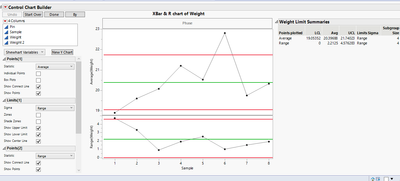
Usually the easiest way for simple cases is to first create the graph with JMP's interactive tools:
jthi_0-1648731395500.png

See if you can find the setting and make modifications and get the script from red triangle menu:

Control Chart Builder(
	K Sigma(2.5),
	Variables(Subgroup(:Sample), Y(:Weight)),
	Chart(Position(1), Limits(Show Lower Limit(0))),
	Chart(Position(2), Limits(Show Lower Limit(0)))
)

and see if the option appears in the script provided by JMP.

-Jarmo

View solution in original post

Ressel
Level VII

Re: JMP - Control chart - Script - LCL

Not sure if this helps, but if you look up Control Chart Builder in the Scripting Index, it shows you how to turn on/off the limits. With that being said, I created a Control Chart,  unticked "Show Lower Limit" and saved it back to the table. Inspecting the script, I could see how to turn of the lower limit:

Control Chart Builder( ... , Limits( Show Lower Limit( 0 ) ) ) )

I think it would be useful if you could provide a complete overview of your script. The snippet above is hard to handle for me.

View solution in original post

2 REPLIES 2
jthi
Super User

Re: JMP - Control chart - Script - LCL

Usually the easiest way for simple cases is to first create the graph with JMP's interactive tools:

jthi_0-1648731395500.png

See if you can find the setting and make modifications and get the script from red triangle menu:

Control Chart Builder(
	K Sigma(2.5),
	Variables(Subgroup(:Sample), Y(:Weight)),
	Chart(Position(1), Limits(Show Lower Limit(0))),
	Chart(Position(2), Limits(Show Lower Limit(0)))
)

and see if the option appears in the script provided by JMP.

-Jarmo
Ressel
Level VII

Re: JMP - Control chart - Script - LCL

Not sure if this helps, but if you look up Control Chart Builder in the Scripting Index, it shows you how to turn on/off the limits. With that being said, I created a Control Chart,  unticked "Show Lower Limit" and saved it back to the table. Inspecting the script, I could see how to turn of the lower limit:

Control Chart Builder( ... , Limits( Show Lower Limit( 0 ) ) ) )

I think it would be useful if you could provide a complete overview of your script. The snippet above is hard to handle for me.

Recommended Articles