- JMP will suspend normal business operations for our Winter Holiday beginning on Wednesday, Dec. 24, 2025, at 5:00 p.m. ET (2:00 p.m. ET for JMP Accounts Receivable).
Regular business hours will resume at 9:00 a.m. EST on Friday, Jan. 2, 2026. - We’re retiring the File Exchange at the end of this year. The JMP Marketplace is now your destination for add-ins and extensions.
- Subscribe to RSS Feed
- Mark Topic as New
- Mark Topic as Read
- Float this Topic for Current User
- Bookmark
- Subscribe
- Mute
- Printer Friendly Page
Discussions
Solve problems, and share tips and tricks with other JMP users.- JMP User Community
- :
- Discussions
- :
- JMP - Control chart - Script - LCL

- Mark as New
- Bookmark
- Subscribe
- Mute
- Subscribe to RSS Feed
- Get Direct Link
- Report Inappropriate Content
JMP - Control chart - Script - LCL
Hello everyone,
I would like to make a control chart without the LCL limit.
Is it possible to remove it?
Here is my script example:
KSigma( 9.87903978847575 ),
Chart Col( :"Y"n, P( LCL( -3 ) ) ),
SendToReport(...
Can someone help me with this?
Thanks a lot.
Sebastien
Accepted Solutions


- Mark as New
- Bookmark
- Subscribe
- Mute
- Subscribe to RSS Feed
- Get Direct Link
- Report Inappropriate Content
Re: JMP - Control chart - Script - LCL
Usually the easiest way for simple cases is to first create the graph with JMP's interactive tools:
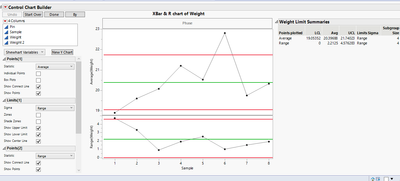
See if you can find the setting and make modifications and get the script from red triangle menu:
Control Chart Builder(
	K Sigma(2.5),
	Variables(Subgroup(:Sample), Y(:Weight)),
	Chart(Position(1), Limits(Show Lower Limit(0))),
	Chart(Position(2), Limits(Show Lower Limit(0)))
)
and see if the option appears in the script provided by JMP.

- Mark as New
- Bookmark
- Subscribe
- Mute
- Subscribe to RSS Feed
- Get Direct Link
- Report Inappropriate Content
Re: JMP - Control chart - Script - LCL
Not sure if this helps, but if you look up Control Chart Builder in the Scripting Index, it shows you how to turn on/off the limits. With that being said, I created a Control Chart, unticked "Show Lower Limit" and saved it back to the table. Inspecting the script, I could see how to turn of the lower limit:
Control Chart Builder( ... , Limits( Show Lower Limit( 0 ) ) ) )I think it would be useful if you could provide a complete overview of your script. The snippet above is hard to handle for me.
- Mark as New
- Bookmark
- Subscribe
- Mute
- Subscribe to RSS Feed
- Get Direct Link
- Report Inappropriate Content
Re: JMP - Control chart - Script - LCL
Usually the easiest way for simple cases is to first create the graph with JMP's interactive tools:
See if you can find the setting and make modifications and get the script from red triangle menu:
Control Chart Builder(
	K Sigma(2.5),
	Variables(Subgroup(:Sample), Y(:Weight)),
	Chart(Position(1), Limits(Show Lower Limit(0))),
	Chart(Position(2), Limits(Show Lower Limit(0)))
)
and see if the option appears in the script provided by JMP.
- Mark as New
- Bookmark
- Subscribe
- Mute
- Subscribe to RSS Feed
- Get Direct Link
- Report Inappropriate Content
Re: JMP - Control chart - Script - LCL
Not sure if this helps, but if you look up Control Chart Builder in the Scripting Index, it shows you how to turn on/off the limits. With that being said, I created a Control Chart, unticked "Show Lower Limit" and saved it back to the table. Inspecting the script, I could see how to turn of the lower limit:
Control Chart Builder( ... , Limits( Show Lower Limit( 0 ) ) ) )I think it would be useful if you could provide a complete overview of your script. The snippet above is hard to handle for me.
Recommended Articles
- © 2025 JMP Statistical Discovery LLC. All Rights Reserved.
- Terms of Use
- Privacy Statement
- Contact Us