cancel
Showing results for 
Show  only  | Search instead for 
Did you mean: 

Discussions

Solve problems, and share tips and tricks with other JMP users.
%3CLINGO-SUB%20id%3D%22lingo-sub-605135%22%20slang%3D%22en-US%22%20mode%3D%22NONE%22%3EJMP%2016%3A%20Script%20para%20abrir%20el%20archivo%20.csv%20m%C3%A1s%20reciente%20en%20una%20carpeta.%3C%2FLINGO-SUB%3E%3CLINGO-BODY%20id%3D%22lingo-body-605135%22%20slang%3D%22en-US%22%20mode%3D%22NONE%22%3E%3CP%3EHe%20estado%20usando%20la%20ruta%20%3D%20Pick%20File()%3B%20comando%20para%20seleccionar%20manualmente%20el%20archivo%20para%20importar%20a%20una%20tabla%20de%20datos.%20%C2%BFPuede%20escribir%20un%20comando%20para%20importar%20el%20archivo%20.csv%20m%C3%A1s%20reciente%20en%20una%20carpeta%20a%20una%20tabla%20de%20datos%3F%20Solo%20hay%20una%20hoja%20de%20trabajo%20en%20estos%20archivos.%3C%2FP%3E%3C%2FLINGO-BODY%3E%3CLINGO-LABS%20id%3D%22lingo-labs-605135%22%20slang%3D%22en-US%22%20mode%3D%22NONE%22%3E%3CLINGO-LABEL%3ETabla%20de%20datos%3C%2FLINGO-LABEL%3E%3CLINGO-LABEL%3Esecuencias%20de%20comandos%3C%2FLINGO-LABEL%3E%3C%2FLINGO-LABS%3E%3CLINGO-SUB%20id%3D%22lingo-sub-605264%22%20slang%3D%22en-US%22%20mode%3D%22NONE%22%3ERe%3A%20JMP%2016%3A%20Script%20para%20abrir%20el%20archivo%20.csv%20m%C3%A1s%20reciente%20en%20una%20carpeta.%3C%2FLINGO-SUB%3E%3CLINGO-BODY%20id%3D%22lingo-body-605264%22%20slang%3D%22en-US%22%20mode%3D%22NONE%22%3E%3CP%3E%C2%BFBusc%C3%B3%20Funciones%20en%20Ayuda%20%26gt%3B%20%C3%8Dndice%20de%20secuencias%20de%20comandos%20y%20examin%C3%B3%20el%20grupo%20de%20funciones%20Archivo%3F%3C%2FP%3E%0A%3CP%3E%26nbsp%3B%3C%2FP%3E%0A%3CP%3E%26nbsp%3B%3C%2FP%3E%0A%3CP%3E%3CSPAN%20class%3D%22lia-inline-image-display-wrapper%20lia-image-align-inline%22%20image-alt%3D%22file.PNG%22%20style%3D%22width%3A%20958px%3B%22%3E%3CSPAN%20class%3D%22lia-inline-image-display-wrapper%22%20image-alt%3D%22file.PNG%22%20style%3D%22width%3A%20958px%3B%22%3E%3CSPAN%20class%3D%22lia-inline-image-display-wrapper%22%20image-alt%3D%22file.PNG%22%20style%3D%22width%3A%20958px%3B%22%3E%3CSPAN%20class%3D%22lia-inline-image-display-wrapper%22%20image-alt%3D%22file.PNG%22%20style%3D%22width%3A%20958px%3B%22%3E%3CSPAN%20class%3D%22lia-inline-image-display-wrapper%22%20image-alt%3D%22file.PNG%22%20style%3D%22width%3A%20958px%3B%22%3E%3CSPAN%20class%3D%22lia-inline-image-display-wrapper%22%20image-alt%3D%22file.PNG%22%20style%3D%22width%3A%20958px%3B%22%3E%3CSPAN%20class%3D%22lia-inline-image-display-wrapper%22%20image-alt%3D%22file.PNG%22%20style%3D%22width%3A%20958px%3B%22%3E%3CSPAN%20class%3D%22lia-inline-image-display-wrapper%22%20image-alt%3D%22file.PNG%22%20style%3D%22width%3A%20958px%3B%22%3E%3CSPAN%20class%3D%22lia-inline-image-display-wrapper%22%20image-alt%3D%22file.PNG%22%20style%3D%22width%3A%20958px%3B%22%3E%3CSPAN%20class%3D%22lia-inline-image-display-wrapper%22%20image-alt%3D%22file.PNG%22%20style%3D%22width%3A%20958px%3B%22%3E%3CSPAN%20class%3D%22lia-inline-image-display-wrapper%22%20image-alt%3D%22file.PNG%22%20style%3D%22width%3A%20958px%3B%22%3E%3CSPAN%20class%3D%22lia-inline-image-display-wrapper%22%20image-alt%3D%22file.PNG%22%20style%3D%22width%3A%20958px%3B%22%3E%3CSPAN%20class%3D%22lia-inline-image-display-wrapper%22%20image-alt%3D%22file.PNG%22%20style%3D%22width%3A%20958px%3B%22%3E%3CSPAN%20class%3D%22lia-inline-image-display-wrapper%22%20image-alt%3D%22file.PNG%22%20style%3D%22width%3A%20958px%3B%22%3E%3CSPAN%20class%3D%22lia-inline-image-display-wrapper%22%20image-alt%3D%22file.PNG%22%20style%3D%22width%3A%20958px%3B%22%3E%3CSPAN%20class%3D%22lia-inline-image-display-wrapper%22%20image-alt%3D%22file.PNG%22%20style%3D%22width%3A%20958px%3B%22%3E%3CSPAN%20class%3D%22lia-inline-image-display-wrapper%22%20image-alt%3D%22file.PNG%22%20style%3D%22width%3A%20958px%3B%22%3E%3CSPAN%20class%3D%22lia-inline-image-display-wrapper%22%20image-alt%3D%22file.PNG%22%20style%3D%22width%3A%20958px%3B%22%3E%3CSPAN%20class%3D%22lia-inline-image-display-wrapper%22%20image-alt%3D%22file.PNG%22%20style%3D%22width%3A%20958px%3B%22%3E%3CSPAN%20class%3D%22lia-inline-image-display-wrapper%22%20image-alt%3D%22file.PNG%22%20style%3D%22width%3A%20958px%3B%22%3E%3CSPAN%20class%3D%22lia-inline-image-display-wrapper%22%20image-alt%3D%22file.PNG%22%20style%3D%22width%3A%20958px%3B%22%3E%3CSPAN%20class%3D%22lia-inline-image-display-wrapper%22%20image-alt%3D%22file.PNG%22%20style%3D%22width%3A%20958px%3B%22%3E%3CSPAN%20class%3D%22lia-inline-image-display-wrapper%22%20image-alt%3D%22file.PNG%22%20style%3D%22width%3A%20958px%3B%22%3E%3CSPAN%20class%3D%22lia-inline-image-display-wrapper%22%20image-alt%3D%22file.PNG%22%20style%3D%22width%3A%20958px%3B%22%3E%3CSPAN%20class%3D%22lia-inline-image-display-wrapper%22%20image-alt%3D%22file.PNG%22%20style%3D%22width%3A%20958px%3B%22%3E%3CSPAN%20class%3D%22lia-inline-image-display-wrapper%22%20image-alt%3D%22file.PNG%22%20style%3D%22width%3A%20958px%3B%22%3E%3CSPAN%20class%3D%22lia-inline-image-display-wrapper%22%20image-alt%3D%22file.PNG%22%20style%3D%22width%3A%20958px%3B%22%3E%3CSPAN%20class%3D%22lia-inline-image-display-wrapper%22%20image-alt%3D%22file.PNG%22%20style%3D%22width%3A%20958px%3B%22%3E%3Cspan%20class%3D%22lia-inline-image-display-wrapper%22%20image-alt%3D%22file.PNG%22%20style%3D%22width%3A%20958px%3B%22%3E%3Cimg%20src%3D%22https%3A%2F%2Fcommunity.jmp.com%2Ft5%2Fimage%2Fserverpage%2Fimage-id%2F50476i68B9DA306128860A%2Fimage-size%2Flarge%3Fv%3Dv2%26amp%3Bpx%3D999%22%20role%3D%22button%22%20title%3D%22file.PNG%22%20alt%3D%22file.PNG%22%20%2F%3E%3C%2Fspan%3E%3C%2FSPAN%3E%3C%2FSPAN%3E%3C%2FSPAN%3E%3C%2FSPAN%3E%3C%2FSPAN%3E%3C%2FSPAN%3E%3C%2FSPAN%3E%3C%2FSPAN%3E%3C%2FSPAN%3E%3C%2FSPAN%3E%3C%2FSPAN%3E%3C%2FSPAN%3E%3C%2FSPAN%3E%3C%2FSPAN%3E%3C%2FSPAN%3E%3C%2FSPAN%3E%3C%2FSPAN%3E%3C%2FSPAN%3E%3C%2FSPAN%3E%3C%2FSPAN%3E%3C%2FSPAN%3E%3C%2FSPAN%3E%3C%2FSPAN%3E%3C%2FSPAN%3E%3C%2FSPAN%3E%3C%2FSPAN%3E%3C%2FSPAN%3E%3C%2FSPAN%3E%3C%2FP%3E%0A%3CP%3E%26nbsp%3B%3C%2FP%3E%0A%3CP%3EPuede%20basar%20un%20script%20en%20las%20funciones%20Fecha%20de%20creaci%C3%B3n()%20o%20Fecha%20de%20%C3%BAltima%20modificaci%C3%B3n().%3C%2FP%3E%3C%2FLINGO-BODY%3E%3CLINGO-SUB%20id%3D%22lingo-sub-605313%22%20slang%3D%22en-US%22%20mode%3D%22NONE%22%3ERe%3A%20JMP%2016%3A%20Script%20para%20abrir%20el%20archivo%20.csv%20m%C3%A1s%20reciente%20en%20una%20carpeta.%3C%2FLINGO-SUB%3E%3CLINGO-BODY%20id%3D%22lingo-body-605313%22%20slang%3D%22en-US%22%20mode%3D%22NONE%22%3E%3CP%3EMarcos%3A%20Gracias%20por%20la%20respuesta.%20No%20estaba%20al%20tanto%20del%20%C3%ADndice%20de%20secuencias%20de%20comandos%20en%20la%20ayuda%2C%20por%20lo%20que%20es%20de%20gran%20ayuda%20en%20el%20futuro.%20Estaba%20haciendo%20referencia%20a%20una%20versi%C3%B3n%20en%20pdf%20de%20una%20Gu%C3%ADa%20de%20secuencias%20de%20comandos%20JMP15%20que%20no%20es%20f%C3%A1cil%20de%20buscar.%20Un%20problema%20que%20tengo%20con%20el%20nombre%20del%20archivo%20es%20que%20incluye%20la%20marca%20de%20tiempo%20al%20final%20del%20nombre%2C%20por%20lo%20que%20es%20din%C3%A1mico.%20El%20formato%20es%20FileName_YYYYMMDDHHMM.csv.%20Me%20quedar%C3%A9%20con%20PickFile%20por%20ahora%20y%20experimentar%C3%A9%20con%20la%20funci%C3%B3n%20LastModificationDate.%20Gracias%20de%20nuevo.%3C%2FP%3E%3C%2FLINGO-BODY%3E%3CLINGO-SUB%20id%3D%22lingo-sub-605315%22%20slang%3D%22en-US%22%20mode%3D%22NONE%22%3ERe%3A%20JMP%2016%3A%20Script%20para%20abrir%20el%20archivo%20.csv%20m%C3%A1s%20reciente%20en%20una%20carpeta.%3C%2FLINGO-SUB%3E%3CLINGO-BODY%20id%3D%22lingo-body-605315%22%20slang%3D%22en-US%22%20mode%3D%22NONE%22%3E%3CP%3EPuede%20hacer%20coincidir%20el%20nombre%20del%20archivo%20con%20la%20funci%C3%B3n%20Contiene()%20si%20desea%20ignorar%20la%20marca%20de%20tiempo.%3C%2FP%3E%3C%2FLINGO-BODY%3E%3CLINGO-SUB%20id%3D%22lingo-sub-605372%22%20slang%3D%22en-US%22%20mode%3D%22NONE%22%3ERe%3A%20JMP%2016%3A%20Script%20para%20abrir%20el%20archivo%20.csv%20m%C3%A1s%20reciente%20en%20una%20carpeta.%3C%2FLINGO-SUB%3E%3CLINGO-BODY%20id%3D%22lingo-body-605372%22%20slang%3D%22en-US%22%20mode%3D%22NONE%22%3E%3CP%3ESimplemente%20tuve%20esta%20necesidad%20en%20el%20pasado%20y%2C%20afortunadamente%2C%20guard%C3%A9%20un%20script%20por%20si%20acaso...%3C%2FP%3E%0A%3CP%3EDeber%C3%A1%20cambiar%20las%20cadenas%20en%20las%20l%C3%ADneas%202%20y%203.%3C%2FP%3E%0A%3CPRE%3E%3CCODE%20class%3D%22%20language-jsl%22%3ENames%20Default%20To%20Here(%201%20)%3B%0Asearchext%20%3D%20%22jmp%22%3B%20%2F%2Fextension%20to%20look%20for%0Asearchfolder%20%3D%20%22%24DESKTOP%22%3B%20%2F%2Fplace%20to%20search%0A%0AlstExtensions%20%3D%20%7B%7D%3B%0AlstDates%20%3D%20%7B%7D%3B%0AlstFiles%20%3D%20Files%20In%20Directory(%20searchfolder%20)%3B%0AFor%20Each(%20%7Bi%2C%20j%7D%2C%20lstFiles%2C%0A%20lstExtensions%5Bj%5D%20%3D%20Char(%20Right(%20i%2C%203%20)%20)%3B%0A%20lstDates%5Bj%5D%20%3D%20As%20Date(%20Creation%20Date(%20searchfolder%20%7C%7C%20%22%2F%22%20%7C%7C%20Char(%20i%20)%20)%20)%3B%0A)%3B%0Adt%20%3D%20New%20Table(%20%22Files%22%2C%0A%20New%20Column(%20%22Name%22%2C%20character%2C%20set%20values(%20lstFiles%20)%20)%2C%0A%20New%20Column(%20%22ext%22%2C%20character%2C%20set%20values(%20lstExtensions%20)%20)%2C%0A%20New%20Column(%20%22Date%22%2C%20numeric%2C%20set%20values(%20Matrix(%20lstDates%20)%20)%20)%0A)%3B%0A%0Adt%20%26lt%3B%26lt%3B%20Select%20where(%20%3Aext%20!%3D%20searchext%20)%3B%0Adt%20%26lt%3B%26lt%3B%20Delete%20Rows%3B%0A%0Anewest%20%3D%20Col%20Min(%20%3ADate%20)%3B%0Anewfile%20%3D%20searchfolder%20%7C%7C%20%22%2F%22%20%7C%7C%20%3AName%5Bdt%20%26lt%3B%26lt%3B%20Get%20Rows%20Where(%20%3ADate%20%3D%3D%20newest%20)%5D%5B1%5D%3B%0AClose(%20dt%2C%20no%20save%20)%3B%0AOpen(%20newfile%20)%3B%3C%2FCODE%3E%3C%2FPRE%3E%3C%2FLINGO-BODY%3E
Choose Language Hide Translation Bar
WoHNY
Level IV

JMP 16: Script to open most recent .csv file in a folder.

I have been using the path = Pick File(); command to manually select the file to import into a data table. Can you script a command to import the most recent .csv file in a folder to a data table? There is only one worksheet in these files.

4 REPLIES 4

Re: JMP 16: Script to open most recent .csv file in a folder.

Did you search Functions in Help > Scripting Index and examine the File group of functions?
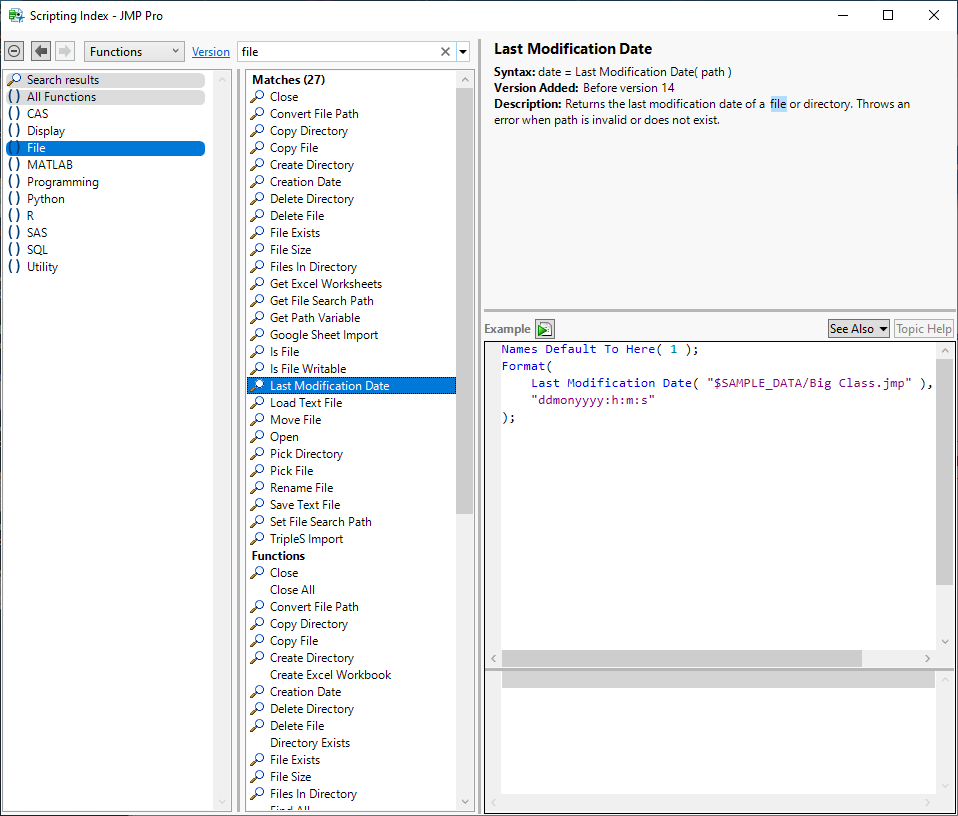


file.PNG


You could base a script on the Creation Date() or the Last Modification Date() functions.

WoHNY
Level IV

Re: JMP 16: Script to open most recent .csv file in a folder.

Mark: Thank you for the response. I wasn't aware of the Scripting index under help so that is big help going forward. I was referencing a pdf version of a JMP15 Scripting Guide that is not search friendly. One issue I have with the file name is that it includes the time stamp at the end of the name, so it is dynamic. The format is FileName_YYYYMMDDHHMM.csv. I will stick with PickFile for now and experiment with the LastModificationDate function. Thanks again.

Re: JMP 16: Script to open most recent .csv file in a folder.

You can match the file name with the Contains() function if you want to ignore the time stamp.

Re: JMP 16: Script to open most recent .csv file in a folder.

I just happen to have had this need in the past, and luckily saved a script just in case...

You'll need to change the strings on line 2 and 3.

Names Default To Here( 1 );
searchext = "jmp"; //extension to look for
searchfolder = "$DESKTOP"; //place to search

lstExtensions = {};
lstDates = {};
lstFiles = Files In Directory( searchfolder );
For Each( {i, j}, lstFiles,
	lstExtensions[j] = Char( Right( i, 3 ) );
	lstDates[j] = As Date( Creation Date( searchfolder || "/" || Char( i ) ) );
);
dt = New Table( "Files",
	New Column( "Name", character, set values( lstFiles ) ),
	New Column( "ext", character, set values( lstExtensions ) ),
	New Column( "Date", numeric, set values( Matrix( lstDates ) ) )
);

dt << Select where( :ext != searchext );
dt << Delete Rows;

newest = Col Min( :Date );
newfile = searchfolder || "/" || :Name[dt << Get Rows Where( :Date == newest )][1];
Close( dt, no save );
Open( newfile );

Recommended Articles