cancel
Showing results for 
Show  only  | Search instead for 
Did you mean: 
  • JMP will suspend normal business operations for our Winter Holiday beginning on Wednesday, Dec. 24, 2025, at 5:00 p.m. ET (2:00 p.m. ET for JMP Accounts Receivable).
    Regular business hours will resume at 9:00 a.m. EST on Friday, Jan. 2, 2026.
  • We’re retiring the File Exchange at the end of this year. The JMP Marketplace is now your destination for add-ins and extensions.

Discussions

Solve problems, and share tips and tricks with other JMP users.
%3CLINGO-SUB%20id%3D%22lingo-sub-470283%22%20slang%3D%22en-US%22%20mode%3D%22NONE%22%3EFunzione%20Informat%20(ParseDate)%20con%20l'ora%3C%2FLINGO-SUB%3E%3CLINGO-BODY%20id%3D%22lingo-body-470283%22%20slang%3D%22en-US%22%20mode%3D%22NONE%22%3E%3CP%3ECiao%2C%3C%2FP%3E%3CP%3E%26nbsp%3B%3C%2FP%3E%3CP%3EHo%20una%20domanda%20sulla%20funzione%20Informat%20(o%20il%20suo%20alias%20ParseDate).%20Se%20ho%20una%20stringa%20con%20informazioni%20su%20data%20e%20ora%20e%20provo%20ad%20analizzare%20la%20data%20su%20JMP%2015.2.0.%3C%2FP%3E%3CP%3E%26nbsp%3B%3C%2FP%3E%3CPRE%3E%3CCODE%20class%3D%22%20language-jsl%22%3Estr%3D%222022-10-22%2016%3A25%3A37%22%3B%0A%0Adatetime%3D%20Informat(%20str%2C%20%22yyyy-mm-dd%20HH%3Amm%3Ass%22%20)%3B%0Ashow(type(datetime))%3B%0Ashow(datetime)%3B%3C%2FCODE%3E%3C%2FPRE%3E%3CP%3EOttengo%20output%20diversi%20tipi%20di%20output%2C%20a%20seconda%20delle%20impostazioni%20di%20data%20e%20ora%20(Win%2010).%3C%2FP%3E%3CP%3E%26nbsp%3B%3C%2FP%3E%3CP%3EFormato%20regionale%20inglese%20(Regno%20Unito)%3A%3CBR%20%2F%3E%20str%20%3D%20%222022-10-22%2016%3A23%3A37%22%3B%3CBR%20%2F%3E%20Tipo(dataora)%20%3D%20%22Data%22%3B%3CBR%20%2F%3E%20datetime%20%3D%2022Oct2022%3A16%3A23%3A37%3B%3C%2FP%3E%3CP%3E%26nbsp%3B%3C%2FP%3E%3CP%3EOppure%20formato%20regionale%20finlandese%20(Finlandia)%3A%3C%2FP%3E%3CP%3Estr%20%3D%20%2222-10-2022%2016%3A23%3A37%22%3B%3CBR%20%2F%3E%20Tipo(dataora)%20%3D%20%22Numero%22%3B%3CBR%20%2F%3E%20dataora%20%3D%20.%3B%3CBR%20%2F%3E%3CBR%20%2F%3E%20C'%C3%A8%20una%20funzione%20che%20potrebbe%20analizzare%20anche%20il%20tempo%3F%20O%20ci%20sono%20suggerimenti%20su%20come%20farlo%3F%3C%2FP%3E%3C%2FLINGO-BODY%3E%3CLINGO-LABS%20id%3D%22lingo-labs-470283%22%20slang%3D%22en-US%22%20mode%3D%22NONE%22%3E%3CLINGO-LABEL%3EScripting%3C%2FLINGO-LABEL%3E%3CLINGO-LABEL%3Efinestre%3C%2FLINGO-LABEL%3E%3C%2FLINGO-LABS%3E%3CLINGO-SUB%20id%3D%22lingo-sub-470743%22%20slang%3D%22en-US%22%20mode%3D%22NONE%22%3ERe%3A%20funzione%20Informat%20(ParseDate)%20con%20l'ora%3C%2FLINGO-SUB%3E%3CLINGO-BODY%20id%3D%22lingo-body-470743%22%20slang%3D%22en-US%22%20mode%3D%22NONE%22%3E%3CP%3EGrazie%2C%20questo%20esempio%20funziona%20per%20le%20impostazioni%20datetime%20testate.%3C%2FP%3E%3C%2FLINGO-BODY%3E%3CLINGO-SUB%20id%3D%22lingo-sub-470742%22%20slang%3D%22en-US%22%20mode%3D%22NONE%22%3ERe%3A%20funzione%20Informat%20(ParseDate)%20con%20l'ora%3C%2FLINGO-SUB%3E%3CLINGO-BODY%20id%3D%22lingo-body-470742%22%20slang%3D%22en-US%22%20mode%3D%22NONE%22%3E%3CP%3Eho%20usato%3CSPAN%3E%20%26lt%3B%26lt%3B%20Usa%20Locale()%20per%20superare%20i%20problemi%20con%20i%20formati%20di%20data%20e%20ora.%20L'esempio%20che%20hai%20fornito%20non%20ha%20risolto%20il%20problema%2C%20penso%20che%20ci%20torner%C3%B2%20pi%C3%B9%20tardi%20quando%20avr%C3%B2%20tempo%20(gioco%20di%20parole).%20Il%20problema%20con%20l'esempio%20%C3%A8%20molto%20probabilmente%20risolto%20con%20%26lt%3B%26lt%3B%20Use%20Locale().%3C%2FSPAN%3E%3CSPAN%3EProver%C3%B2%20anche%20Format%20Pattern%2C%20se%20ottengo%20una%20versione%20pi%C3%B9%20recente%20di%20JMP.%3C%2FSPAN%3E%3C%2FP%3E%3CP%3E%26nbsp%3B%3C%2FP%3E%3CP%3E%3CSPAN%3EGrazie%20ancora%20condividendo%20le%20tue%20conoscenze.%3C%2FSPAN%3E%3C%2FP%3E%3C%2FLINGO-BODY%3E%3CLINGO-SUB%20id%3D%22lingo-sub-470322%22%20slang%3D%22en-US%22%20mode%3D%22NONE%22%3ERe%3A%20funzione%20Informat%20(ParseDate)%20con%20l'ora%3C%2FLINGO-SUB%3E%3CLINGO-BODY%20id%3D%22lingo-body-470322%22%20slang%3D%22en-US%22%20mode%3D%22NONE%22%3E%3CP%3EEcco%20un%20modo%20per%20gestire%20il%20problema%3C%2FP%3E%0A%3CPRE%3E%3CCODE%20class%3D%22%20language-jsl%22%3Estr%3D%222022-10-22%2016%3A25%3A37%22%3B%0A%0Adatetime%20%3D%20datemdy(num(word(2%2Cstr%2C%22%20-%3A%22))%2C%0A%20num(word(3%2Cstr%2C%22%20-%3A%22))%2C%0A%20num(word(1%2Cstr%2C%22%20-%3A%22))%20)%20%2B%0A%203600*num(word(4%2Cstr%2C%22%20-%3A%22))%20%2B%0A%2060%20*%20num(word(5%2Cstr%2C%22%20-%3A%22))%20%2B%0A%20num(word(6%2Cstr%2C%22%20-%3A%22)%0A)%3B%0Ashow(format(datetime%2C%22m%2Fd%2Fy%20h%3Am%3As%22))%3B%3C%2FCODE%3E%3C%2FPRE%3E%0A%3CP%3ESi%20vede%20nel%20registro%3C%2FP%3E%0A%3CPRE%3EFormat(datetime%2C%20%22m%2Fd%2Fy%20h%3Am%3As%22)%20%3D%20%2210%2F22%2F2022%204%3A25%3A37%20PM%22%3B%3C%2FPRE%3E%3C%2FLINGO-BODY%3E%3CLINGO-SUB%20id%3D%22lingo-sub-470316%22%20slang%3D%22en-US%22%20mode%3D%22NONE%22%3ERe%3A%20funzione%20Informat%20(ParseDate)%20con%20l'ora%3C%2FLINGO-SUB%3E%3CLINGO-BODY%20id%3D%22lingo-body-470316%22%20slang%3D%22en-US%22%20mode%3D%22NONE%22%3E%3CP%3EControlla%20se%20l'uso%20di%20%26lt%3B%26lt%3B%20Use%20Locale%20()%20aiuta%20affatto.%3C%2FP%3E%0A%3CP%3EJMP%20era%20abbastanza%20incapace%20di%20gestire%20il%20tempo%20(e%20le%20date)%20prima%20di%20JMP16.%20Molto%20probabilmente%20analizzerei%20la%20stringa%20in%20anno%2C%20mese%2C%20giorno%2C%20ora%2C%20minuto%20e%20secondo.%20Quindi%20sommali%20per%20ottenere%20date_time.%20Con%20JMP16%20molto%20probabilmente%20potresti%20semplicemente%20usare%20Format%20Pattern%3C%2FP%3E%0A%3CP%3E%26nbsp%3B%3C%2FP%3E%0A%3CP%3EForse%20questo%20pu%C3%B2%20dare%20qualche%20idea%3A%3C%2FP%3E%0A%3CP%3E%26nbsp%3B%3C%2FP%3E%0A%3CPRE%3E%3CCODE%20class%3D%22%20language-jsl%22%3ENames%20Default%20To%20Here(1)%3B%0A%0Astr%20%3D%20%222022-10-22%2016%3A25%3A37%22%3B%0A%0Adate%20%3D%20Word(1%2C%20str%2C%20%22%20%22)%3B%0Atime%20%3D%20Word(2%2C%20str%2C%20%22%20%22)%3B%0Ay%20%3D%20Num(Word(1%2C%20date%2C%20%22-%22))%3B%0Am%20%3D%20Num(Word(2%2C%20date%2C%20%22-%22))%3B%0Ad%20%3D%20Num(Word(3%2C%20date%2C%20%22-%22))%3B%0A%0Atime_separator%20%3D%20Left(Regex(Format(Today()%2C%20%22h%3Am%3As%22)%2C%20%22%5Cd%22%2C%20%22%22%2C%20GLOBALREPLACE)%2C%201)%3B%0A%0Ahh%20%3D%20Num(Word(1%2C%20time%2C%20time_separator))%3B%0Amm%20%3D%20Num(Word(2%2C%20time%2C%20time_separator))%3B%0Ass%20%3D%20Num(Word(3%2C%20time%2C%20time_separator))%3B%0A%0Adate_time%20%3D%20Date%20DMY(d%2C%20m%2C%20y)%20%2B%20hh%20*%2060%20*%2060%20%2B%20mm%20*%2060%20%2B%20ss%3B%0AAsDate(date_time)%3B%3C%2FCODE%3E%3C%2FPRE%3E%0A%3CP%3E%26nbsp%3B%3C%2FP%3E%0A%3CP%3E%26nbsp%3B%3C%2FP%3E%3C%2FLINGO-BODY%3E%3CLINGO-SUB%20id%3D%22lingo-sub-736131%22%20slang%3D%22en-US%22%20mode%3D%22CREATE%22%3ERi%3A%20Funzione%20Informat%20(ParseDate)%20con%20l'ora%3C%2FLINGO-SUB%3E%3CLINGO-BODY%20id%3D%22lingo-body-736131%22%20slang%3D%22en-US%22%20mode%3D%22CREATE%22%3E%3CP%3ESembra%20che%20in%20Jmp%2015.2%20Informat%20abbia%20semplicemente%20ignorato%20modelli%20fantasiosi%20come%3C%2FP%3E%3CPRE%3E%3CCODE%20class%3D%22%20language-jsl%22%3Edatetime%3D%20Informat(%20str%2C%20%22yyyy-mm-dd%20HH%3Amm%3Ass%22%20)%3B%3C%2FCODE%3E%3C%2FPRE%3E%3CP%3EAnche%20pattern%20%3D%20%22ciao%22%20risulta%3C%2FP%3E%3CP%3E%3CSPAN%20class%3D%22lia-inline-image-display-wrapper%20lia-image-align-inline%22%20image-alt%3D%22hogi_0-1710792939811.png%22%20style%3D%22width%3A%20400px%3B%22%3E%3Cspan%20class%3D%22lia-inline-image-display-wrapper%22%20image-alt%3D%22hogi_0-1710792939811.png%22%20style%3D%22width%3A%20286px%3B%22%3E%3Cimg%20src%3D%22https%3A%2F%2Fcommunity.jmp.com%2Ft5%2Fimage%2Fserverpage%2Fimage-id%2F62313i6A4D60AB68096A39%2Fimage-size%2Fmedium%3Fv%3Dv2%26amp%3Bpx%3D400%22%20role%3D%22button%22%20title%3D%22hogi_0-1710792939811.png%22%20alt%3D%22hogi_0-1710792939811.png%22%20%2F%3E%3C%2Fspan%3E%3C%2FSPAN%3E%3C%2FP%3E%3CP%3E%20%3C%2FP%3E%3CP%3ENelle%20versioni%20successive%2C%20Jmp%20dir%C3%A0%20all'utente%3A%3CBR%20%2F%3E%3CBR%20%2F%3E%20%3CFONT%20face%3D%22courier%20new%2Ccourier%22%3EFormato%20sconosciuto%3A%20ciao%3C%2FFONT%3E%3C%2FP%3E%3CP%3E%20%3C%2FP%3E%3CP%3E%20%3C%2FP%3E%3CP%3ECosa%20funziona%3A%3CBR%20%2F%3E%20%3CSTRONG%3EInformazioni%3C%2FSTRONG%3E%20con%20l'opzione%20%3CFONT%20face%3D%22courier%20new%2Ccourier%22%3EFormato%20modello%3C%2FFONT%3E%20%3A%3C%2FP%3E%3CPRE%3E%3CCODE%20class%3D%22%20language-jsl%22%3Estr%3D%222022-10-22%2016%3A25%3A37%22%3B%0Adatetime%3D%20Informat(%20str%2C%20%22Format%20Pattern%22%2C%20%22%3CYYYY%3E%3CMM%3E%3C%2FMM%3E%3C%2FYYYY%3E%3C%2FCODE%3E%3CDL%3E%3CDD%3E%3CCODE%20class%3D%22%20language-jsl%22%3E%20%3CHH%3E%26lt%3B%3A%26gt%3B%3CMM%3E%20%26lt%3B%3A%26gt%3B%3CSS%3E%20%22%20)%3B%20mostra(tipo(dataora))%3B%20mostra(dataora)%3B%3C%2FSS%3E%3C%2FMM%3E%3C%2FHH%3E%3C%2FCODE%3E%3C%2FDD%3E%3C%2FDL%3E%3C%2FPRE%3E%3C%2FLINGO-BODY%3E
Choose Language Hide Translation Bar
jueefo
Level II

Informat (ParseDate) function with time

Hi,


I have a question about Informat function (or its alias ParseDate). If I have a string with date and time information, and I try to parse date on JMP 15.2.0.


str="2022-10-22 16:25:37";

datetime= Informat( str, "yyyy-mm-dd HH:mm:ss" );
show(type(datetime));
show(datetime);

I get output different kind of outputs, depending on date time settings (Win 10).


Regional format English (United Kingdom):
str = "2022-10-22 16:23:37";
Type(datetime) = "Date";
datetime = 22Oct2022:16:23:37;


Or Regional format Finnish (Finland):

str = "2022-10-22 16:23:37";
Type(datetime) = "Number";
datetime = .;

Is there a function that could parse time also? Or are there suggestions how this could be done?

1 ACCEPTED SOLUTION

Accepted Solutions
txnelson
Super User

Re: Informat (ParseDate) function with time

Here is one way to handle the issue

str="2022-10-22 16:25:37";

datetime = datemdy(num(word(2,str," -:")),
	num(word(3,str," -:")),
	num(word(1,str," -:")) ) +
	3600*num(word(4,str," -:")) +
	60 * num(word(5,str," -:")) +
	num(word(6,str," -:")
);
show(format(datetime,"m/d/y h:m:s"));

It shows in the log

Format(datetime, "m/d/y h:m:s") = "10/22/2022 4:25:37 PM";

Jim

View solution in original post

5 REPLIES 5
jthi
Super User

Re: Informat (ParseDate) function with time

Check out if using << Use Locale() helps at all.

JMP was fairly bad at managing managing time (and dates) before JMP16. I would most likely parse the string to year, month, day, hour, minute and second. Then sum those to get date_time. With JMP16 you could most likely just use Format Pattern


Maybe this can give some ideas:


Names Default To Here(1);

str = "2022-10-22 16:25:37";

date = Word(1, str, " ");
time = Word(2, str, " ");
y = Num(Word(1, date, "-"));
m = Num(Word(2, date, "-"));
d = Num(Word(3, date, "-"));

time_separator = Left(Regex(Format(Today(), "h:m:s"), "\d", "", GLOBALREPLACE), 1);

hh = Num(Word(1, time, time_separator));
mm = Num(Word(2, time, time_separator));
ss = Num(Word(3, time, time_separator));

date_time = Date DMY(d, m, y) + hh * 60 * 60 + mm * 60 + ss;
AsDate(date_time);


-Jarmo
jueefo
Level II

Re: Informat (ParseDate) function with time

I have used << Use Locale() to overcome issues with date and time formats. The example you provided did not solve issue, I  think that I come back to this later when I have time (pun intended). The issue with the example is most probably solved with << Use Locale(). I'll also try Format Pattern, if I get newer version of the JMP.


Thanks again sharing your knowledge.

txnelson
Super User

Re: Informat (ParseDate) function with time

Here is one way to handle the issue

str="2022-10-22 16:25:37";

datetime = datemdy(num(word(2,str," -:")),
	num(word(3,str," -:")),
	num(word(1,str," -:")) ) +
	3600*num(word(4,str," -:")) +
	60 * num(word(5,str," -:")) +
	num(word(6,str," -:")
);
show(format(datetime,"m/d/y h:m:s"));

It shows in the log

Format(datetime, "m/d/y h:m:s") = "10/22/2022 4:25:37 PM";
Jim
jueefo
Level II

Re: Informat (ParseDate) function with time

Thank you, this example works for the datetime settings tested.

hogi
Level XIII

Re: Informat (ParseDate) function with time

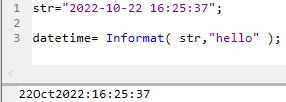
It seems that in Jmp 15.2 Informat just ignored fancy patterns like 

datetime= Informat( str, "yyyy-mm-dd HH:mm:ss" );

Even pattern = "hello" results in 

hogi_0-1710792939811.png


In later versions, Jmp will tell the user:

Unknown format: hello


What works:
Informat with the option Format Pattern

str="2022-10-22 16:25:37";
datetime= Informat( str, "Format Pattern", "<YYYY></><MM></><DD> <hh><:><mm><:><ss>" );
show(type(datetime));
show(datetime);

Recommended Articles