- Don’t miss your chance to experience Discovery Summit Europe at our best available rate! Early bird registration through 31 Oct.
- Graph Builder Toolbar streamlines interactive graphing. Creates shortcuts on Report and GraphBuilder Helpers toolbars. Download and install the extension.
- Subscribe to RSS Feed
- Mark Topic as New
- Mark Topic as Read
- Float this Topic for Current User
- Bookmark
- Subscribe
- Mute
- Printer Friendly Page
Discussions
Solve problems, and share tips and tricks with other JMP users.- User Community
- :
- Discussions
- :
- Independent Grouped X Scales in Graph Builder

- Mark as New
- Bookmark
- Subscribe
- Mute
- Subscribe to RSS Feed
- Get Direct Link
- Report Inappropriate Content
Independent Grouped X Scales in Graph Builder
Hello,
I've just seen this Live Webcast "Using Design of Experiments to Increase Predictability, Optimise Processes and Minimise Costs".
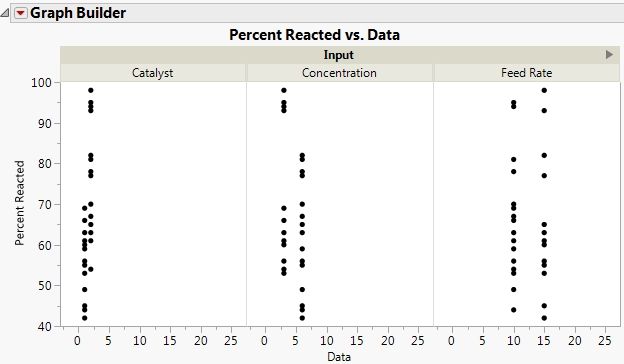
One of the charts I saw was Graph Builder single chart with several X Scales (X Group) but each X Scale had its own min and max values.
Please see attached the image. In that image I would like that each Input will have its own independent X scale.
Now, when I saw it is possible, how do I do it? :)
Thank you.
Accepted Solutions


- Mark as New
- Bookmark
- Subscribe
- Mute
- Subscribe to RSS Feed
- Get Direct Link
- Report Inappropriate Content
Re: Independent Grouped X Scales in Graph Builder
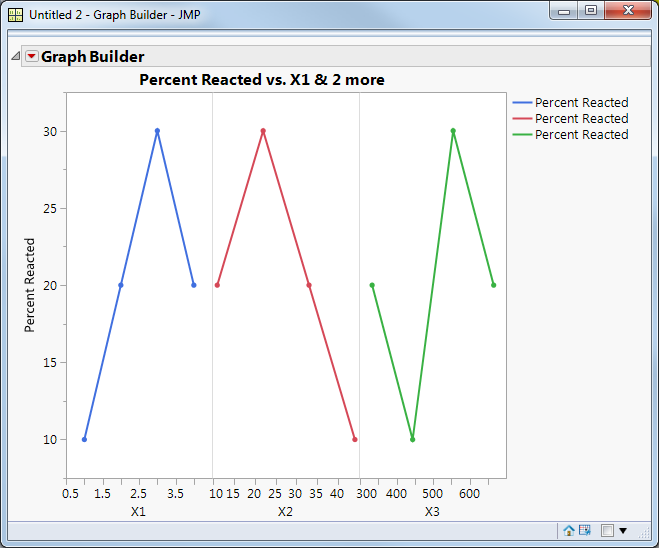
In JMP 13, in Graph Builder I dragged X1, X2 and X3 to the x axis, one at a time. When I dragged X2 I dropped it into the zone at the lower right, not the center. Same for X3. This is my result:
Here's the corresponding JSL:
New Table( "Test", 	Add Rows( 4 ),
	New Script("Percent Reacted vs. X1 & 2 more",
		Graph Builder(Size( 486, 452 ),
			Show Control Panel( 0 ),
			Variables( X( :X1 ), X( :X2 ), X( :X3 ), Y( :Percent Reacted ) ),
			Elements( Position( 1, 1 ),
				Line( X, Y, Legend( 40 ) ),
				Points( X, Y, Legend( 43 ) ) ),
			Elements( Position( 2, 1 ),
				Line( X, Y, Legend( 41 ) ),
				Points( X, Y, Legend( 44 ) ) ),
			Elements( Position( 3, 1 ),
				Line( X, Y, Legend( 42 ) ),
				Points( X, Y, Legend( 45 ) ) )
		)
	),
	New Column( "X1", Numeric, "Continuous", Format( "Best", 12 ),
		Set Values( [1, 2, 3, 4] )),
	New Column( "X2", Numeric, "Continuous", Format( "Best", 12 ),
		Set Values( [44, 33, 22, 11] )),
	New Column( "X3", Numeric, "Continuous", Format( "Best", 12 ),
		Set Values( [444, 333, 555, 666] )),
	New Column( "Percent Reacted", Numeric, "Continuous", Format( "Best", 12 ),
		Set Values( [10, 20, 30, 20] ))
);- Mark as New
- Bookmark
- Subscribe
- Mute
- Subscribe to RSS Feed
- Get Direct Link
- Report Inappropriate Content
Re: Independent Grouped X Scales in Graph Builder
In JMP 13, in Graph Builder I dragged X1, X2 and X3 to the x axis, one at a time. When I dragged X2 I dropped it into the zone at the lower right, not the center. Same for X3. This is my result:
Here's the corresponding JSL:
New Table( "Test", 	Add Rows( 4 ),
	New Script("Percent Reacted vs. X1 & 2 more",
		Graph Builder(Size( 486, 452 ),
			Show Control Panel( 0 ),
			Variables( X( :X1 ), X( :X2 ), X( :X3 ), Y( :Percent Reacted ) ),
			Elements( Position( 1, 1 ),
				Line( X, Y, Legend( 40 ) ),
				Points( X, Y, Legend( 43 ) ) ),
			Elements( Position( 2, 1 ),
				Line( X, Y, Legend( 41 ) ),
				Points( X, Y, Legend( 44 ) ) ),
			Elements( Position( 3, 1 ),
				Line( X, Y, Legend( 42 ) ),
				Points( X, Y, Legend( 45 ) ) )
		)
	),
	New Column( "X1", Numeric, "Continuous", Format( "Best", 12 ),
		Set Values( [1, 2, 3, 4] )),
	New Column( "X2", Numeric, "Continuous", Format( "Best", 12 ),
		Set Values( [44, 33, 22, 11] )),
	New Column( "X3", Numeric, "Continuous", Format( "Best", 12 ),
		Set Values( [444, 333, 555, 666] )),
	New Column( "Percent Reacted", Numeric, "Continuous", Format( "Best", 12 ),
		Set Values( [10, 20, 30, 20] ))
);Recommended Articles
- © 2026 JMP Statistical Discovery LLC. All Rights Reserved.
- Terms of Use
- Privacy Statement
- Contact Us