- JMP Statement Regarding Critical PHP Remote Code Execution Vulnerabilities (CVE-2026-109618, CVE-2026-109619)
- Don’t miss your chance to experience Discovery Summit Europe at our best available rate! Early bird registration through 31 Oct.
- Graph Builder Toolbar streamlines interactive graphing. Creates shortcuts on Report and GraphBuilder Helpers toolbars. Download and install the extension.
- Subscribe to RSS Feed
- Mark Topic as New
- Mark Topic as Read
- Float this Topic for Current User
- Bookmark
- Subscribe
- Mute
- Printer Friendly Page
Discussions
Solve problems, and share tips and tricks with other JMP users.- User Community
- :
- Discussions
- :
- How was power calculated from anticipate rmse?

- Mark as New
- Bookmark
- Subscribe
- Mute
- Subscribe to RSS Feed
- Get Direct Link
- Report Inappropriate Content
How was power calculated from anticipate rmse?
Hi there,
In the evaluate design platform, there is a power analysis section. within that section, one of the option I can set is anticipate rmse. It's default value is 1.
I am wondering how the powers are calculated after I enter a new RMSE. what is the equation that calculate power from rmse. I can't find it everywhere.
Accepted Solutions


- Mark as New
- Bookmark
- Subscribe
- Mute
- Subscribe to RSS Feed
- Get Direct Link
- Report Inappropriate Content
Re: How was power calculated from anticipate rmse?
I'm not familiar with this platform but usually you can find the details from jmp help page. Use Help (?) tool from toolbar and hover over to your point of interest and click (in this case Power Analysis), this will open help page close to where you want to be (usually)
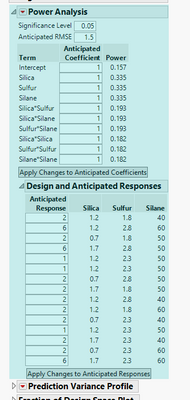
Then start searching the page you get Design of Experiments Guide > Evaluate Designs > Evaluate Design Window > Power Analysis

Click link and hope that it takes you further Design of Experiments Guide > Technical Details > Power Calculations .
Or in this case I think you have to go a bit further on the first page

Hopefully this at least provides some location for correct documentation
- Mark as New
- Bookmark
- Subscribe
- Mute
- Subscribe to RSS Feed
- Get Direct Link
- Report Inappropriate Content
Re: How was power calculated from anticipate rmse?
I'm not familiar with this platform but usually you can find the details from jmp help page. Use Help (?) tool from toolbar and hover over to your point of interest and click (in this case Power Analysis), this will open help page close to where you want to be (usually)
Then start searching the page you get Design of Experiments Guide > Evaluate Designs > Evaluate Design Window > Power Analysis
Click link and hope that it takes you further Design of Experiments Guide > Technical Details > Power Calculations .
Or in this case I think you have to go a bit further on the first page
Hopefully this at least provides some location for correct documentation
Recommended Articles
- © 2026 JMP Statistical Discovery LLC. All Rights Reserved.
- Terms of Use
- Privacy Statement
- Contact Us