- Subscribe to RSS Feed
- Mark Topic as New
- Mark Topic as Read
- Float this Topic for Current User
- Bookmark
- Subscribe
- Mute
- Printer Friendly Page
Discussions
Solve problems, and share tips and tricks with other JMP users.- JMP User Community
- :
- Discussions
- :
- How to write a script to be able to plot any parameters based on the raw data ?

- Mark as New
- Bookmark
- Subscribe
- Mute
- Subscribe to RSS Feed
- Get Direct Link
- Report Inappropriate Content
How to write a script to be able to plot any parameters based on the raw data ?
Hi All,
I was thinking hard about the ways to do automation using JMP recently. Are there any scripts which could do this:-
(1) I have the raw data saved in a JMP table.
(2) I have a script that will automatically plot the graphs (example, var chart) by grabbing any Y variables from the Colume (in the raw data) and plot by a fix X parameter (defined in the script). This will save some time to name all the Y variables in the script, especially when I have ~50 parameters to be added into the script.
Thank you,
Ann
Accepted Solutions


- Mark as New
- Bookmark
- Subscribe
- Mute
- Subscribe to RSS Feed
- Get Direct Link
- Report Inappropriate Content
Re: How to write a script to be able to plot any parameters based on the raw data ?
By default, the Save Presentation() function will write on top of any previous pptx created, unless you specify the "A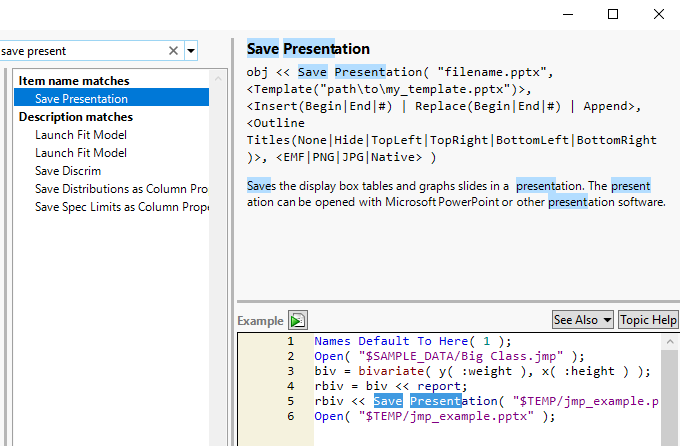
- Mark as New
- Bookmark
- Subscribe
- Mute
- Subscribe to RSS Feed
- Get Direct Link
- Report Inappropriate Content
Re: How to write a script to be able to plot any parameters based on the raw data ?
Ann,
Once the X and Y columns are identified, this becomes a fairly easy task to setup. You specify that the X columns would be defined in the script, so that one is handled. But I am a little confused about the Y columns. Could you provide a little more detail on how one would identify a Y column in your data table?
Any continuous, numeric column?
Any column not defined in your script as an X column?
Any column starting with a specific series of letters, etc.
- Mark as New
- Bookmark
- Subscribe
- Mute
- Subscribe to RSS Feed
- Get Direct Link
- Report Inappropriate Content
Re: How to write a script to be able to plot any parameters based on the raw data ?
Hi Jim,
The Y variables would have these features below:
(1) they are numeric columns
(2) the parameters' name would always begin with a serial number, then followed by alphabets. For example:
001: voltage_dif <> PinOut
002: resistance_div <> PinIn
Thank you,
Ann Ann
- Mark as New
- Bookmark
- Subscribe
- Mute
- Subscribe to RSS Feed
- Get Direct Link
- Report Inappropriate Content
Re: How to write a script to be able to plot any parameters based on the raw data ?
Here is a simple example that should get you started.
Names Default To Here( 1 );
dt = Open( "$SAMPLE_DATA\semiconductor capability.jmp" );

// Modify the sample data table to resemble Ann's data table

// Reduce the number of columns for the demonstration
dt << delete columns( Index( 15, N Cols( dt ) ) );

// Add a Serial Number to the parameters
For( i = 5, i <= N Cols( dt ), i++,
	Column( dt, i ) << set name(
		Substr( "000", 1, 3 - Length( Char( i - 4 ) ) ) || Char( i - 4 ) || ":" ||
		Char( Column( dt, i ) << get name )
	)
);

// Wait 5 seconds to allow for viewing of the new table before running the
// actual analysis script
Wait( 5 );

/**************************************************************************/

// Actual Analysis Script Example

// Point to the current data table
dt = Current Data Table();

// Find the Y Columns
numericColNamesList = dt << get column names( string, numeric );

// Loop accros the list from back to front and delete all columns
// not meeting the right structure
// nnnnn:cccccc
For( i = N Items( numericColNamesList ), i >= 1, i--,
	If(
		Not(
			Is Missing( Num( Word( 1, numericColNamesList[i], ":" ) ) ) == 0 &
			Word( 2, numericColNamesList[i], ":" ) != ""
		),
		numericColNamesList = Remove( numericColNamesList, i, 1 )
	)
);

// Run the Variance Charts
// With dynamic Y columns and fixed X columns
Variability Chart( Y( Eval( numericColNamesList ) ), X( :lot_id, :SITE ) );- Mark as New
- Bookmark
- Subscribe
- Mute
- Subscribe to RSS Feed
- Get Direct Link
- Report Inappropriate Content
Re: How to write a script to be able to plot any parameters based on the raw data ?
If I would love to export all these graphs to Excel, do I need to load in the counter, i too ?
- Mark as New
- Bookmark
- Subscribe
- Mute
- Subscribe to RSS Feed
- Get Direct Link
- Report Inappropriate Content
Re: How to write a script to be able to plot any parameters based on the raw data ?
I am not sure what your expectations are, when you state that you would like them to be exported back to Excel?
JMP can save the graphical output to Word, or PowerPoint, but not to Excel. However, JMP can save a JMP data table to Excel, but it will only save the data table, not any of the graphical output.
And, you can manually cut and paste the graphics from JMP to Excel.
Would you please provide more detail on what you are thinking?
- Mark as New
- Bookmark
- Subscribe
- Mute
- Subscribe to RSS Feed
- Get Direct Link
- Report Inappropriate Content
Re: How to write a script to be able to plot any parameters based on the raw data ?
Sorry that I did not explain myself properly, Jim. My apologies for this.
Below is an example of the code that I was trying to modify/ initially work on.
I am looking into ploting the variability charts automatically with the input data. And then output them into like ppt or so.
But somehow nothing seems to be workng well witt the script.
/* Open a sample data table */
dt = Open( "12.jmp" );

/* Obtain a list of numeric/continuous column names as strings */
colList = dt << Get Column Names( Continuous, String );

/* Loop through the list to generate the desired graph
   and save the report as a JPEG file */
For( i = 2, i <= Nitems( colList ), i++,
	obj = dt << Variability Chart(
 Y( ::Column( dt, colList[i] ) ),
 X( :WAFER ),
 Max Iter( 100 ),
 Conv Limit( 0.00000001 ),
 Number Integration Abscissas( 128 ),
 Number Function Evals( 65536 ),
 Analysis Type( "Choose best analysis (EMS REML Bayesian)" ),
 Connect Cell Means( 1 ),
 Std Dev Chart( 1 ),
 Automatic Recalc( 1 )
);

);
	obj << Save Picture("C:\Users\Ann Ann" || colList[i] ||".jpg", JPEG );


/* Close table and all invisible reports */
Close( dt, No Save );- Mark as New
- Bookmark
- Subscribe
- Mute
- Subscribe to RSS Feed
- Get Direct Link
- Report Inappropriate Content
Re: How to write a script to be able to plot any parameters based on the raw data ?
The output from a Platform, is saved within a Report structure for the Platform. Therefore, you need to reference the report for the Platform to gain access to it's output.
Report( obj ) << Save Picture("C:\Users\Ann Ann" || colList[i] ||".jpg", JPEG );- Mark as New
- Bookmark
- Subscribe
- Mute
- Subscribe to RSS Feed
- Get Direct Link
- Report Inappropriate Content
Re: How to write a script to be able to plot any parameters based on the raw data ?
Possible to seek for your advice, is there any way to automate and to output these saved figures into Ppt or Word ? I guess the number of plots would easily reach 40-50.
- Mark as New
- Bookmark
- Subscribe
- Mute
- Subscribe to RSS Feed
- Get Direct Link
- Report Inappropriate Content
Re: How to write a script to be able to plot any parameters based on the raw data ?
Take a look at the Save Presentation() function in the Scripting Index.
Recommended Articles
- © 2026 JMP Statistical Discovery LLC. All Rights Reserved.
- Terms of Use
- Privacy Statement
- Contact Us