- JMP Statement Regarding Critical PHP Remote Code Execution Vulnerabilities (CVE-2026-109618, CVE-2026-109619)
- Don’t miss your chance to experience Discovery Summit Europe at our best available rate! Early bird registration through 31 Oct.
- Graph Builder Toolbar streamlines interactive graphing. Creates shortcuts on Report and GraphBuilder Helpers toolbars. Download and install the extension.
- Subscribe to RSS Feed
- Mark Topic as New
- Mark Topic as Read
- Float this Topic for Current User
- Bookmark
- Subscribe
- Mute
- Printer Friendly Page
Discussions
Solve problems, and share tips and tricks with other JMP users.- User Community
- :
- Discussions
- :
- Re: How to use Set Property() to make a custerm order for a column?

- Mark as New
- Bookmark
- Subscribe
- Mute
- Subscribe to RSS Feed
- Get Direct Link
- Report Inappropriate Content
How to use Set Property() to make a custerm order for a column?
Hi, Dears,
I have a Demo.jmp which includes 3 columns:
Column Name, Data Type
T, Character
Value,Numeric
SN,Characer
I'd like to make a custerm order on column "T" as "LT","RT","HT" ascending with the script below:
//dt = Open("Demo.jmp");
//please open Demo.jmp manually
dt = Current Data Table();
dt << Recode Column( :T, Update Properties( 1 ), Target Column( :T ));
:T <<Set Property( "Value Order",{"LT", "RT", "HT"});
Here is the error info, and I need your suggestion, thanks.
Name Unresolved: Update Properties in access or evaluation of 'Update Properties' , Update Properties( 1 ) /*###*/
Accepted Solutions


- Mark as New
- Bookmark
- Subscribe
- Mute
- Subscribe to RSS Feed
- Get Direct Link
- Report Inappropriate Content
Re: How to use Set Property() to make a custerm order for a column?
Do it interactively in JMP and get the script from enhanced log OR by using Copy Column Properties
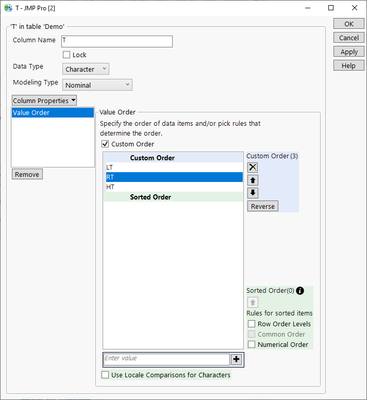
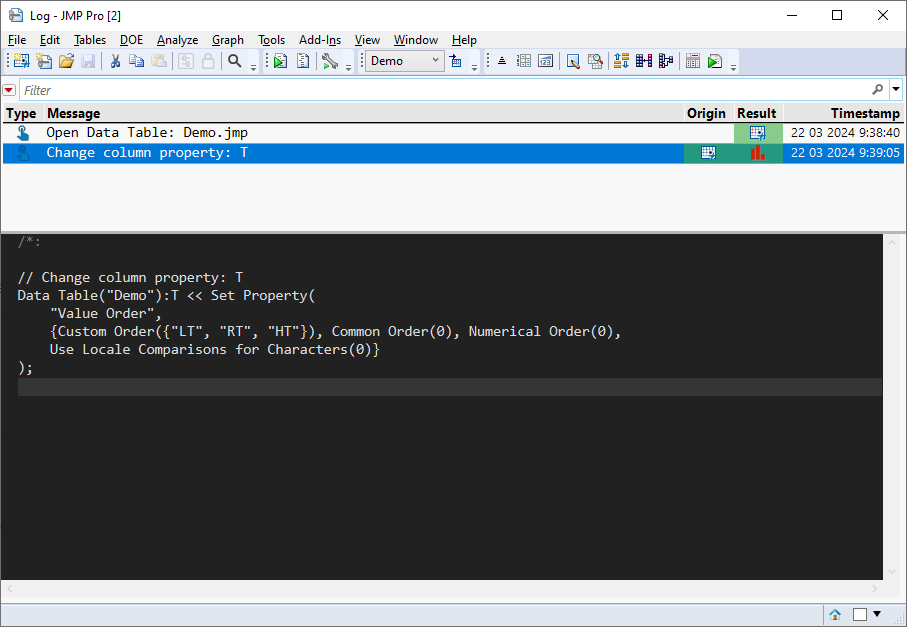
Data Table("Demo"):T << Set Property(
	"Value Order",
	{Custom Order({"LT", "RT", "HT"}), Common Order(0), Numerical Order(0),
	Use Locale Comparisons for Characters(0)}
);
Copy Column / Copy Column properties scripts usually require a bit modification (this is from Copy Column Properties)
Add Column Properties(
	Set Property(
		"Value Order",
		{Custom Order({"LT", "RT", "HT"}), Common Order(0), Numerical Order(0),
		Use Locale Comparisons for Characters(0)}
	)
)- Mark as New
- Bookmark
- Subscribe
- Mute
- Subscribe to RSS Feed
- Get Direct Link
- Report Inappropriate Content
Re: How to use Set Property() to make a custerm order for a column?
Do it interactively in JMP and get the script from enhanced log OR by using Copy Column Properties
Data Table("Demo"):T << Set Property(
	"Value Order",
	{Custom Order({"LT", "RT", "HT"}), Common Order(0), Numerical Order(0),
	Use Locale Comparisons for Characters(0)}
);
Copy Column / Copy Column properties scripts usually require a bit modification (this is from Copy Column Properties)
Add Column Properties(
	Set Property(
		"Value Order",
		{Custom Order({"LT", "RT", "HT"}), Common Order(0), Numerical Order(0),
		Use Locale Comparisons for Characters(0)}
	)
)Recommended Articles
- © 2026 JMP Statistical Discovery LLC. All Rights Reserved.
- Terms of Use
- Privacy Statement
- Contact Us