- JMP will suspend normal business operations for our Winter Holiday beginning on Wednesday, Dec. 24, 2025, at 5:00 p.m. ET (2:00 p.m. ET for JMP Accounts Receivable).
Regular business hours will resume at 9:00 a.m. EST on Friday, Jan. 2, 2026. - We’re retiring the File Exchange at the end of this year. The JMP Marketplace is now your destination for add-ins and extensions.
- RSS フィードを購読する
- トピックを新着としてマーク
- トピックを既読としてマーク
- このトピックを現在のユーザーにフロートします
- ブックマーク
- 購読
- ミュート
- 印刷用ページ
Discussions
Solve problems, and share tips and tricks with other JMP users.- JMP User Community
- :
- Discussions
- :
- How to split multi-word-values and re-arranging them in alphabetical order

- 新着としてマーク
- ブックマーク
- 購読
- ミュート
- RSS フィードを購読する
- ダイレクトリンクを取得
- 印刷
- 不適切なコンテンツを報告
How to split multi-word-values and re-arranging them in alphabetical order
I have a column with character values that are two letter abbreviations. Some are single values and others are multiple values separated by the delimiter “/”. The problem is that the multi-value values are not in alphabetical order.
I want to iterate through each row and split the multi-values and re arrange them in alphabetical order and insert the new "value" in a New Column. Single values should be just "Copied" and nulls left as nulls.
This is way over my head and I will appreciate any suggestions pointers or reading lists to help me fix this one.
Thanks!
Current data NEW Data
AB AB
CD CD
EF EF
CD/AB AB/CD
null null
EF/AB/CD AB/CD/EF
col = ("Really | Long | and | Boring | Column | Name");

Vals = As Column (col) << Get Values;  // Get Values

dt = New Column ("NewAbs", Character, "Nominal" );  //New column for NEW DATA
rows = N rows (dt); // Total number of rows to iterate

for(i = 1 , i <= rows, i++,
	if(rowVal (Contains (Vals[i], "/")),  // check if is multi-value i.e. AB/DF
	rowVal = Words(Vals[i],"/");  // Words will split multi-values at "/"
	sval = Sort List(Eval List(rowVal) );  // sort the character values

	For(i = 1, i <= N Items (sVal), i++,
	newVal = sVal[i];
	conCat = Concat Items ( newVal[i] || "/"|| newVal[i+i])

	),
	Insert Into (dt, conCat[i]),
		if(rowVal (!Contains (Vals[i], "/")),  // if is NOT multi-value i.e. AB/DF
		Insert Into (dt, rowVal[i])),
	 ),
);受理された解決策


- 新着としてマーク
- ブックマーク
- 購読
- ミュート
- RSS フィードを購読する
- ダイレクトリンクを取得
- 印刷
- 不適切なコンテンツを報告
Re: How to split multi-word-values and re-arranging them in alphabetical order
Here is a formula that works on your sample data table. Attached is a data table with the formula applied
If( Contains( :Current data, "/" ) == 0,
	x = :Current data,
	i = 1;
	theList = {};
	While( Word( i, :Current data, "/" ) != "",
		Insert Into( theList, Word( i, :Current data, "/" ) );
		i++;
	);
	theList = Sort List( theList );
	x = theList[1];
	For( i = 2, i <= N Items( theList ), i++,
		x = x || "/" || theList[i]
	);
)

 Community Manager
- 新着としてマーク
- ブックマーク
- 購読
- ミュート
- RSS フィードを購読する
- ダイレクトリンクを取得
- 印刷
- 不適切なコンテンツを報告
Re: How to split multi-word-values and re-arranging them in alphabetical order
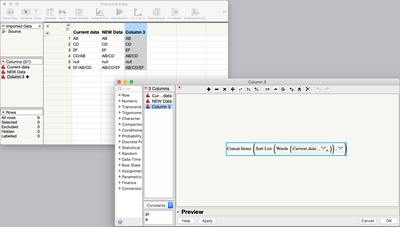
It's not often that I can improve on @txnelson, but I can get it down to a one line formula:
Concat Items( Sort List( Words( :Current data, "/" ) ), "/" )Words() creates a list of words by breaking the column into words using a "/" as delimiter.
Sort List() sorts the list alphabetically
Concat Items() concatenates the items in the list into a single string using the "/" to separate the items.
- 新着としてマーク
- ブックマーク
- 購読
- ミュート
- RSS フィードを購読する
- ダイレクトリンクを取得
- 印刷
- 不適切なコンテンツを報告
Re: How to split multi-word-values and re-arranging them in alphabetical order
Here is a formula that works on your sample data table. Attached is a data table with the formula applied
If( Contains( :Current data, "/" ) == 0,
	x = :Current data,
	i = 1;
	theList = {};
	While( Word( i, :Current data, "/" ) != "",
		Insert Into( theList, Word( i, :Current data, "/" ) );
		i++;
	);
	theList = Sort List( theList );
	x = theList[1];
	For( i = 2, i <= N Items( theList ), i++,
		x = x || "/" || theList[i]
	);
)- 新着としてマーク
- ブックマーク
- 購読
- ミュート
- RSS フィードを購読する
- ダイレクトリンクを取得
- 印刷
- 不適切なコンテンツを報告
Re: How to split multi-word-values and re-arranging them in alphabetical order
It's not often that I can improve on @txnelson, but I can get it down to a one line formula:
Concat Items( Sort List( Words( :Current data, "/" ) ), "/" )Words() creates a list of words by breaking the column into words using a "/" as delimiter.
Sort List() sorts the list alphabetically
Concat Items() concatenates the items in the list into a single string using the "/" to separate the items.
- 新着としてマーク
- ブックマーク
- 購読
- ミュート
- RSS フィードを購読する
- ダイレクトリンクを取得
- 印刷
- 不適切なコンテンツを報告
Re: How to split multi-word-values and re-arranging them in alphabetical order
- 新着としてマーク
- ブックマーク
- 購読
- ミュート
- RSS フィードを購読する
- ダイレクトリンクを取得
- 印刷
- 不適切なコンテンツを報告
Re: How to split multi-word-values and re-arranging them in alphabetical order
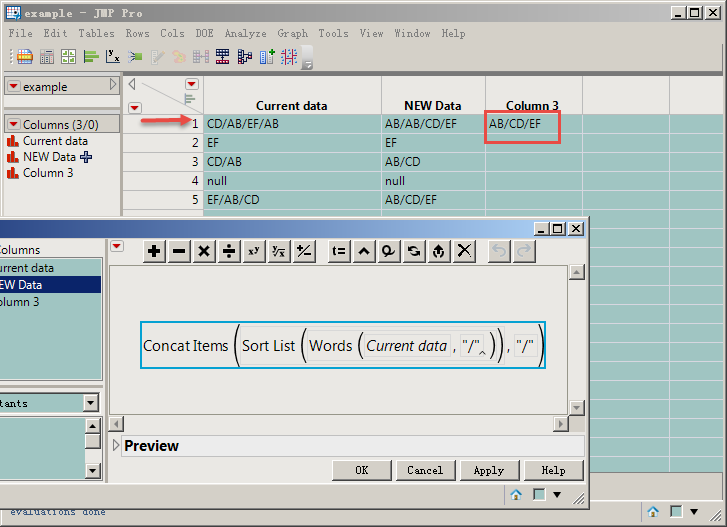
In addition to segmentation and sorting, does this formula add and remove the duplicated values after segmentation and keep only the fields that do not repeat?Such as:
Best regards.
- 新着としてマーク
- ブックマーク
- 購読
- ミュート
- RSS フィードを購読する
- ダイレクトリンクを取得
- 印刷
- 不適切なコンテンツを報告
Re: How to split multi-word-values and re-arranging them in alphabetical order
No, neither solution specified removes duplicates. That requirement was not part of the original request.
The Contains() function has the ability to check across items in a list to see if a match is found. I use it quite often.
Names Default To Here( 1 );
theList = {"AB", "AB", "CD", "EF"};
x = {};
Insert Into( x, theList[1] );
For( i = 2, i <= N Items( theList ), i++,
	If( Contains( x, theList[i] ) == 0,
		Insert Into( x, theList[i] )
	)
);
show(x);
So all that has to be done, is to place this code into one or the other suggested solutions.
x = :Current data;
If( Contains( x, "/" ) > 0,
	theList = Words( x, "/" );
	theList = Sort List( theList );
	x = {};
	Insert Into( x, theList[1] );
	For( i = 2, i <= N Items( theList ), i++,
		If( Contains( x, theList[i] ) == 0,
			Insert Into( x, theList[i] )
		)
	);
	x = Concat Items( x, "/" );
);
x;
- 新着としてマーク
- ブックマーク
- 購読
- ミュート
- RSS フィードを購読する
- ダイレクトリンクを取得
- 印刷
- 不適切なコンテンツを報告
Re: How to split multi-word-values and re-arranging them in alphabetical order
This example illustrates another approach using dictionaries:
Names Default To Here( 1 );
theList = {"AB", "AB", "CD", "EF"};

theArray = Associative Array( theList );

theNewList = theArray << Get Keys;

Show( theNewList );- 新着としてマーク
- ブックマーク
- 購読
- ミュート
- RSS フィードを購読する
- ダイレクトリンクを取得
- 印刷
- 不適切なコンテンツを報告
Re: How to split multi-word-values and re-arranging them in alphabetical order
Dear @txnelson and @Jeff_Perkinson Thank you very much for your answers; 0ne a great lesson about loops and the other a mind boggling one-liner.
I will add both to my bag of JSL.
Best regards.
おすすめの記事
- © 2026 JMP Statistical Discovery LLC. All Rights Reserved.
- 利用規約
- 個人情報の取り扱いについて
- お問い合わせ