cancel
Showing results for 
Show  only  | Search instead for 
Did you mean: 
  • JMP will suspend normal business operations for our Winter Holiday beginning on Wednesday, Dec. 24, 2025, at 5:00 p.m. ET (2:00 p.m. ET for JMP Accounts Receivable).
    Regular business hours will resume at 9:00 a.m. EST on Friday, Jan. 2, 2026.
  • We’re retiring the File Exchange at the end of this year. The JMP Marketplace is now your destination for add-ins and extensions.

Discussions

Solve problems, and share tips and tricks with other JMP users.
%3CLINGO-SUB%20id%3D%22lingo-sub-596675%22%20slang%3D%22en-US%22%20mode%3D%22NONE%22%3E%E3%82%B0%E3%83%A9%E3%83%95%E3%83%93%E3%83%AB%E3%83%80%E3%83%BC%E3%81%A7%E5%B9%B3%E5%9D%87%2B%2F-%203SD%E7%AF%84%E5%9B%B2%E3%82%92%E8%A1%A8%E7%A4%BA%E3%81%99%E3%82%8B%E3%81%AB%E3%81%AF%3F%3C%2FLINGO-SUB%3E%3CLINGO-BODY%20id%3D%22lingo-body-596675%22%20slang%3D%22en-US%22%20mode%3D%22NONE%22%3E%3CP%3E%E3%82%B0%E3%83%A9%E3%83%95%20%E3%83%93%E3%83%AB%E3%83%80%E3%83%BC%E3%81%A7%E5%B9%B3%E5%9D%87%20%2B%2F-3SD%20%E3%81%AE%E7%AF%84%E5%9B%B2%E3%82%92%E8%A1%A8%E7%A4%BA%E3%81%97%E3%81%A6%E3%80%81%E5%80%A4%E3%82%92%E8%A1%A8%E7%A4%BA%E3%81%97%E3%81%A6%E6%AF%94%E8%BC%83%E3%81%97%E3%81%9F%E3%81%84%E3%81%A8%E8%80%83%E3%81%88%E3%81%A6%E3%81%84%E3%81%BE%E3%81%99%E3%80%82%3C%2FP%3E%3CP%3E%E3%82%B0%E3%83%A9%E3%83%95%20%E3%83%93%E3%83%AB%E3%83%80%E3%83%BC%E3%81%AF%E3%80%81%E5%B9%B3%E5%9D%87%20%2B%2F-%20SD%20%E3%81%AE%E6%A3%92%E3%81%AE%E7%AF%84%E5%9B%B2%E3%81%AE%E3%81%BF%E3%82%92%E6%8F%90%E4%BE%9B%E3%81%97%E3%81%BE%E3%81%99%E3%80%82%3C%2FP%3E%3CP%3E%26nbsp%3B%3C%2FP%3E%3C%2FLINGO-BODY%3E%3CLINGO-LABS%20id%3D%22lingo-labs-596675%22%20slang%3D%22en-US%22%20mode%3D%22NONE%22%3E%3CLINGO-LABEL%3E%E3%82%B0%E3%83%A9%E3%83%95%E3%82%A3%E3%83%83%E3%82%AF%3C%2FLINGO-LABEL%3E%3C%2FLINGO-LABS%3E%3CLINGO-SUB%20id%3D%22lingo-sub-596935%22%20slang%3D%22en-US%22%20mode%3D%22NONE%22%3ERe%3A%20%E3%82%B0%E3%83%A9%E3%83%95%20%E3%83%93%E3%83%AB%E3%83%80%E3%83%BC%E3%81%A7%E5%B9%B3%E5%9D%87%20%2B%2F-%203SD%20%E7%AF%84%E5%9B%B2%E3%82%92%E8%A1%A8%E7%A4%BA%E3%81%99%E3%82%8B%E3%81%AB%E3%81%AF%E3%81%A9%E3%81%86%E3%81%99%E3%82%8C%E3%81%B0%E3%82%88%E3%81%84%E3%81%A7%E3%81%99%E3%81%8B%3F%3C%2FLINGO-SUB%3E%3CLINGO-BODY%20id%3D%22lingo-body-596935%22%20slang%3D%22en-US%22%20mode%3D%22NONE%22%3E%3CP%3E%E3%82%84%E3%81%82%3CA%20href%3D%22https%3A%2F%2Fcommunity.jmp.com%2Ft5%2Fuser%2Fviewprofilepage%2Fuser-id%2F45854%22%20target%3D%22_blank%22%3E%40jmpneeeeewbie%3C%2FA%3E%20%E3%80%81%3C%2FP%3E%3CP%3E%26nbsp%3B%3C%2FP%3E%3CP%3E%E3%81%93%E3%82%8C%E3%81%8C%E3%81%BE%E3%81%95%E3%81%AB%E3%81%82%E3%81%AA%E3%81%9F%E3%81%8C%E6%9C%9B%E3%82%80%E3%82%82%E3%81%AE%E3%81%8B%E3%81%A9%E3%81%86%E3%81%8B%E3%81%AF%E3%82%8F%E3%81%8B%E3%82%8A%E3%81%BE%E3%81%9B%E3%82%93%E3%81%8C%E3%80%81%E3%81%9D%E3%82%8C%E3%81%AF%E3%81%82%E3%81%AA%E3%81%9F%E3%81%8C%E6%9C%9B%E3%82%80%E3%82%82%E3%81%AE%E3%82%92%E5%BE%97%E3%82%8B1%E3%81%A4%E3%81%AE%E6%96%B9%E6%B3%95%E3%81%A7%E3%81%99%EF%BC%88%E7%A7%81%E3%81%AFJMP%E3%83%98%E3%83%AB%E3%83%97%E3%81%AE%E3%83%93%E3%83%83%E3%82%B0%E3%82%AF%E3%83%A9%E3%82%B9%E3%81%AE%E4%BE%8B%E3%81%AE%E8%A1%A8%E3%82%92%E4%BD%BF%E7%94%A8%E3%81%97%E3%81%A6%E3%81%84%E3%81%BE%E3%81%99%EF%BC%89%EF%BC%9A%3C%2FP%3E%3CP%3E%3CSPAN%20class%3D%22lia-inline-image-display-wrapper%20lia-image-align-inline%22%20image-alt%3D%22SDF1_1-1675442143859.png%22%20style%3D%22width%3A%20400px%3B%22%3E%3CSPAN%20class%3D%22lia-inline-image-display-wrapper%22%20image-alt%3D%22SDF1_1-1675442143859.png%22%20style%3D%22width%3A%20400px%3B%22%3E%3Cspan%20class%3D%22lia-inline-image-display-wrapper%22%20image-alt%3D%22SDF1_1-1675442143859.png%22%20style%3D%22width%3A%20400px%3B%22%3E%3Cimg%20src%3D%22https%3A%2F%2Fcommunity.jmp.com%2Ft5%2Fimage%2Fserverpage%2Fimage-id%2F49779i465723CA0DE0A849%2Fimage-size%2Fmedium%3Fv%3Dv2%26amp%3Bpx%3D400%22%20role%3D%22button%22%20title%3D%22SDF1_1-1675442143859.png%22%20alt%3D%22SDF1_1-1675442143859.png%22%20%2F%3E%3C%2Fspan%3E%3C%2FSPAN%3E%3C%2FSPAN%3E%3C%2FP%3E%3CP%3E%26nbsp%3B%3C%2FP%3E%3CP%3E%E3%81%93%E3%82%8C%E3%82%92%E5%8F%96%E5%BE%97%E3%81%99%E3%82%8B%E3%81%AB%E3%81%AF%E3%80%81%E3%82%B0%E3%83%A9%E3%83%95%20%E3%83%93%E3%83%AB%E3%83%80%E3%83%BC%E3%81%AB%E7%A7%BB%E5%8B%95%E3%81%97%E3%80%81%E3%83%92%E3%82%B9%E3%83%88%E3%82%B0%E3%83%A9%E3%83%A0%20%E3%82%B0%E3%83%A9%E3%83%95%20%E3%82%AA%E3%83%97%E3%82%B7%E3%83%A7%E3%83%B3%E3%82%92%E9%81%B8%E6%8A%9E%E3%81%97%E3%81%A6%E3%80%81%E3%82%B0%E3%83%A9%E3%83%95%20%E3%83%93%E3%83%AB%E3%83%80%E3%83%BC%E3%81%A7%E5%88%97%E3%82%92%20Y%20%E3%83%AD%E3%83%BC%E3%83%AB%E3%81%AB%E3%82%AD%E3%83%A3%E3%82%B9%E3%83%88%E3%81%97%E3%81%BE%E3%81%99%E3%80%82%20%E6%AC%A1%E3%81%AB%20Y%20%E8%BB%B8%E3%82%92%E3%83%80%E3%83%96%E3%83%AB%E3%82%AF%E3%83%AA%E3%83%83%E3%82%AF%E3%81%99%E3%82%8B%E3%81%A8%E3%80%81%E8%BB%B8%E3%81%AE%E8%A8%AD%E5%AE%9A%E3%82%92%E7%B7%A8%E9%9B%86%E3%81%97%E3%81%A6%E5%8F%82%E7%85%A7%E7%B7%9A%E3%82%92%E8%BF%BD%E5%8A%A0%E3%81%A7%E3%81%8D%E3%81%BE%E3%81%99%E3%80%82%20%3Aheight%20%E3%81%A7%E3%83%92%E3%82%B9%E3%83%88%E3%82%B0%E3%83%A9%E3%83%A0%E5%88%86%E6%9E%90%E3%82%92%E5%AE%9F%E8%A1%8C%E3%81%97%E3%80%81%3Aheight%20%E3%81%AE%20SD%20%E3%81%AB%E5%9F%BA%E3%81%A5%E3%81%84%E3%81%A6%20%2B%2F-3SD%20%E5%80%A4%E3%82%92%E8%A8%88%E7%AE%97%E3%81%99%E3%82%8B%E3%81%93%E3%81%A8%E3%81%A7%E3%80%81%2B%2F-3SD%20%E5%80%A4%E3%82%92%E5%8F%96%E5%BE%97%E3%81%97%E3%81%BE%E3%81%97%E3%81%9F%E3%80%82%20%E5%9F%BA%E6%BA%96%E7%B7%9A%E3%82%B5%E3%83%96%E3%83%91%E3%83%8D%E3%83%AB%E3%81%A7%E3%81%AF%E3%80%81%E7%B7%9A%E3%81%AE%E5%80%A4%E3%82%92%E5%85%A5%E5%8A%9B%E3%81%97%E3%81%9F%E3%82%8A%E3%80%81%E7%B7%9A%E3%81%AE%E8%89%B2%E3%82%84%E7%B7%9A%E3%81%AE%E3%82%B9%E3%82%BF%E3%82%A4%E3%83%AB%E3%82%92%E5%A4%89%E6%9B%B4%E3%81%97%E3%81%9F%E3%82%8A%E3%81%A7%E3%81%8D%E3%81%BE%E3%81%99%E3%80%82%3C%2FP%3E%3CP%3E%3CSPAN%20class%3D%22lia-inline-image-display-wrapper%20lia-image-align-inline%22%20image-alt%3D%22SDF1_2-1675442255106.png%22%20style%3D%22width%3A%20400px%3B%22%3E%3CSPAN%20class%3D%22lia-inline-image-display-wrapper%22%20image-alt%3D%22SDF1_2-1675442255106.png%22%20style%3D%22width%3A%20400px%3B%22%3E%3Cspan%20class%3D%22lia-inline-image-display-wrapper%22%20image-alt%3D%22SDF1_2-1675442255106.png%22%20style%3D%22width%3A%20400px%3B%22%3E%3Cimg%20src%3D%22https%3A%2F%2Fcommunity.jmp.com%2Ft5%2Fimage%2Fserverpage%2Fimage-id%2F49780iBC5A98C4DFAD0FE0%2Fimage-size%2Fmedium%3Fv%3Dv2%26amp%3Bpx%3D400%22%20role%3D%22button%22%20title%3D%22SDF1_2-1675442255106.png%22%20alt%3D%22SDF1_2-1675442255106.png%22%20%2F%3E%3C%2Fspan%3E%3C%2FSPAN%3E%3C%2FSPAN%3E%3C%2FP%3E%3CP%3E%26nbsp%3B%3C%2FP%3E%3CP%3E%E3%81%93%E3%82%8C%E3%81%AF%E3%80%81%E5%AE%9F%E8%A1%8C%E3%81%A7%E3%81%8D%E3%82%8B%201%20%E3%81%A4%E3%81%AE%E6%96%B9%E6%B3%95%E3%81%AB%E3%81%99%E3%81%8E%E3%81%BE%E3%81%9B%E3%82%93%E3%80%82%3C%2FP%3E%3CP%3E%26nbsp%3B%3C%2FP%3E%3CP%3E%E3%81%93%E3%82%8C%E3%81%8C%E5%BD%B9%E7%AB%8B%E3%81%A4%E3%81%93%E3%81%A8%E3%82%92%E9%A1%98%E3%81%A3%E3%81%A6%E3%81%84%E3%81%BE%E3%81%99!%26lt%3B%3C%2FP%3E%3CP%3EDS%3C%2FP%3E%3C%2FLINGO-BODY%3E
Choose Language Hide Translation Bar
jmpneeeewbie
Level II

How to show mean +/- 3SD range in graph builder?

I want to show and compare the values by showing its mean+/-3SD range in graph builder.

The graph builder only provide the bar range of mean+/-SD.

 

2 REPLIES 2
SDF1
Super User

Re: How to show mean +/- 3SD range in graph builder?

Hi @jmpneeeewbie ,


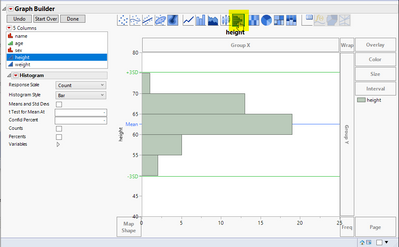
  Not sure if this is exactly what you want, but it is ONE way of getting what you want (I'm using the Big Class example table from JMP help):
SDF1_1-1675442143859.png


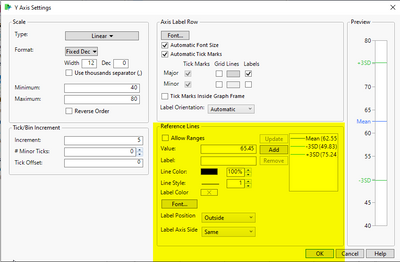
  To get this, go to graph builder, select the histogram graph option and cast a column to the Y role in graph builder. If you then double click the Y axis, you can edit the setting for the axis and add some reference lines. I got the +/-3SD values by performing a histogram analysis on :height and then just calculating the +/-3SD values based on the SD of :height. In the Reference Lines sub panel, you can enter in the values for the lines, change the line colors and even line styles. 
SDF1_2-1675442255106.png


  This is just one way it can be done.


Hope this helps!<

DS

Victor_G
Super User

Re: How to show mean +/- 3SD range in graph builder?

Hi @jmpneeeewbie,


For Control chart, is there a reason for using Graph Builder and not Control Chart Builder (in Analyze, Quality and Process, Control Chart Builder) ?

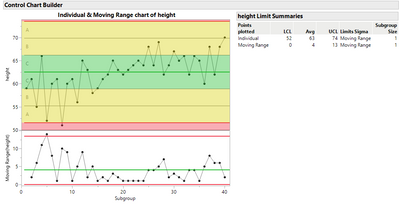
You just have to select your Y response, and in the left panel, check in the submenu "Limits[1]" the options "Zones" and "Shade Zones". Once I have checked these options and click on done, I have this control chart (for Big Class dataset) :
 

Victor_G_1-1675443833260.png

And you can easily spot the +/- 1 SD zone (C, in green), +/- 2 SD (B) and +/-3 SD (A) in yellow.

Maybe what not you expect, but I just wanted to make sure you know this option in Control Chart Builder.

Victor GUILLER

"It is not unusual for a well-designed experiment to analyze itself" (Box, Hunter and Hunter)

Recommended Articles