cancel
Showing results for 
Show  only  | Search instead for 
Did you mean: 
  • JMP will suspend normal business operations for our Winter Holiday beginning on Wednesday, Dec. 24, 2025, at 5:00 p.m. ET (2:00 p.m. ET for JMP Accounts Receivable).
    Regular business hours will resume at 9:00 a.m. EST on Friday, Jan. 2, 2026.
  • We’re retiring the File Exchange at the end of this year. The JMP Marketplace is now your destination for add-ins and extensions.

Discussions

Solve problems, and share tips and tricks with other JMP users.
%3CLINGO-SUB%20id%3D%22lingo-sub-375653%22%20slang%3D%22en-US%22%20mode%3D%22NONE%22%3E%E3%83%97%E3%83%AD%E3%82%BB%E3%82%B9%E3%83%91%E3%83%95%E3%82%A9%E3%83%BC%E3%83%9E%E3%83%B3%E3%82%B9%E3%82%B0%E3%83%A9%E3%83%95%E3%82%92JPEG%20%2F%20PNG%E3%81%A8%E3%81%97%E3%81%A6%E4%BF%9D%E5%AD%98%E3%81%99%E3%82%8B%E3%81%AB%E3%81%AF%E3%81%A9%E3%81%86%E3%81%99%E3%82%8C%E3%81%B0%E3%82%88%E3%81%84%E3%81%A7%E3%81%99%E3%81%8B%EF%BC%9F%3C%2FLINGO-SUB%3E%3CLINGO-BODY%20id%3D%22lingo-body-375653%22%20slang%3D%22en-US%22%20mode%3D%22NONE%22%3E%3CP%3E%E3%81%93%E3%82%93%E3%81%AB%E3%81%A1%E3%81%AFJMP%E3%80%81%3C%2FP%3E%3CP%3E%26nbsp%3B%3C%2FP%3E%3CP%3E%E4%BE%8B%E3%81%A8%E3%81%97%E3%81%A6%E5%A4%A7%E3%81%8D%E3%81%AA%E3%82%AF%E3%83%A9%E3%82%B9%E3%82%92%E5%8F%96%E3%82%8A%E4%B8%8A%E3%81%92%E3%81%BE%E3%81%97%E3%82%87%E3%81%86%E3%80%82%3C%2FP%3E%3CP%3E%E3%83%97%E3%83%AD%E3%82%BB%E3%82%B9%E3%83%91%E3%83%95%E3%82%A9%E3%83%BC%E3%83%9E%E3%83%B3%E3%82%B9%E3%82%B0%E3%83%A9%E3%83%95%E3%82%92JPEG%20%2F%20PNG%E3%81%A8%E3%81%97%E3%81%A6%E3%82%A8%E3%82%AF%E3%82%B9%E3%83%9D%E3%83%BC%E3%83%88%E3%81%99%E3%82%8BJSL%E3%82%B9%E3%82%AF%E3%83%AA%E3%83%97%E3%83%88%E3%81%AE%E4%BE%8B%E3%81%AF%E3%81%82%E3%82%8A%E3%81%BE%E3%81%99%E3%81%8B%EF%BC%9F%20%E7%8F%BE%E5%9C%A8%E3%80%81%E3%82%B0%E3%83%A9%E3%83%95%E3%82%92%E3%82%AF%E3%83%AA%E3%83%83%E3%83%97%E3%83%9C%E3%83%BC%E3%83%89%E3%81%AB%E6%89%8B%E5%8B%95%E3%81%A7%E3%82%B3%E3%83%94%E3%83%BC%E3%81%97%E3%81%A6%E3%80%81pptx%E3%81%AB%E8%B2%BC%E3%82%8A%E4%BB%98%E3%81%91%E3%81%A6%E3%81%84%E3%81%BE%E3%81%99%E3%80%82%20%E3%81%9D%E3%82%8C%E3%82%92%E8%A1%8C%E3%81%86%E6%96%B9%E6%B3%95%E3%82%92%E8%87%AA%E5%8B%95%E5%8C%96%E3%81%97%E3%81%9F%E3%81%84%E3%80%82%3A)%3C%2FP%3E%3CP%3E%E3%81%A1%E3%81%AA%E3%81%BF%E3%81%AB%E3%80%81%E3%83%97%E3%83%AD%E3%82%BB%E3%82%B9%E3%83%91%E3%83%95%E3%82%A9%E3%83%BC%E3%83%9E%E3%83%B3%E3%82%B9%E3%82%B0%E3%83%A9%E3%83%95%E3%82%92%E4%BD%9C%E6%88%90%E3%81%99%E3%82%8B%E3%81%9F%E3%82%81%E3%81%A0%E3%81%91%E3%81%AB%E3%80%81%E3%82%B9%E3%83%9A%E3%83%83%E3%82%AF%E5%88%B6%E9%99%90%E3%81%AB%E4%B9%B1%E6%95%B0%E3%82%92%E8%A8%AD%E5%AE%9A%E3%81%97%E3%81%BE%E3%81%97%E3%81%9F%E3%80%82%3C%2FP%3E%3CP%3E%26nbsp%3B%3C%2FP%3E%3CP%3E%3CSPAN%20class%3D%22lia-inline-image-display-wrapper%20lia-image-align-inline%22%20image-alt%3D%22gtroey86_0-1618008971882.png%22%20style%3D%22width%3A%20400px%3B%22%3E%3Cspan%20class%3D%22lia-inline-image-display-wrapper%22%20image-alt%3D%22gtroey86_0-1618008971882.png%22%20style%3D%22width%3A%20400px%3B%22%3E%3Cimg%20src%3D%22https%3A%2F%2Fcommunity.jmp.com%2Ft5%2Fimage%2Fserverpage%2Fimage-id%2F31971iA70F9C6563D7868C%2Fimage-size%2Fmedium%3Fv%3Dv2%26amp%3Bpx%3D400%22%20role%3D%22button%22%20title%3D%22gtroey86_0-1618008971882.png%22%20alt%3D%22gtroey86_0-1618008971882.png%22%20%2F%3E%3C%2Fspan%3E%3C%2FSPAN%3E%3C%2FP%3E%3CP%3E%26nbsp%3B%3C%2FP%3E%3C%2FLINGO-BODY%3E%3CLINGO-LABS%20id%3D%22lingo-labs-375653%22%20slang%3D%22en-US%22%20mode%3D%22NONE%22%3E%3CLINGO-LABEL%3E%E3%82%B0%E3%83%A9%E3%83%95%E3%82%A3%E3%83%83%E3%82%AF%E3%82%B9%3C%2FLINGO-LABEL%3E%3CLINGO-LABEL%3E%E3%82%B9%E3%82%AF%E3%83%AA%E3%83%97%E3%83%86%E3%82%A3%E3%83%B3%E3%82%B0%3C%2FLINGO-LABEL%3E%3C%2FLINGO-LABS%3E%3CLINGO-SUB%20id%3D%22lingo-sub-375676%22%20slang%3D%22en-US%22%20mode%3D%22NONE%22%3ERe%EF%BC%9A%E3%83%97%E3%83%AD%E3%82%BB%E3%82%B9%E3%83%91%E3%83%95%E3%82%A9%E3%83%BC%E3%83%9E%E3%83%B3%E3%82%B9%E3%82%B0%E3%83%A9%E3%83%95%E3%82%92JPEG%20%2F%20PNG%E3%81%A8%E3%81%97%E3%81%A6%E4%BF%9D%E5%AD%98%E3%81%99%E3%82%8B%E3%81%AB%E3%81%AF%E3%81%A9%E3%81%86%E3%81%99%E3%82%8C%E3%81%B0%E3%82%88%E3%81%84%E3%81%A7%E3%81%99%E3%81%8B%EF%BC%9F%3C%2FLINGO-SUB%3E%3CLINGO-BODY%20id%3D%22lingo-body-375676%22%20slang%3D%22en-US%22%20mode%3D%22NONE%22%3E%3CP%3E%E3%82%B0%E3%83%A9%E3%83%95%E3%82%92PowerPoint%E3%81%AB%E4%BF%9D%E5%AD%98%E3%81%99%E3%82%8B1%E3%81%A4%E3%81%AE%E6%96%B9%E6%B3%95%E3%82%92%E7%A4%BA%E3%81%99%E7%B0%A1%E5%8D%98%E3%81%AA%E3%82%B9%E3%82%AF%E3%83%AA%E3%83%97%E3%83%88%E3%82%92%E6%AC%A1%E3%81%AB%E7%A4%BA%E3%81%97%E3%81%BE%E3%81%99%E3%80%82%3C%2FP%3E%0A%3CP%3E%3CSPAN%20class%3D%22lia-inline-image-display-wrapper%20lia-image-align-inline%22%20image-alt%3D%22pp.PNG%22%20style%3D%22width%3A%20999px%3B%22%3E%3Cspan%20class%3D%22lia-inline-image-display-wrapper%22%20image-alt%3D%22pp.PNG%22%20style%3D%22width%3A%20999px%3B%22%3E%3Cimg%20src%3D%22https%3A%2F%2Fcommunity.jmp.com%2Ft5%2Fimage%2Fserverpage%2Fimage-id%2F31972i6965540451487E40%2Fimage-size%2Flarge%3Fv%3Dv2%26amp%3Bpx%3D999%22%20role%3D%22button%22%20title%3D%22pp.PNG%22%20alt%3D%22pp.PNG%22%20%2F%3E%3C%2Fspan%3E%3C%2FSPAN%3E%3C%2FP%3E%0A%3CPRE%3E%3CCODE%20class%3D%22%20language-jsl%22%3ENames%20Default%20To%20Here(%201%20)%3B%0Adt%20%3D%20Open(%20%22%24SAMPLE_DATA%5Csemiconductor%20capability.jmp%22%20)%3B%0Aps%20%3D%20Process%20Screening(%0A%20Process%20Variables(%20%3ANPN1%20)%2C%0A%20Control%20Chart%20Type(%20%22Indiv%20and%20MR%22%20)%2C%0A%20Process%20Performance%20Graph(%201%20)%0A)%3B%0AReport(%20ps%20)%5B%22Process%20Performance%20Graph%22%5D%20%26lt%3B%26lt%3B%20save%20presentation(%20%22%24TEMP%5Cmygraph.pptx%22%20)%3B%0A%0AOpen(%20%22%24TEMP%5Cmygraph.pptx%22%20)%3B%3C%2FCODE%3E%3C%2FPRE%3E%0A%3CP%3E%26nbsp%3B%3C%2FP%3E%3C%2FLINGO-BODY%3E%3CLINGO-SUB%20id%3D%22lingo-sub-375865%22%20slang%3D%22en-US%22%20mode%3D%22NONE%22%3ERe%EF%BC%9A%E3%83%97%E3%83%AD%E3%82%BB%E3%82%B9%E3%83%91%E3%83%95%E3%82%A9%E3%83%BC%E3%83%9E%E3%83%B3%E3%82%B9%E3%82%B0%E3%83%A9%E3%83%95%E3%82%92JPEG%20%2F%20PNG%E3%81%A8%E3%81%97%E3%81%A6%E4%BF%9D%E5%AD%98%E3%81%99%E3%82%8B%E3%81%AB%E3%81%AF%E3%81%A9%E3%81%86%E3%81%99%E3%82%8C%E3%81%B0%E3%82%88%E3%81%84%E3%81%A7%E3%81%99%E3%81%8B%EF%BC%9F%3C%2FLINGO-SUB%3E%3CLINGO-BODY%20id%3D%22lingo-body-375865%22%20slang%3D%22en-US%22%20mode%3D%22NONE%22%3E%3CP%3E%E3%81%93%E3%82%93%E3%81%AB%E3%81%A1%E3%81%AF%E3%83%8D%E3%83%AB%E3%82%BD%E3%83%B3%E3%80%81%3C%2FP%3E%3CP%3E%26nbsp%3B%3C%2FP%3E%3CP%3E%E8%BF%85%E9%80%9F%E3%81%AA%E5%AF%BE%E5%BF%9C%E3%81%AB%E6%84%9F%E8%AC%9D%E3%81%97%E3%81%BE%E3%81%99%E3%80%82%20%E3%81%9D%E3%82%8C%E3%81%AF%E3%81%86%E3%81%BE%E3%81%8F%E3%81%84%E3%81%8D%E3%81%BE%E3%81%99%EF%BC%81%3A)%3C%2FP%3E%3CP%3E%26nbsp%3B%3C%2FP%3E%3CP%3E%26nbsp%3B%3C%2FP%3E%3CP%3E%26nbsp%3B%3C%2FP%3E%3C%2FLINGO-BODY%3E
Choose Language Hide Translation Bar
gtroey86
Level I

How to save Process Performance Graph as JPEG/PNG?

Hi JMP, 


Let's take the big class as an example. 

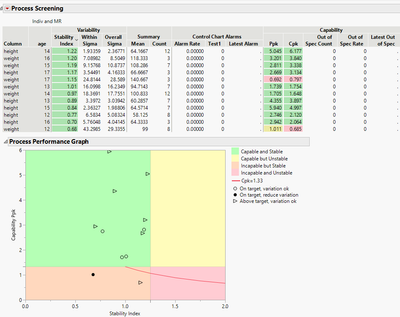
Do you have a JSL script example to export the process performance graph as a JPEG/PNG? Currently, I manually copy the graph to clipboard and paste it at my pptx. Wish to have automate way of doing it. :)

By the way, I set a random number for the spec limit just to produce the process performance graph.
 

gtroey86_0-1618008971882.png


1 ACCEPTED SOLUTION

Accepted Solutions
txnelson
Super User

Re: How to save Process Performance Graph as JPEG/PNG?

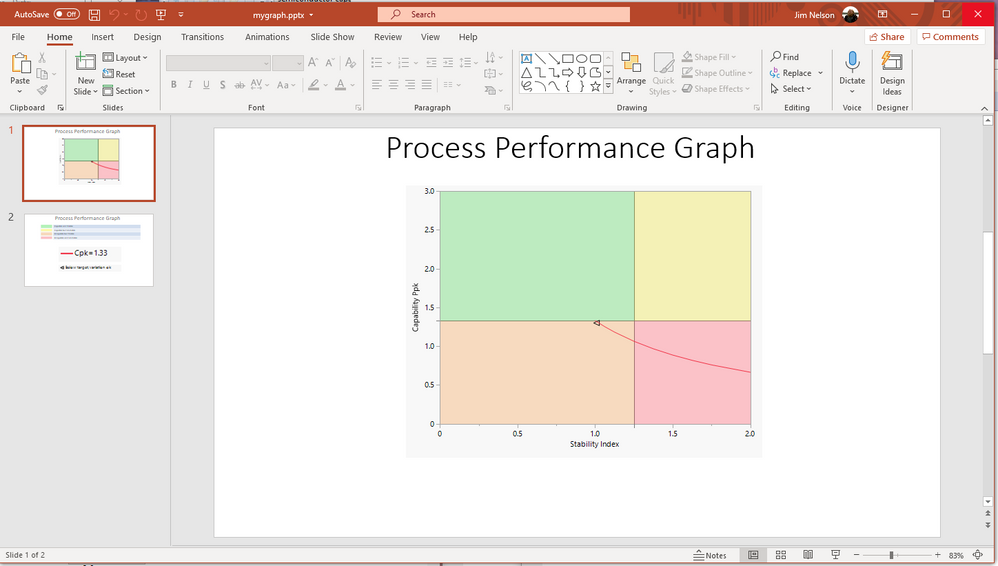
Here is a simple script to show one way of saving the graph to PowerPoint
pp.PNG

Names Default To Here( 1 );
dt = Open( "$SAMPLE_DATA\semiconductor capability.jmp" );
ps = Process Screening(
	Process Variables( :NPN1 ),
	Control Chart Type( "Indiv and MR" ),
	Process Performance Graph( 1 )
);
Report( ps )["Process Performance Graph"] << save presentation( "$TEMP\mygraph.pptx" );

Open( "$TEMP\mygraph.pptx" );


Jim

View solution in original post

2 REPLIES 2
txnelson
Super User

Re: How to save Process Performance Graph as JPEG/PNG?

Here is a simple script to show one way of saving the graph to PowerPoint

pp.PNG

Names Default To Here( 1 );
dt = Open( "$SAMPLE_DATA\semiconductor capability.jmp" );
ps = Process Screening(
	Process Variables( :NPN1 ),
	Control Chart Type( "Indiv and MR" ),
	Process Performance Graph( 1 )
);
Report( ps )["Process Performance Graph"] << save presentation( "$TEMP\mygraph.pptx" );

Open( "$TEMP\mygraph.pptx" );


Jim
gtroey86
Level I

Re: How to save Process Performance Graph as JPEG/PNG?

HI Nelson,


Appreciate your prompt response. It works well ! :)


Recommended Articles