Turn on suggestions
Auto-suggest helps you quickly narrow down your search results by suggesting possible matches as you type.
- JMP will suspend normal business operations for our Winter Holiday beginning on Wednesday, Dec. 24, 2025, at 5:00 p.m. ET (2:00 p.m. ET for JMP Accounts Receivable).
Regular business hours will resume at 9:00 a.m. EST on Friday, Jan. 2, 2026. - We’re retiring the File Exchange at the end of this year. The JMP Marketplace is now your destination for add-ins and extensions.
Options
- Subscribe to RSS Feed
- Mark Topic as New
- Mark Topic as Read
- Float this Topic for Current User
- Bookmark
- Subscribe
- Mute
- Printer Friendly Page
Discussions
Solve problems, and share tips and tricks with other JMP users.- JMP User Community
- :
- Discussions
- :
- How to save Process Performance Graph as JPEG/PNG?

Level I
- Mark as New
- Bookmark
- Subscribe
- Mute
- Subscribe to RSS Feed
- Get Direct Link
- Report Inappropriate Content
How to save Process Performance Graph as JPEG/PNG?
Created:
Apr 9, 2021 07:08 PM
| Last Modified: Jun 11, 2023 4:12 AM
(2172 views)
Hi JMP,
Let's take the big class as an example.
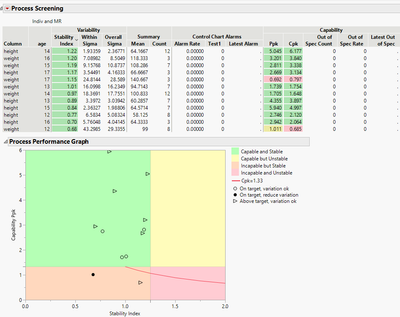
Do you have a JSL script example to export the process performance graph as a JPEG/PNG? Currently, I manually copy the graph to clipboard and paste it at my pptx. Wish to have automate way of doing it. :)
By the way, I set a random number for the spec limit just to produce the process performance graph.
1 ACCEPTED SOLUTION
Accepted Solutions


Super User
Solution
- Mark as New
- Bookmark
- Subscribe
- Mute
- Subscribe to RSS Feed
- Get Direct Link
- Report Inappropriate Content
Re: How to save Process Performance Graph as JPEG/PNG?
Created:
Apr 9, 2021 09:34 PM
| Last Modified: Apr 9, 2021 6:35 PM
(2159 views)
| Posted in reply to message from gtroey86 04-09-2021
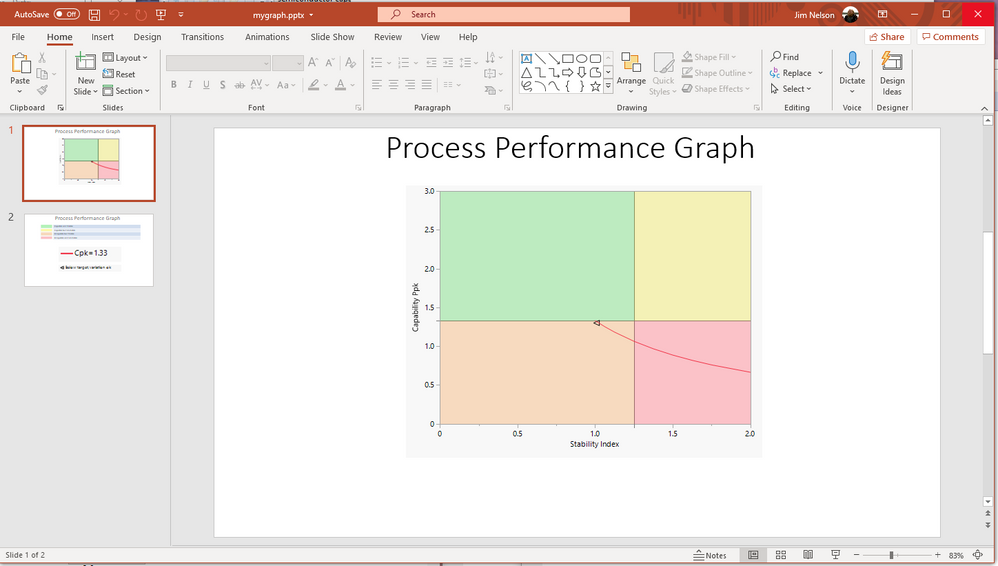
Here is a simple script to show one way of saving the graph to PowerPoint
Names Default To Here( 1 );
dt = Open( "$SAMPLE_DATA\semiconductor capability.jmp" );
ps = Process Screening(
	Process Variables( :NPN1 ),
	Control Chart Type( "Indiv and MR" ),
	Process Performance Graph( 1 )
);
Report( ps )["Process Performance Graph"] << save presentation( "$TEMP\mygraph.pptx" );

Open( "$TEMP\mygraph.pptx" );
Jim
2 REPLIES 2
Super User
Solution
- Mark as New
- Bookmark
- Subscribe
- Mute
- Subscribe to RSS Feed
- Get Direct Link
- Report Inappropriate Content
Re: How to save Process Performance Graph as JPEG/PNG?
Created:
Apr 9, 2021 09:34 PM
| Last Modified: Apr 9, 2021 6:35 PM
(2160 views)
| Posted in reply to message from gtroey86 04-09-2021
Here is a simple script to show one way of saving the graph to PowerPoint
Names Default To Here( 1 );
dt = Open( "$SAMPLE_DATA\semiconductor capability.jmp" );
ps = Process Screening(
	Process Variables( :NPN1 ),
	Control Chart Type( "Indiv and MR" ),
	Process Performance Graph( 1 )
);
Report( ps )["Process Performance Graph"] << save presentation( "$TEMP\mygraph.pptx" );

Open( "$TEMP\mygraph.pptx" );
Jim
Level I
- Mark as New
- Bookmark
- Subscribe
- Mute
- Subscribe to RSS Feed
- Get Direct Link
- Report Inappropriate Content
Re: How to save Process Performance Graph as JPEG/PNG?
HI Nelson,
Appreciate your prompt response. It works well ! :)
Recommended Articles
- © 2025 JMP Statistical Discovery LLC. All Rights Reserved.
- Terms of Use
- Privacy Statement
- Contact Us