- JMP will suspend normal business operations for our Winter Holiday beginning on Wednesday, Dec. 24, 2025, at 5:00 p.m. ET (2:00 p.m. ET for JMP Accounts Receivable).
Regular business hours will resume at 9:00 a.m. EST on Friday, Jan. 2, 2026. - We’re retiring the File Exchange at the end of this year. The JMP Marketplace is now your destination for add-ins and extensions.
- Subscribe to RSS Feed
- Mark Topic as New
- Mark Topic as Read
- Float this Topic for Current User
- Bookmark
- Subscribe
- Mute
- Printer Friendly Page
Discussions
Solve problems, and share tips and tricks with other JMP users.- JMP User Community
- :
- Discussions
- :
- How to rename multiple variables from 1 column?

- Mark as New
- Bookmark
- Subscribe
- Mute
- Subscribe to RSS Feed
- Get Direct Link
- Report Inappropriate Content
How to rename multiple variables from 1 column?
I have multiple variables in 1 column (i.e., B,F,T) which needed to be renamed.
Local({dt, col1},
	dt = Data Table("ProductDefect");
	dt << Begin Data Update;
	col1 = dt << New Column(dt:LayerData);
	col1 << Set Name("Side");
	dt << Move Selected Columns({col1}, after(dt:LayerData));
	For Each Row(
		dt,
		col1[] = If(Contains(dt:LayerData, "B"),
			"Back",
			dt:LayerData
		)
	);
	dt << End Data Update;
);
Using this script, I am only changing for B while the other variable (i.e., "F","T") will not be changed. What should be done for all to be renamed in new column; B = Back, F = Front, T = Top?
Accepted Solutions


- Mark as New
- Bookmark
- Subscribe
- Mute
- Subscribe to RSS Feed
- Get Direct Link
- Report Inappropriate Content
Re: How to rename multiple variables from 1 column?
You can use Recode and Replace string multiple times. I don't know your data, so I'm not sure what would be the best way (I would maybe go with simple regex and if more complicated is necessary you could also do that)
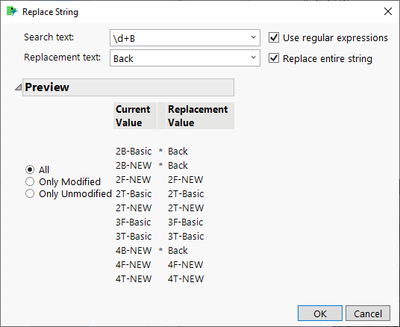
Repeat this for all with their own patterns

And JMP creates you a script
// Recode column: ProductDefect
Local({dt},
	dt = Data Table("Sheet1");
	dt << Begin Data Update;
	dt << Recode Column(
		dt:ProductDefect,
		{Regex(_rcNow, ".*?\d+B.*", "Back", GLOBALREPLACE),
		Regex(_rcNow, ".*?\d+T.*", "Top", GLOBALREPLACE),
		Regex(_rcNow, ".*?\d+F.*", "Front", GLOBALREPLACE)},
		Update Properties(1),
		Target Column(:ProductDefect)
	);
	dt << End Data Update;
);
If you don't want to do it in place,run recode without that enabled
- Mark as New
- Bookmark
- Subscribe
- Mute
- Subscribe to RSS Feed
- Get Direct Link
- Report Inappropriate Content
Re: How to rename multiple variables from 1 column?
Recode platform can create this type of conversion for you easily.


Local({dt, col1},
	dt = Data Table("Big Class");
	dt << Begin Data Update;
	col1 = dt << New Column(dt:sex);
	col1 << Set Name("sex 2");
	dt << Move Selected Columns({col1}, after(dt:sex));
	dt << Recode Column(
		dt:sex,
		{Map Value(_rcOrig, {"F", "Female", "M", "Male"}, Unmatched(_rcNow))},
		Update Properties(1),
		Target Column(col1)
	);
	dt << End Data Update;
);
You might also want to consider using Value Labels column property

It won't change the data in the table, but you will see the "recoded" values
- Mark as New
- Bookmark
- Subscribe
- Mute
- Subscribe to RSS Feed
- Get Direct Link
- Report Inappropriate Content
Re: How to rename multiple variables from 1 column?
Thank you for the feedback!
However, by using recode platform, the script cannot be automated as i will have to upload data from database and manually Recode it everytime there are new additions to database.
As Sample attached, say, my data keeps being updated from system the naming will be changing continuously while the number and variable maintains (e.g, 1B-xx, 1F-xx, 1T-xx, 2B-xx, 2F-xx, 2T-xx, ...). From system, it will not be automatically displayed whereby B = Back, F = Front, T = Top.
Is there a way without having to repeat Recode everytime I want to do analysis?
- Mark as New
- Bookmark
- Subscribe
- Mute
- Subscribe to RSS Feed
- Get Direct Link
- Report Inappropriate Content
Re: How to rename multiple variables from 1 column?
Should "2B-New" be "Back" or "2Back-New" and so on?
- Mark as New
- Bookmark
- Subscribe
- Mute
- Subscribe to RSS Feed
- Get Direct Link
- Report Inappropriate Content
Re: How to rename multiple variables from 1 column?
Yes, in new column, I only want to specify the "Side". So 2B-New will be "Back", 2T-Basic will be "Top" and so on.
- Mark as New
- Bookmark
- Subscribe
- Mute
- Subscribe to RSS Feed
- Get Direct Link
- Report Inappropriate Content
Re: How to rename multiple variables from 1 column?
You can use Recode and Replace string multiple times. I don't know your data, so I'm not sure what would be the best way (I would maybe go with simple regex and if more complicated is necessary you could also do that)
Repeat this for all with their own patterns
And JMP creates you a script
// Recode column: ProductDefect
Local({dt},
	dt = Data Table("Sheet1");
	dt << Begin Data Update;
	dt << Recode Column(
		dt:ProductDefect,
		{Regex(_rcNow, ".*?\d+B.*", "Back", GLOBALREPLACE),
		Regex(_rcNow, ".*?\d+T.*", "Top", GLOBALREPLACE),
		Regex(_rcNow, ".*?\d+F.*", "Front", GLOBALREPLACE)},
		Update Properties(1),
		Target Column(:ProductDefect)
	);
	dt << End Data Update;
);
If you don't want to do it in place,run recode without that enabled
- Mark as New
- Bookmark
- Subscribe
- Mute
- Subscribe to RSS Feed
- Get Direct Link
- Report Inappropriate Content
Re: How to rename multiple variables from 1 column?
Thanks a lot for the help! This works as what I have in mind!
Recommended Articles
- © 2026 JMP Statistical Discovery LLC. All Rights Reserved.
- Terms of Use
- Privacy Statement
- Contact Us