- JMP will suspend normal business operations for our Winter Holiday beginning on Wednesday, Dec. 24, 2025, at 5:00 p.m. ET (2:00 p.m. ET for JMP Accounts Receivable).
Regular business hours will resume at 9:00 a.m. EST on Friday, Jan. 2, 2026. - We’re retiring the File Exchange at the end of this year. The JMP Marketplace is now your destination for add-ins and extensions.
- Subscribe to RSS Feed
- Mark Topic as New
- Mark Topic as Read
- Float this Topic for Current User
- Bookmark
- Subscribe
- Mute
- Printer Friendly Page
Discussions
Solve problems, and share tips and tricks with other JMP users.- JMP User Community
- :
- Discussions
- :
- How to remove "where" condition from Contol Chart displays.

- Mark as New
- Bookmark
- Subscribe
- Mute
- Subscribe to RSS Feed
- Get Direct Link
- Report Inappropriate Content
How to remove "where" condition from Contol Chart displays.
Hello,
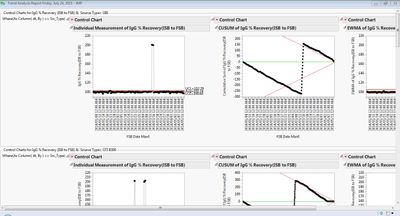
I'm plotting three different charts(IR,EWMA & CUSUM) in a single window but the problem I'm facing is it's displaying the where condition used within charts on the display window as well.
Display Window:
Code:
obj=New Window("Trend Analysis Report "||Long Date(Today()),
vlb=V list Box()
);
display=Function({Process,Label,By,Src_Type,lmt1,lmt2,lmt3},
r1=New Window("",
plb=Panel Box(" Control Charts for "||Process||" & "||" Source Type= "||Src_Type,Current Data Table(dt);
H List Box(
Control Chart(
Sample Label(Column(dt,Label)),
Group Size(1),KSigma(3),
As Column(dt,Process),Individual Measurement(LCL(lmt1[6]),AVG(lmt1[5]),UCL(lmt1[7]))),
Where(As Column(dt,By)==Src_Type);
);
Sample Label(Column(dt,Label)),
Sample Size(1),
Alpha(0.00269979606326021),
Show Limits Legend(0),
As Column(dt,Process),CUSUM(Two Sided(1),AVG(lmt2[5]))),
Where(As Column(dt,By)==Src_Type);
);
Sample Label(Column(dt,Label)),
Sample Size(1),
KSigma(3),Weight(0.2),
As Column(dt,Process),EWMA(AVG(lmt3[5]))),
Where(As Column(dt,By)==Src_Type);
);
);
);
);vlb<<Append(r1);r1<<Close Window;
);
plot=Function({lmts,pmt_path},
param_dt=Open(pmt_path,"invisible");
param_summ=param_dt<<Summary(Invisible,
Group(:Group By,:Process,:Sample Label,:By))<<Show Window(0);
For(q=12,q<=NRow(param_summ),q++,Current Data Table(param_summ);
col2=:Process[q];col3=:Sample Label[q];col4=:By[q];
Current Data Table(lmts);
clms=lmts<<Get Column Names(String);
Remove From(clms,1,3);
For(t=1,t<=N Items(clms),t++,Current Data Table(lmts);
indv_lmts=As Column(clms[t])[lmts<<Get Rows Where(:Parameter==col2 & :Chart Type=="Individual")];
cusum_lmts=As Column(clms[t])[lmts<<Get Rows Where(:Parameter==col2 & :Chart Type=="CUSUM")];
ewma_lmts=As Column(clms[t])[lmts<<Get Rows Where(:Parameter==col2 & :Chart Type=="EWMA")];
display(col2,col3,col4,clms[t],indv_lmts,cusum_lmts,ewma_lmts);
);
);
);
I'm not able to figure out why it is happening. Any help would be appreciated. Thanks!!
Accepted Solutions

- Mark as New
- Bookmark
- Subscribe
- Mute
- Subscribe to RSS Feed
- Get Direct Link
- Report Inappropriate Content
Re: How to remove "where" condition from Contol Chart displays.
See if this example is helpful. I modified an example in the excellent JSL intro Jump into JMP Scripting by Murphrey and Lucas.
dt = Open( "$SAMPLE_DATA/Quality Control/Diameter.jmp" );
cc = Control Chart(
Group Size( 1 ),
KSigma( 3 ),
Chart Col( :DIAMETER, Individual Measurement ),
Where( :MACHINE == "A386" )
);
Wait( 2 );
(Report( cc ) << Parent)[Text Box( 1 )] << delete;
Wait( 2 );


- Mark as New
- Bookmark
- Subscribe
- Mute
- Subscribe to RSS Feed
- Get Direct Link
- Report Inappropriate Content
Re: How to remove "where" condition from Contol Chart displays.
The text for the where clause is standard output from JMP and not specific to your code. For example for this script:
Control Chart(
Group Size( 1 ),
KSigma( 3 ),
Chart Col( :DIAMETER, Individual Measurement ),
Where(:Machine=="A386")
);
The output looks like this:
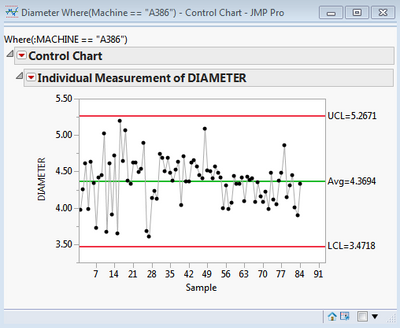
Unfortunately this text doesn't seem to appear in the display tree and so can't easily be removed. The approach I take is to create subsets of data for each chart so that the where clause is not required. If I am composing a window containing multiple charts then having the title "Control Chart" doesn't add any useful information so I replace this text with the selection clause used to subset the data:
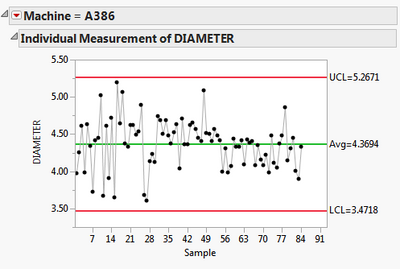
Here is the full script:
dt = Open("$SAMPLE_DATA/Quality Control/Diameter.jmp");
// column name used for 'where' clause
groupName = "Machine";
// need this to do housekeeping after the close window event
ns = New Namespace("temporary-tables-to-be-deleted");
// get unique values for machine
Summarize(levels = By( AsColumn(groupName) ) );
nw = New Window("My Charts",
hlb = H List Box()
);
// iterate over each value
ns:lstTables = {};
For (i=1,i<=NItems(levels),i++,
// create the data subset
matchingRows = dt << Get Rows Where( AsColumn(groupName)==levels[i] );
dtName = "Subset for " || groupName || "=" || levels[i];
dtSubset = dt << Subset(Rows(matchingRows), Output Table(dtName), Invisible);
// add to namespace for referencing by the on close event
InsertInto(ns:lstTables,dtSubset);
// use a container to ensure the chart is not rendered until appended to the window
container = V List Box(
cc = dtSubset << Control Chart(
Group Size( 1 ),
KSigma( 3 ),
Chart Col( :DIAMETER, Individual Measurement ),
)
);
// revise the title
rep = cc << Report;
ob = rep[OutlineBox(1)];
ob << Set Title(groupName || " = " || levels[i]);
// append to the report window
hlb << Append( container )
);
// housekeeping - delete the subset tables
nw << On Close(
ns = Namespace("temporary-tables-to-be-deleted");
For (i=1,i<=NItems(ns:lstTables),i++,
Try( Close(ns:lstTables[i],NoSave) )
)
);
And the associated output:
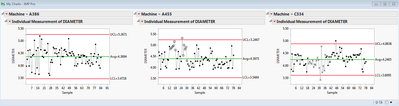
-Dave
- Mark as New
- Bookmark
- Subscribe
- Mute
- Subscribe to RSS Feed
- Get Direct Link
- Report Inappropriate Content
Re: How to remove "where" condition from Contol Chart displays.
Thanks for the input David. That seems to be a good approach and will definitely try it out.
Although was looking for quick solution in the meantime and mpb's solution worked out well.
But your approach also is quite self-explanatory for end-user to interpret the charts well.
- Mark as New
- Bookmark
- Subscribe
- Mute
- Subscribe to RSS Feed
- Get Direct Link
- Report Inappropriate Content
Re: How to remove "where" condition from Contol Chart displays.
See if this example is helpful. I modified an example in the excellent JSL intro Jump into JMP Scripting by Murphrey and Lucas.
dt = Open( "$SAMPLE_DATA/Quality Control/Diameter.jmp" );
cc = Control Chart(
Group Size( 1 ),
KSigma( 3 ),
Chart Col( :DIAMETER, Individual Measurement ),
Where( :MACHINE == "A386" )
);
Wait( 2 );
(Report( cc ) << Parent)[Text Box( 1 )] << delete;
Wait( 2 );
- Mark as New
- Bookmark
- Subscribe
- Mute
- Subscribe to RSS Feed
- Get Direct Link
- Report Inappropriate Content
Re: How to remove "where" condition from Contol Chart displays.
Thanks mpb. That's what I was looking for an exact solution.
Recommended Articles
- © 2026 JMP Statistical Discovery LLC. All Rights Reserved.
- Terms of Use
- Privacy Statement
- Contact Us